
Hey friend, are you facing an issue of not secure a URL. Then don't worry about this, the best solution of How to force Laravel redirect HTTP to HTTPS in Laravel 8.x, 9.x and 10.x and more upcoming Laravel versions.
How do I redirect to https?
There are several methods of enabling an Apache redirect HTTP to HTTPS. Let's checkout how to force https. HTTPS is very important for SEO.
- Enable the redirect in the Virtual Host file for the necessary domain.
- Enable it in the .htaccess file (previously created in the webroot folder).
- Use the mod_rewrite rule in the Virtual Host file.
- Use it in the .htaccess file to force HTTPS.
Read this also: How to Clear cache in Laravel
Laravel 9 force https
How do I redirect http to htaccess https?
Redirecting HTTP to HTTPS is easy with the .htaccess file, but this is not a proper way to do this in the Laravel framework.
- Redirect All Web Traffic. If you have existing code in your .htaccess, add the following:
RewriteEngine On
RewriteCond %{SERVER_PORT} 80
RewriteRule ^(.*)$ https://www.yourdomain.com/$1 [R,L]- Redirect Only a Specific Domain.
- Redirect Only a Specific Folder.
How do I redirect in Laravel http to https?
You can make it works with a Middleware class. Let me give you an idea. Here, we have to create Middleware, So simple create middleware on the following path, and then you have to register that middleware in the Kernel.php file.
Read this also: How to install Laravel on windows using wamp
So let's just follow these steps:
Create Https Protocol Middleware
Now we have to create "HttpsProtocol" middleware and we will write code to redirect HTTP to the force https link. So here I have written code for redirect and make only for the production server. So let's create middleware.
Checkout This link for
You path: app/Http/Middleware/HttpsProtocol.php
<?php
namespace App\Http\Middleware;

use Closure;

class HttpsProtocol {

    public function handle($request, Closure $next)
    {
            if (!$request->secure()) {
               return redirect()->secure($request->getRequestUri());
            }

            return $next($request);
    }
}
?>
Next we have to register this middleware in Kernel.php file as bellow following code.
You path for Kernel: app/Http/Kernel.php
You just need to add this line in the middleware Groups section.
\App\Http\Middleware\HttpsProtocol::class,Look at the complete file of kernel.php
<?php

namespace App\Http;

use Illuminate\Foundation\Http\Kernel as HttpKernel;

class Kernel extends HttpKernel
{
    /**
     * The application's global HTTP middleware stack.
     *
     * These middleware are run during every request to your application.
     *
     * @var array
     */
    protected $middleware = [
        \App\Http\Middleware\TrustProxies::class,
        \App\Http\Middleware\CheckForMaintenanceMode::class,
        \Illuminate\Foundation\Http\Middleware\ValidatePostSize::class,
        \App\Http\Middleware\TrimStrings::class,
        \Illuminate\Foundation\Http\Middleware\ConvertEmptyStringsToNull::class,
    ];

    /**
     * The application's route middleware groups.
     *
     * @var array
     */
    protected $middlewareGroups = [
        'web' => [
            \App\Http\Middleware\EncryptCookies::class,
            \Illuminate\Cookie\Middleware\AddQueuedCookiesToResponse::class,
            \Illuminate\Session\Middleware\StartSession::class,
            // \Illuminate\Session\Middleware\AuthenticateSession::class,
            \Illuminate\View\Middleware\ShareErrorsFromSession::class,
            \App\Http\Middleware\VerifyCsrfToken::class,
            \Illuminate\Routing\Middleware\SubstituteBindings::class,
            \App\Http\Middleware\HttpsProtocol::class,
        ],

        'api' => [
            'throttle:60,1',
            \Illuminate\Routing\Middleware\SubstituteBindings::class,
        ],
    ];

    /**
     * The application's route middleware.
     *
     * These middleware may be assigned to groups or used individually.
     *
     * @var array
     */
    protected $routeMiddleware = [
        'auth' => \App\Http\Middleware\Authenticate::class,
        'auth.basic' => \Illuminate\Auth\Middleware\AuthenticateWithBasicAuth::class,
        'bindings' => \Illuminate\Routing\Middleware\SubstituteBindings::class,
        'cache.headers' => \Illuminate\Http\Middleware\SetCacheHeaders::class,
        'can' => \Illuminate\Auth\Middleware\Authorize::class,
        'guest' => \App\Http\Middleware\RedirectIfAuthenticated::class,
        'password.confirm' => \Illuminate\Auth\Middleware\RequirePassword::class,
        'signed' => \Illuminate\Routing\Middleware\ValidateSignature::class,
        'throttle' => \Illuminate\Routing\Middleware\ThrottleRequests::class,
        'verified' => \Illuminate\Auth\Middleware\EnsureEmailIsVerified::class,
		'role' => \App\Http\Middleware\Role::class,
		'superadmin' => \App\Http\Middleware\Superadmin::class
    ];

    /**
     * The priority-sorted list of middleware.
     *
     * This forces non-global middleware to always be in the given order.
     *
     * @var array
     */
    protected $middlewarePriority = [
        \Illuminate\Session\Middleware\StartSession::class,
        \Illuminate\View\Middleware\ShareErrorsFromSession::class,
        \App\Http\Middleware\Authenticate::class,
        \Illuminate\Routing\Middleware\ThrottleRequests::class,
        \Illuminate\Session\Middleware\AuthenticateSession::class,
        \Illuminate\Routing\Middleware\SubstituteBindings::class,
        \Illuminate\Auth\Middleware\Authorize::class,
    ];
}
I hope you found your best solution. Thank you for reading this.
Why Force HTTPS in a Laravel Application?
Security and browser trust
HTTPS encrypts traffic between the browser and the server and allows browsers to treat secure cookies and security headers correctly. Redirecting every HTTP request gives visitors one consistent canonical address and avoids warnings caused by entering an old insecure URL.
Choose the correct enforcement layer
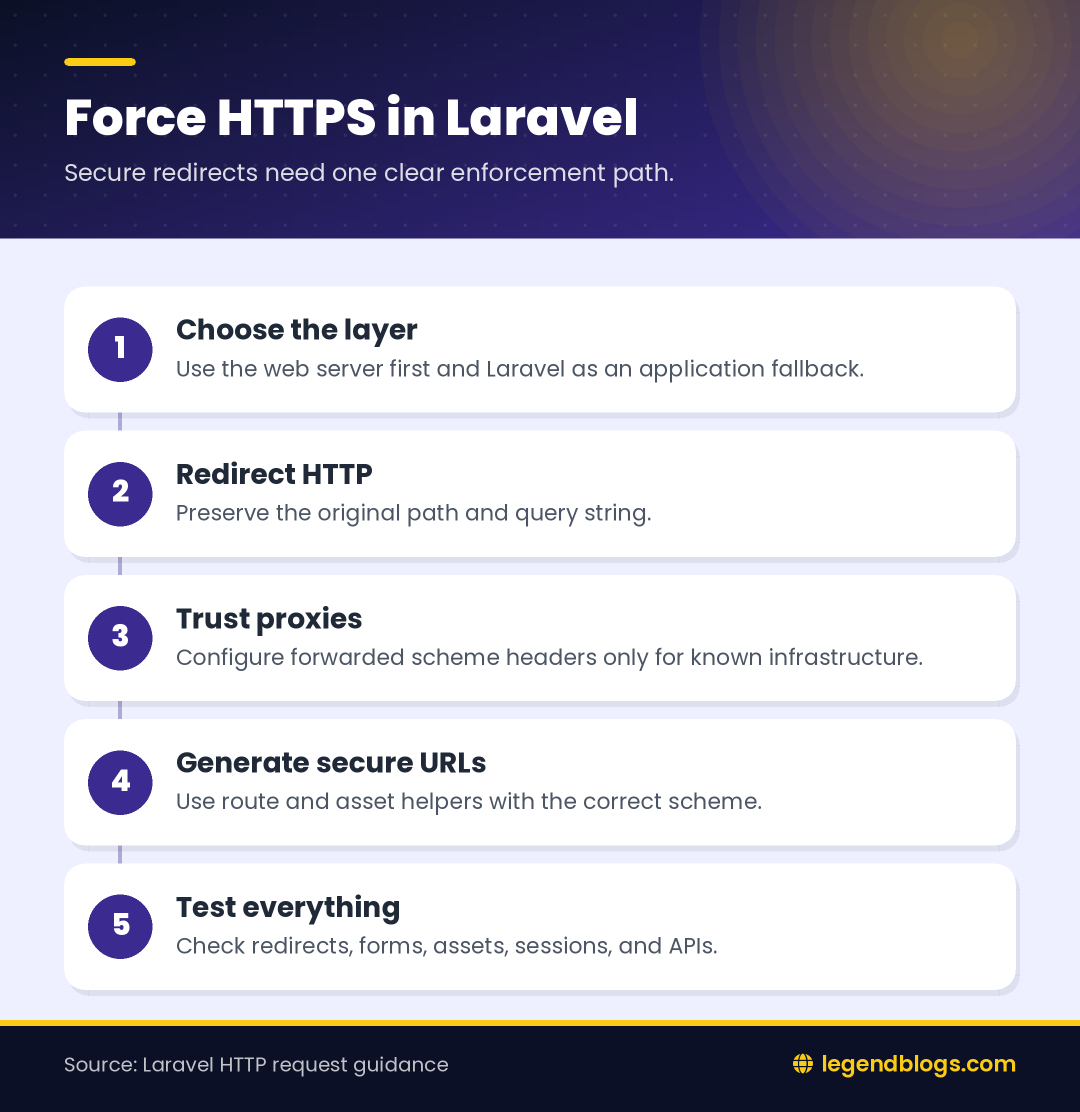
The web server is usually the best first layer because it can redirect before Laravel boots. Laravel middleware is useful as a second layer, especially when the application is deployed behind a proxy or when route-generated URLs also need the secure scheme.
Apache Redirects for Laravel
Use a simple redirect rule
In an Apache environment, place the redirect in the virtual host or the public webroot configuration. Preserve the original path and query string, and use a permanent redirect only after testing the rule:
RewriteEngine On
RewriteCond %{HTTPS} !=on
RewriteRule ^ https://%{HTTP_HOST}%{REQUEST_URI} [R=301,L]
Do not place a rule that redirects HTTPS back to HTTPS. Test the root page, nested routes, assets, form submissions, and a URL with query parameters.
Why server configuration is preferable
A server redirect handles requests for static assets and requests that never reach Laravel. It also reduces application work. Keep the Laravel middleware as a safety net rather than using several competing redirect rules.
Nginx Redirects for Laravel
Separate HTTP and HTTPS blocks
Nginx commonly uses one server block that listens on port 80 and redirects to the secure host, followed by another block that serves the Laravel public directory over TLS. The redirect should preserve the request URI so a visitor does not always land on the home page.
server {
    listen 80;
    server_name example.com www.example.com;
    return 301 https://example.com$request_uri;
}
Check the proxy and load balancer
If TLS ends at a load balancer, the application may receive an internal HTTP connection even though the visitor used HTTPS. The proxy must send the appropriate forwarded scheme, and Laravel must trust that proxy only when it is part of your infrastructure.
Create Laravel HTTPS Middleware
Generating the middleware
Create a middleware class that checks the request scheme and redirects only in the environment where HTTPS is expected. A typical implementation can use the request's secure state and return the next response unchanged when the request is already secure.
public function handle($request, Closure $next)
{
    if (app()->environment('production') && ! $request->secure()) {
        return redirect()->secure($request->getRequestUri());
    }

    return $next($request);
}
Register the middleware for the web group or apply it to the routes that require it. Avoid forcing HTTPS on a local development environment unless your local certificate and proxy setup are ready.
Route groups and APIs
Web pages, form posts, and API endpoints may have different requirements. If the server already redirects all HTTP traffic, applying another application redirect can create extra hops. For APIs, consider returning the expected error response or configuring the server consistently rather than redirecting clients that may not follow redirects.
Configure Trusted Proxies Correctly
Why Laravel may think HTTPS is HTTP
When a reverse proxy terminates TLS, Laravel sees the proxy-to-application connection. Without trusted proxy configuration and a forwarded scheme, methods such as secure checks and URL generation can report HTTP incorrectly.
Trust only the infrastructure you control
Configure the trusted proxy package or framework setting according to your deployment. Do not blindly trust arbitrary forwarded headers from the public internet. The proxy should overwrite those headers and the application should trust only known proxy hops or the platform's documented configuration.
Force HTTPS URLs in Laravel
URL generation
After proxy settings are correct, route and asset helpers can generate secure addresses based on the request. Some deployments also set the URL generator scheme in a service provider, but that should be environment-specific and tested with queues, console commands, and signed URLs.
use Illuminate\Support\Facades\URL;

public function boot()
{
    if ($this->app->environment('production')) {
        URL::forceScheme('https');
    }
}
Do not hard-code every link
Prefer named routes, asset helpers, and configuration values over manually concatenating https strings. This keeps tests and local development easier and reduces the chance of mixed-content links after a domain or deployment change.
Fix Redirect Loops and Mixed Content
Common causes of a loop
- The application does not trust the TLS-terminating proxy.
- The proxy sends an incorrect or stale forwarded scheme.
- Apache, Nginx, a CDN, and Laravel all apply different redirect rules.
- The redirect checks a port value that is not visible at the application layer.
Inspect response headers and the first redirect with a command-line client or browser developer tools. Remove duplicate rules one layer at a time rather than adding more conditions.
Mixed content after HTTPS
Search templates, stylesheets, scripts, images, API endpoints, canonical links, and environment variables for hard-coded HTTP addresses. Third-party resources must also support HTTPS. Browser developer tools identify the exact insecure request that remains.
Testing a Laravel HTTPS Deployment
Test the complete request flow
- Request an HTTP page and confirm one redirect to the intended HTTPS URL.
- Open the HTTPS URL directly and confirm there is no second redirect.
- Test login, logout, forms, sessions, file uploads, and signed URLs.
- Test generated assets and canonical URLs.
- Repeat the tests behind the production proxy or CDN.
Review operational details
Confirm that certificates are valid, renewal is working, cookies use secure settings where appropriate, and health checks are not being redirected unexpectedly. Record the final redirect behavior so future server changes can be compared against it.
FAQ
What is the best way to force HTTPS in Laravel?
Use a web-server redirect as the primary layer and configure Laravel correctly behind any trusted proxy. Middleware can provide an application-level fallback.
Why does Laravel redirect HTTPS requests again?
Laravel may not know that the original request was secure because the proxy scheme is missing or untrusted. Check forwarded headers and trusted proxy configuration.
Should HTTPS be enforced in middleware or Apache?
Server redirects are usually more efficient and cover static files. Middleware is useful for application rules and deployments where server configuration is limited.
How do I fix mixed content?
Replace HTTP asset, API, canonical, and image URLs with secure generated URLs or HTTPS addresses, then inspect the browser console for remaining requests.
Conclusion
Force HTTPS consistently by choosing one authoritative redirect layer, configuring trusted proxies, and testing every important Laravel route. Middleware can protect the application, but it cannot correct a proxy that reports the wrong scheme.
After the redirect works, review generated URLs, cookies, assets, forms, and APIs. A careful test prevents loops and mixed content while giving visitors one secure address.







Write a comment