
XML stands for eXtensible Markup Language. XML is a markup language that encodes documents in a machine-readable and human-readable format. XML was designed to store and transport data. XML is often used for distributing data over the Internet. You can use XML in many ways in the web application.
Why Use PHP Array to XML Conversion?
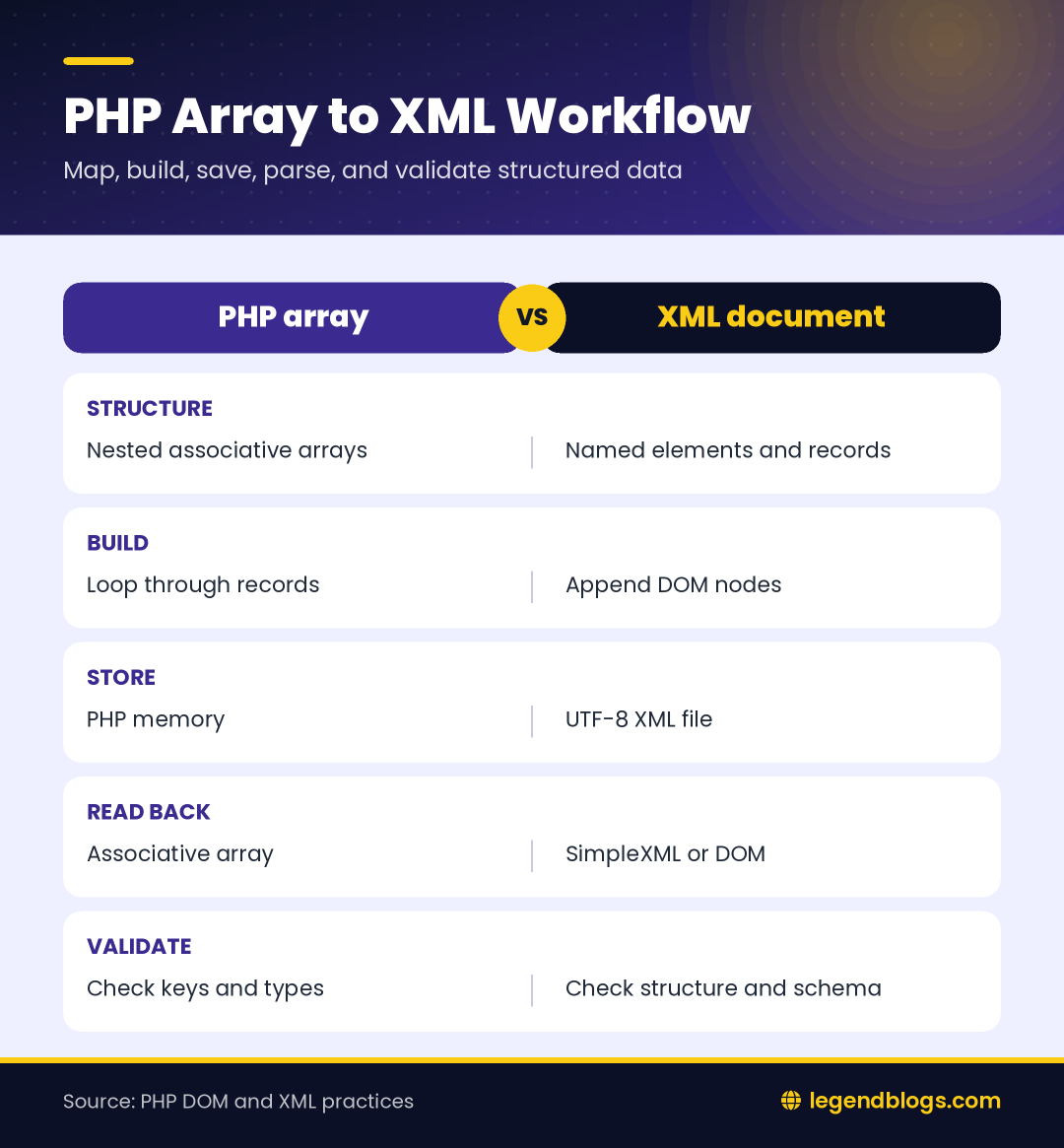
Use a deliberate mapping when the PHP array contains several levels of nesting. A document that mirrors the application array too literally can become difficult to consume, while a small, named XML structure is easier to validate and document. Keep the conversion boundary close to the integration layer so the rest of the application can continue working with normal PHP arrays.
Match the format expected by another system
PHP array to XML conversion is useful when a partner service, import tool, or older application expects named XML elements instead of JSON. XML also works well when the data must follow a documented hierarchy or an XML schema.
Before writing a converter, identify the document structure expected by the receiving system. Decide which array keys become elements, which values become attributes, and which nested arrays represent repeated records. A clear mapping prevents an output file that is technically well formed but unusable to its consumer.
Keep the input structure predictable
Use associative keys for meaningful values and numeric indexes only for list positions. For example, department can become an element while each item in an employees list can become a repeated employee element. Keep names consistent across records so a parser does not need special cases for every row.
- Define one root element for the document.
- Choose stable names for collections and records.
- Decide how empty values should be represented.
- Validate required fields before creating XML nodes.
If you’re concerned about database size and want to reduce database uses, XML can help you to free the space from the database. Instead of the database you can store the data in the XML file and retrieve data from XML file without connecting to the database. A website sitemap is also generated in XML format.
In this tutorial, we will show you how to convert PHP multidimensional or associative array to an XML file, and the example code shows how to parse the XML file and convert XML data to array in PHP.
I have a two-dimensional input array containing the array of key/element pairs. For better understanding, all the Array to XML conversion codes will be grouped together in a PHP function. The generateXML() function converts PHP multidimensional array to XML file format. The data array needs to be passed as a parameter in generateXML() function.
This function creates an XML document using the DOMDocument class and inserts the PHP array content in this XML document. In the end, the XML document is saved as an XML file in the specified file location with a given file name.
First of all, Create PHP Multidimensional Array for converting to the XML file format:
$array = array(
		'department'=> 'Accounts',
		'employe'=> array(
			'0' => array(
				'name' 		=> 'Iron Man',
				'age'		=> '34'
			),
			'1' => array(
				'name' 		=> 'Black',
				'age'		=> '30'
			),
			'2' => array(
				'name' 		=> 'Captain',
				'age'		=> '37'
			),
			'3' => array(
				'name' 		=> 'Loki',
				'age'		=> '35'
			)
		)
	);
Now, you need to create a function generatXML() :
function generateXML($data) {
    $title = $data['department'];
    $rowCount = count($data['employe']);

    //create the xml document
    $xmlDoc = new DOMDocument();

    $root = $xmlDoc->appendChild($xmlDoc->createElement("employe_info"));
    $root->appendChild($xmlDoc->createElement("title",$title));
    $root->appendChild($xmlDoc->createElement("totalRows",$rowCount));
    $tabUsers = $root->appendChild($xmlDoc->createElement('rows'));

    foreach($data['employe'] as $user){
        if(!empty($user)){
            $tabUser = $tabUsers->appendChild($xmlDoc->createElement('employe'));
            foreach($user as $key=>$val){
                $tabUser->appendChild($xmlDoc->createElement($key, $val));
            }
        }
    }

    header("Content-Type: text/plain");

    //make the output pretty
    $xmlDoc->formatOutput = true;

    //save xml file
    $file_name = str_replace(' ', '_',$title).'.xml';
    $xmlDoc->save($file_name);

    //return xml file name
    return $file_name;
}
You only need to use generateXML() function and pass data array in it to convert array to XML in PHP.
generateXML($array);The example code will create your Multidimensional Array into the following XML document with your given file name.
<employe_info>
<title>Accounts</title>
<totalRows>4</totalRows>
<rows>
<employe>
<name>Iron Man</name>
<age>34</age>
</employe>
<employe>
<name>Black</name>
<age>30</age>
</employe>
<employe>
<name>Captain</name>
<age>37</age>
</employe>
<employe>
<name>Loki</name>
<age>35</age>
</employe>
</rows>
</employe_info>
Convert XML to PHP Associative Array
For converting XML to PHP Associative Array we will use the few following steps.
Choose the right XML reading method
SimpleXML is convenient when the document is small and the structure is known. It lets you access elements with property syntax and is easy to combine with application validation. DOM is more appropriate when you need to preserve attributes, inspect namespaces, modify nodes, or work with mixed content.
Whichever method you choose, treat the parsed result as external data. Check the fields you need, set sensible defaults for optional values, and reject a document that does not meet the expected structure. This is especially important when the XML came from a remote endpoint or an uploaded file.
Keep conversion functions reusable
A function that accepts a file path or XML string is easier to test than one that reads a fixed filename from inside the function. Returning an array also lets the caller decide whether to display, store, transform, or validate the result. Keep printing and business decisions outside the conversion helper.
- We will read the XML data from file and convert the XML to an array using PHP.
- Read entire file into string using file_get_contents() function in PHP.
- Convert XML string into an object using simplexml_load_string() function in PHP.
- Convert object into JSON using json_encode() function.
- Convert JSON data into associative array using json_decode() function.
For better way, we will create an xml_to_array() function with all these given steps:
function xml_to_array(){
    //xml file path
    $path = "Accounts.xml";
    //read entire file into string
    $xmlfile = file_get_contents($path);
    //convert xml string into an object
    $xml = simplexml_load_string($xmlfile);
    //convert into json
    $json  = json_encode($xml);
    //convert into associative array
    $array_data = json_decode($json, true);

    print_r($array_data);
}
Now, simply call this function to convert XML to Multidimensional Array:
Production Checklist
- Validate the input array before creating nodes.
- Use a single controlled root element.
- Write text through DOM methods rather than string concatenation.
- Use UTF-8 consistently for the document and source data.
- Check file paths, permissions, and the return value from save operations.
- Handle malformed XML without silently returning incomplete data.
- Normalize one record and many-record results before looping.
These checks keep a small conversion example useful when it becomes part of an export job or an integration. They also make failures easier to diagnose because the boundary between PHP data and XML is explicit.
xml_to_array();The output of this function will be like this:
arry(
    [title] => Accounts
    [totalRows] => 4
    [rows] => Array
        (
            [employe] => Array
                (
                    [0] => Array
                        (
                            [name] => Iron Man
                            [age] => 34
                        )
                    [1] => Array
                        (
                            [name] => Black
                            [age] => 30
                        )
                    [2] => Array
                        (
                            [name] => Captain
                            [age] => 37
                        )
                    [3] => Array
                        (
                            [name] => Loki
                            [age] => 35
                        )
                )
        )
)
Final code:
Common PHP Array to XML Problems
Missing extensions and permissions
If PHP cannot find DOMDocument, the DOM/XML extension is not enabled in the active PHP installation. Enable the matching extension for the PHP version used by the web server or command-line process. A file-writing warning usually indicates a missing directory, an incorrect path, or insufficient permissions.
Invalid element names and missing values
Not every PHP array key is a valid XML element name. Use a controlled mapping for keys and cast scalar values deliberately. If a nested record is optional, decide whether the XML should omit it, create an empty element, or return a validation error. Making this decision explicit prevents inconsistent documents.
XML or JSON?
XML is appropriate when a partner contract, schema, namespace, or legacy tool requires it. JSON is often simpler for a new browser or application API. Compare the consumer's requirements before converting data merely because an XML helper already exists.
| Requirement | Practical choice |
|---|---|
| Namespaces and attributes | XML |
| Existing XML import contract | XML |
| Simple web API payload | Often JSON |
| Schema-based document validation | XML tooling |
<!DOCTYPE html PUBLIC "-//W3C//DTD XHTML 1.0 Transitional//EN" "http://www.w3.org/TR/xhtml1/DTD/xhtml1-transitional.dtd">
<html xmlns="http://www.w3.org/1999/xhtml">
<?php
function generateXML($data) {
    $title = $data['department'];
    $rowCount = count($data['employe']);

    //create the xml document
    $xmlDoc = new DOMDocument();

    $root = $xmlDoc->appendChild($xmlDoc->createElement("employe_info"));
    $root->appendChild($xmlDoc->createElement("title",$title));
    $root->appendChild($xmlDoc->createElement("totalRows",$rowCount));
    $tabUsers = $root->appendChild($xmlDoc->createElement('rows'));

    foreach($data['employe'] as $user){
        if(!empty($user)){
            $tabUser = $tabUsers->appendChild($xmlDoc->createElement('employe'));
            foreach($user as $key=>$val){
                $tabUser->appendChild($xmlDoc->createElement($key, $val));
            }
        }
    }

    header("Content-Type: text/plain");

    //make the output pretty
    $xmlDoc->formatOutput = true;

    //save xml file
    $file_name = str_replace(' ', '_',$title).'.xml';
    $xmlDoc->save($file_name);

    //return xml file name
    return $file_name;
}
function xml_to_array(){
    //xml file path
    $path = "Accounts.xml";
    //read entire file into string
    $xmlfile = file_get_contents($path);
    //convert xml string into an object
    $xml = simplexml_load_string($xmlfile);
    //convert into json
    $json  = json_encode($xml);
    //convert into associative array
    $array_data = json_decode($json, true);

    print_r($array_data);
}
?>
<head>
<meta http-equiv="Content-Type" content="text/html; charset=utf-8" />
<title>Multidimensional Array To XML and XML to Array</title>
</head>
<body>
<div class="container">
  <h2 class="text-success">Multidimensional Array To XML and XML to Array</h2>
    <?php
    $array = array(
		'department'=> 'Accounts',
		'employe'=> array(
			'0' => array(
				'name' 		=> 'Iron Man',
				'age'		=> '34'
			),
			'1' => array(
				'name' 		=> 'Black',
				'age'		=> '30'
			),
			'2' => array(
				'name' 		=> 'Captain',
				'age'		=> '37'
			),
			'3' => array(
				'name' 		=> 'Loki',
				'age'		=> '35'
			)
		)
	);
    generateXML($array);

    echo "XML to Array: <br>";
    xml_to_array();
    ?>
</div>

</body>
</html>







(1) Comments
Ravindra
i was searching for array To XML, but there is both multidimensional array to XML and XML to array.. thank you for writing this...
Write a comment