
Sometimes we have a large multi-dimensional array and we need only one tree of an array where a specific key word or specific element are exits. So in this situation we require searching in an array or something like that, That's why now I am going to tell you a specific function to return an array of matched item from top level to end.
We will use the array_merge PHP function to merge an array in every step of an array.
array_merge($keys, array($key))
For each steps a loop will work with function call itself, for example:
function array_get_location($array, $search, $keys = array())
{
    foreach($array as $key => $value) {
        if (is_array($value)) {
            $child_array = array_get_location($value, $search, array_merge($keys, array($key)));
            if (count($child_array)) {
                return $child_array;
            }
        } elseif ($value === $search) {
            return array_merge($keys, array($key));
        }
    }
    return array();
}
Now create an multi-dimensional array example:
$array = array(
		'sales' => array(
			'id' 		=> 'sales',
			'department'=> 'Sales',
			'employe'	=> array(
				'0' => array(
					'name' 		=> 'Thor',
					'age'		=> '34'
				),
				'1' => array(
					'name' 		=> 'Barton',
					'age'		=> '30'
				),
				'2' => array(
					'name' 		=> 'Hulk',
					'age'		=> '37'
				),
				'3' => array(
					'name' 		=> 'Tony',
					'age'		=> '35'
				)
			)
		),
		'accounts' => array(
			'id' 		=> 'accounts',
			'department'=> 'Accounts',
			'employe'	=> array(
				'0' => array(
					'name' 		=> 'Iron Man',
					'age'		=> '34'
				),
				'1' => array(
					'name' 		=> 'Black',
					'age'		=> '30'
				),
				'2' => array(
					'name' 		=> 'Captain',
					'age'		=> '37'
				),
				'3' => array(
					'name' 		=> 'Loki',
					'age'		=> '35'
				)
			)
		)
	);
And now if we try to find tree by the name "Hulk" then return array will be like this:
Array
(
    [0] => sales
    [1] => employe
    [2] => 2
    [3] => name
)
And if we try to find tree by the name "Loki" then return array will be like this:
Array
(
    [0] => accounts
    [1] => employe
    [2] => 3
    [3] => name
)
So, Final code is:
<!DOCTYPE html PUBLIC "-//W3C//DTD XHTML 1.0 Transitional//EN" "http://www.w3.org/TR/xhtml1/DTD/xhtml1-transitional.dtd">
<html xmlns="http://www.w3.org/1999/xhtml">
<?php
$array = array(
		'sales' => array(
			'id' 		=> 'sales',
			'department'=> 'Sales',
			'employe'	=> array(
				'0' => array(
					'name' 		=> 'Thor',
					'age'		=> '34'
				),
				'1' => array(
					'name' 		=> 'Barton',
					'age'		=> '30'
				),
				'2' => array(
					'name' 		=> 'Hulk',
					'age'		=> '37'
				),
				'3' => array(
					'name' 		=> 'Tony',
					'age'		=> '35'
				)
			)
		),
		'accounts' => array(
			'id' 		=> 'accounts',
			'department'=> 'Accounts',
			'employe'	=> array(
				'0' => array(
					'name' 		=> 'Iron Man',
					'age'		=> '34'
				),
				'1' => array(
					'name' 		=> 'Black',
					'age'		=> '30'
				),
				'2' => array(
					'name' 		=> 'Captain',
					'age'		=> '37'
				),
				'3' => array(
					'name' 		=> 'Loki',
					'age'		=> '35'
				)
			)
		)
	);

function array_get_location($array, $search, $keys = array())
{
    foreach($array as $key => $value) {
        if (is_array($value)) {
            $child_array = array_get_location($value, $search, array_merge($keys, array($key)));
            if (count($child_array)) {
                return $child_array;
            }
        } elseif ($value === $search) {
            return array_merge($keys, array($key));
        }
    }
    return array();
}
?>
<head>
<meta http-equiv="Content-Type" content="text/html; charset=utf-8" />
<title>Find Location Of An Item In Multidimensional Array</title>
<link rel="stylesheet" href="https://maxcdn.bootstrapcdn.com/bootstrap/3.3.7/css/bootstrap.min.css">
</head>
<body>
<div class="container">
  <h2 class="text-success">Find Location Of An Item In Multidimensional Array</h2>
    <?php
    echo "<pre>";
	print_r(array_get_location($array, 'Loki'));
    ?>
</div>

</body>
</html>
How to Use the Returned PHP Array Item Position
Read the value from the path
Once the function returns a path, you can walk through the original array with each key in order. This is safer than building a dynamic PHP expression because every level can be checked before it is accessed. A missing key should produce a controlled result rather than a notice.
$path = findArrayPath($company, 'Hulk');
if ($path !== null) {
    $value = valueAtPath($company, $path);
    var_dump($path, $value);
}
Use a readable display format
For logs or an administrator screen, join the keys into a readable string. Cast numeric indexes only for presentation; keep the original path values unchanged when using them to access the array.
echo implode(' > ', array_map('strval', $path));Search by a Record Condition
Match more than one field
Searching for a name alone may produce an unwanted result when several departments contain the same person. In that situation, compare the record as a whole or check a second field such as department, employee ID, or status.
function findEmployee(array $array, string $name, int $age, array $path = []): ?array
{
    foreach ($array as $key => $value) {
        $currentPath = [...$path, $key];
        if (is_array($value)) {
            if (($value['name'] ?? null) === $name &&
                ($value['age'] ?? null) === $age) {
                return $currentPath;
            }
            $result = findEmployee($value, $name, $age, $currentPath);
            if ($result !== null) {
                return $result;
            }
        }
    }
    return null;
}
This pattern is useful for imported data because it avoids assuming that one display value is unique. Validate the field types before using strict comparison if the source is a request or decoded JSON.
Testing the Recursive Search
Cover both success and failure
Test a value at the first branch, a value several levels deep, a duplicate value, and a value that does not exist. Also test empty arrays and records with missing fields. These cases expose path-handling errors much faster than testing one successful example.
- Verify the returned keys in their original order.
- Confirm that the first-match function stops at the expected branch.
- Confirm that the all-match function returns every path.
- Check that a missing value returns null.
- Test integers and numeric strings separately.
Keep the helper independent
The search function should not print HTML, redirect the user, or change application data. Returning structured results lets a controller, command, API endpoint, or test decide how the result should be used.
Performance Considerations
Understand the traversal cost
A recursive search may inspect many elements before it finds a match. Returning the first result avoids extra work when only one match is needed. If the same large structure is searched repeatedly, consider indexing it once or storing records by a unique identifier.
Protect the application boundary
Do not allow an untrusted request to create an unlimited-depth array and send it directly to a recursive function. Limit input size and nesting depth when data comes from uploads, APIs, or user-submitted JSON. This keeps the helper predictable and reduces the risk of excessive memory or call-stack use.
Conclusion
A complete PHP array item position is a sequence of keys, not always one numeric index. Recursive traversal preserves that sequence while it searches through each nested branch.
Use a first-match function for simple lookups, collect all paths when duplicates matter, and use a condition when several fields identify a record. Strict comparisons, clear not-found handling, and focused tests make the helper dependable in production code.
PHP Array Item Position at a Glance
The phrase PHP array item position describes the complete key path needed to reach a value inside nested data. A result may contain a department, an employee list, an index, and a field name rather than one numeric position.
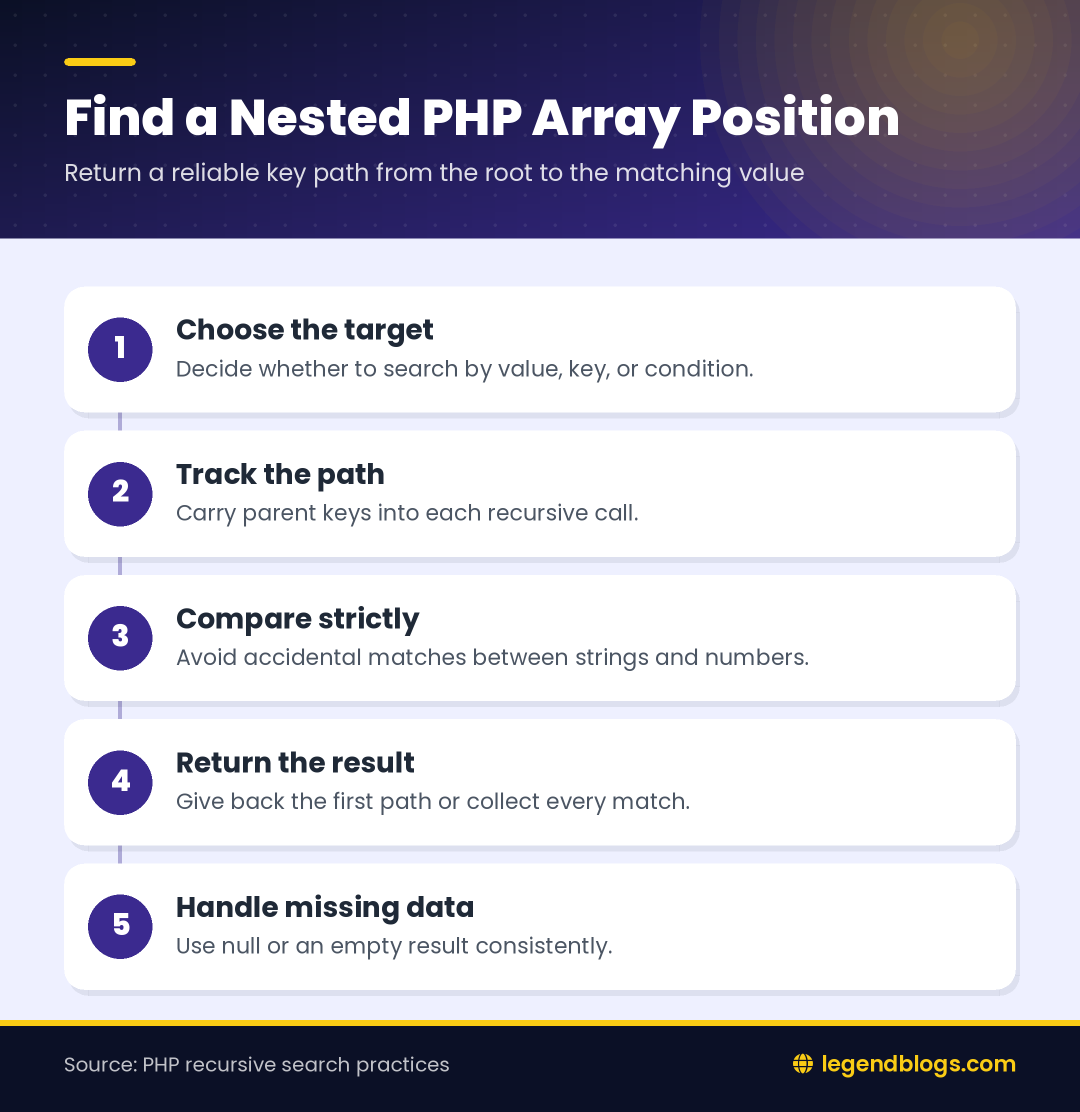
Before searching, decide whether the function should return the first match or every match. Also decide whether comparison should be strict. These choices affect duplicate handling and values received as strings.
Choose a predictable result
Returning null for a missing value makes the result easy to test. Returning an array of keys for a match keeps the helper independent from the original array and allows the caller to display, read, or update the matching location separately.
Troubleshoot an Incorrect Array Path
Check the search value and type
If the function returns no path, inspect the exact value being searched. A trailing space, different capitalization, or a numeric string can make a strict comparison fail even when the data looks similar on screen. Log the value and its type during development rather than changing the comparison rule blindly.
var_dump($search, gettype($search));
var_dump($company);
Check the nesting level
When a path is shorter or longer than expected, inspect the array shape at each level. Imported JSON, database results, and form data may use different keys or may wrap one record in an additional list. A small normalization step before searching can make the returned paths consistent.
For maintainable code, document whether numeric indexes are zero-based, whether keys are case-sensitive, and whether a missing branch should return null or raise a validation error. Clear conventions are especially valuable when another function later uses the path to update data.







Write a comment