
Ajax stands for Asynchronous JavaScript and XML. And I'll tell you what are the technologies used by ajax. The word "asynchronous" means that the user need not wait until the server replies.
AJAX is not a programming or script language, no new invention, and no separate Web service, module, or plug-in. It is a group of inter-related technologies like javascript, dom, XML, HTML, CSS, etc.
AJAX was made popular in 2005 by Google, with Google Suggest. It is an algorithm with 'old' technologies similar to the Dynamic Html.
Ajax allows creating server connections in the background while a user is interacting with a Web front-end. These connections can be created asynchronously, which means that the user need not wait until the server replies.
Technologies are being used in Ajax
Here is the technologies are being used in Ajax. Let's check all these thing to know more about What is ajax? and How it works?
WordPress Automatic Plugin update
HTML/XHTML and CSS:
XHTML stands for EXtensible HyperText Markup Language. These technologies are used for displaying content and style. It is mainly used for presentation. CSS is independent of HTML and can be used with any XML-based markup language.
DOM:
The browser creates a Document Object Model (DOM) of the page. It is used for dynamic display and interaction with data.
Javascript:
JavaScript is the programming language of HTML and the Web. It is used to bring the above technologies together. It used for Client-side validation and validates user input in an HTML form before sending the data to a server.
XMLHttpRequest:
For asynchronous communication between client and server. For more visit the next page. The XMLHttpRequest object can be used to request data from a web server.
XML or JSON:
JSON and XML are hierarchical - values within values. Both JSON and XML can be fetched with an XMLHttpRequest For carrying data to and from the server. JSON (Javascript Object Notation) is like XML but short and faster than XML.
ASP or JSP:
JSP (Java Server Pages) and ASP (Active Server Pages) are two of the commonly used server-side scripting languages. JSP have access to the entire family of Java APIs, including the JDBC API to access enterprise databases.
Examples
Let’s get start with a basic JQuery Ajax GET request:
$.ajax({
    type: "GET",
    url: 'server.php',
    success: function(data){
        alert(data);
    },
    error: function (Status, errorThrown) {
    }
});
Check this URL to get the complete example for Ajax.
jQuery ajax GET example with PHP
Final create your index page to call your Ajax:-
<!DOCTYPE html>
    <html lang="en">
    <head>
    <meta charset="utf-8">
    <title>JQuery Ajax POST Example</title>
    <script src="https://code.jquery.com/jquery-1.12.4.min.js"></script>

    <script type="text/javascript">
    $(document).ready(function(){

        $.ajax({
            type: "GET",
            url: 'server_ajax.php',
            data: {action: 'get_record'},
            success: function(data){
               $("#result").append(data);
            }
        });
    });

    </script>
    </head>
    <body>
        <div id="result"></div>
    </body>
</html>
Cheers.
What Are AJAX Technologies?
AJAX is a group of browser technologies
AJAX technologies are the browser and server components that let a page request data in the background and update part of its interface without loading a completely new document. AJAX is not a separate programming language. It is a development pattern that combines familiar web standards.
A typical AJAX feature uses HTML for structure, CSS for presentation, JavaScript for control, the DOM for page updates, a request API for communication, and a response format such as JSON. A server-side program receives the request, performs work, and returns data or an error.
Why asynchronous requests matter
With a traditional form submission, the browser sends a request and often replaces the current document when the server responds. An asynchronous request allows the user to continue interacting with the page while a smaller operation runs in the background.
This pattern is useful for search suggestions, filters, account forms, dashboards, comments, shopping carts, and loading additional records. It does not mean that the server is always faster; it means the interface can handle the response without rebuilding the entire page.
How AJAX Works in a Web Application
The browser creates a request
JavaScript starts the operation after an event such as a click, form submission, or input change. The code chooses an endpoint, an HTTP method, optional headers, and any data that must be sent. It can then show a loading state so the user understands that work is in progress.
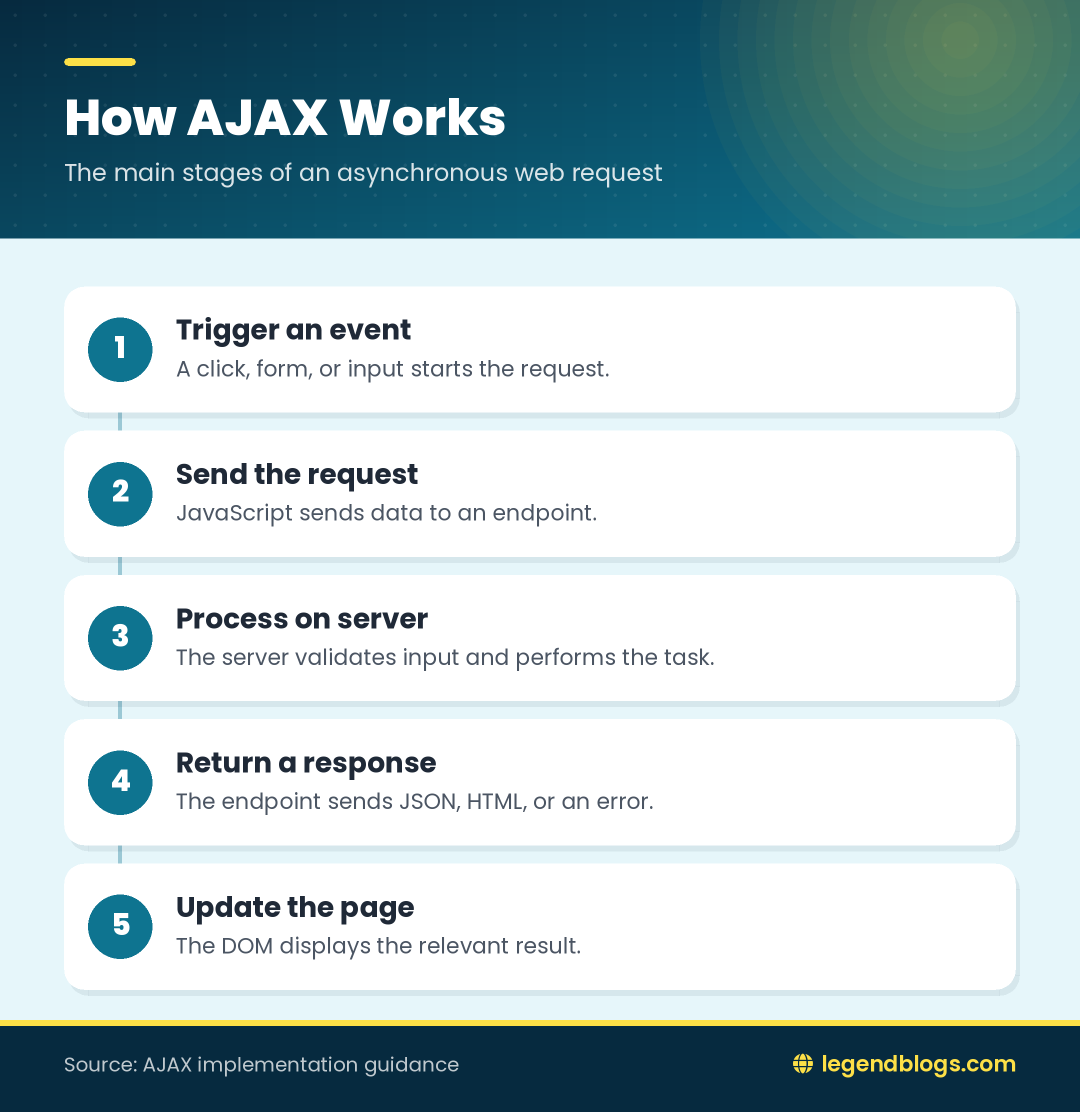
The request should be scoped to the action the user requested. Sending only the necessary fields makes the endpoint easier to validate and reduces the chance of accidentally exposing unrelated information.
The server returns a response
The server receives the request, checks authentication and input, performs the requested operation, and returns a response. That response may contain a JSON object, a list of records, an HTML fragment, or an error description.
JavaScript reads the response and updates the relevant DOM element. A good interface handles success, validation errors, authentication failures, and temporary server problems separately instead of treating every response as successful.
HTML and CSS in AJAX Interfaces
HTML provides the target structure
HTML defines the elements that JavaScript will update. Give important regions meaningful structure and, where useful, stable IDs or classes. A results container, status message, and loading indicator should each have a clear purpose.
Do not replace a large page region when only one label or list item needs to change. Smaller updates preserve user input, focus, and scroll position more reliably.
CSS communicates state
CSS can show loading, success, warning, and error states through classes. For example, JavaScript can add an is-loading class while a request is pending and remove it when the response arrives. The text should still explain the state because color alone is not enough.
Responsive styles should account for longer error messages and empty result sets. Test the component with real content rather than only a short successful response.
JavaScript and the DOM
Starting an asynchronous request
JavaScript listens for an event, prevents an unwanted full-page form submission when appropriate, and sends the request. It can disable a submit button temporarily to prevent duplicate operations, but it should restore the control after success or failure.
Modern code commonly uses fetch, while older projects may use XMLHttpRequest or a library wrapper. The underlying idea is the same: send a request, wait for a result, inspect it, and update the interface.
Updating selected elements
The DOM represents the document as objects that scripts can inspect and change. A response might update the text of a status element, append rows to a list, or replace an empty-state message.
When response data contains user-controlled text, create text nodes or use safe templating rather than inserting untrusted strings as raw HTML. This reduces the risk of cross-site scripting when displaying server responses.
XMLHttpRequest and Fetch Requests
Understanding XMLHttpRequest
XMLHttpRequest is the older browser API traditionally associated with AJAX. It supports asynchronous requests and exposes callbacks for completion, progress, and errors. It remains common in legacy code and in libraries that need to support older environments.
Its callback style can become difficult to follow when several requests depend on one another. Centralize error handling and make sure every code path clears the loading state.
Using the modern fetch approach
Fetch provides a promise-based interface for HTTP requests. A response object must still be checked because a resolved promise does not automatically mean that the server returned a successful HTTP status. Parse JSON only when the response format is actually JSON.
Fetch also supports request options such as method, headers, body, credentials, and an AbortController signal. Use these options deliberately and avoid sending sensitive data in a URL when a request body is more appropriate.
JSON and XML Data Formats
Why JSON is common
JSON maps naturally to objects, arrays, strings, numbers, booleans, and null values used in JavaScript. An API can return a compact object containing a status, message, and data collection. The client can then render only the fields it needs.
Validate the response shape before using deeply nested properties. A server error page or proxy response may not have the JSON structure that a successful request provides.
When XML still appears
XML can represent hierarchical data and remains present in older services, feeds, enterprise systems, and some configuration formats. XMLHttpRequest can receive XML, but the client must parse the document and handle namespaces and nodes correctly.
The response format should be chosen for compatibility with the service and clients. AJAX does not require XML; JSON, HTML, and other formats can all be used.
Server-Side Technologies in AJAX
Processing the request
PHP, Java, Python, Node.js, .NET, Ruby, and other server technologies can provide an AJAX endpoint. The browser does not care which language performs the work, as long as the endpoint follows an understandable HTTP contract.
The server should validate input, check permissions, use parameterized database queries, and return an appropriate status. Client-side validation improves usability but cannot replace server-side validation.
Returning a useful response
A predictable response makes the front end easier to maintain. Include a clear success indicator, a human-readable message when needed, and the requested data. Use status codes consistently for validation problems, authentication issues, missing resources, and server failures.
AJAX GET and POST Requests
Reading data with GET
GET is suitable for retrieving information without changing server state. Filters and search terms can be represented as query parameters, which makes a request easier to repeat or bookmark. Do not put secrets in a query string because URLs can be recorded in browser history and logs.
Sending data with POST
POST is commonly used when sending form data or creating a server-side record. Send the correct content type and make the endpoint verify the submitted fields. Disable duplicate submissions only as a user-interface improvement; the server should still protect against repeated requests where necessary.
Handling Responses and Errors
Loading, success, and empty states
A useful AJAX interface has at least three visible states: loading, successful content, and an empty result. The empty state is not necessarily an error; it can tell the user that a search found no matching records.
Restore buttons and remove spinners in a finally-style cleanup path. Otherwise one failed request can leave the page looking permanently busy.
Network and server failures
Network failure, a timeout, an expired session, invalid input, and a server exception need different responses. Keep technical details in logs and show the user a concise explanation with a practical next step.
Advantages and Limitations of AJAX
Benefits for interaction
- Only the relevant part of the page needs to change.
- Loading indicators can provide immediate feedback.
- Search and filtering interfaces can feel more responsive.
- Reusable endpoints can support multiple front-end screens.
Things that need planning
- Browser history and Back-button behavior may require additional state management.
- Content loaded after the initial page must remain accessible and usable.
- Cross-origin requests require an appropriate server policy.
- Authentication, authorization, and input validation still belong on the server.
FAQ
What technologies are used in AJAX?
Common components include HTML, CSS, JavaScript, the DOM, XMLHttpRequest or fetch, a response format such as JSON, and a server-side application or API.
Is AJAX a programming language?
No. AJAX is a pattern for combining browser and server technologies so a page can request and display data asynchronously.
Does AJAX require XML?
No. XML was common in early AJAX applications, but modern applications often use JSON. HTML fragments and other formats are also possible.
What is the difference between AJAX and fetch?
AJAX describes the broader asynchronous communication pattern. Fetch is one modern browser API that can implement that pattern; XMLHttpRequest is another.
Can AJAX send data to a PHP server?
Yes. JavaScript can send a GET or POST request to a PHP endpoint. The PHP code must validate the request and return a predictable response.
Conclusion
AJAX technologies work together rather than operating as one standalone language. HTML and CSS create the interface, JavaScript starts the request, the DOM receives the update, a browser API handles communication, and a server returns data.
Build the feature around a clear request contract, safe input handling, useful loading and error states, and small DOM updates. Whether the project uses XMLHttpRequest, fetch, JSON, or an older server language, these principles make asynchronous interfaces easier to test and maintain.







Write a comment