
Pass form data in ajax, Yes now I am going to introduce one more thing for Ajax formdata. The point is "How to submit additional parameter to the Ajax page with form-data". Yes, you can do that in jQuery Ajax with the append method.
Sometimes programmers require to send adding key and value to an Ajax page which is not in form, that time this method is helpful. So what should I do?
Sending form data or Pass form data in ajax
Now, let's start with the submit the form using ajax JavaScript. I'll also discuss the jQuery ajax serialize form data for example.
When you create your Ajax page you need to implement new FormData (this) to send the form to another page, now that time you require append you add on data with this.
var formData = new FormData(this);
formData.append(KEY, PARAMETER);
Rendering the form in HTML
Ok, First you have to create your form as previous you have created.
       <form id="sendFormData">
           	  <div class="form-group">
                <label for="Name">Name</label>
                <input type="text" placeholder="Name" class="form-control" name="name" required="">
              </div>
           	  <div class="form-group">
                <label for="Email">Email address</label>
                <input type="email" placeholder="Email" class="form-control" name="email" required="">
              </div>
              <div class="form-check">
                <input type="checkbox" class="form-check-input" name="check" required="">
                <label class="form-check-label" for="exampleCheck1">Check me</label>
              </div>
            <div class="statusMsg"></div>
            <input type="submit" name="submit" class="btn btn-danger" value="Submit"/>
        </form>
Form Submit Logic in JavaScript - JQuery
Second, you have to create your java script code like this:
$(document).ready(function(e){
    $("#sendFormData").on('submit', function(e){
        e.preventDefault();
	var formData = new FormData(this);
	formData.append('action', 'savadata');
        $.ajax({
            type: 'POST',
            url: 'ajax_page.php',
            data: formData,
            contentType: false,
            cache: false,
            processData:false,
            success: function(data){
		alert(data);
            },
	    complete: function(){
		alert("Data uploaded successfully.");
	    },
	    error: function (jqXHR, textStatus, errorThrown) {
		alert("Some problem occurred, please try again.");
	    }
        });
    });
});
Third, your Ajax page will receive these values as normally with:
$_POST[KEY]Now, finally your code should be:
Top 50 MySQL Interview Questions and Answers
Final Thoughts on pass form data in ajax
<!DOCTYPE html>
<html lang="en">
<head>
  <title>Send form data to ajax page with additional parameter</title>
  <meta charset="utf-8">
  <meta name="viewport" content="width=device-width, initial-scale=1">
  <link rel="stylesheet" href="https://maxcdn.bootstrapcdn.com/bootstrap/3.3.7/css/bootstrap.min.css">
  <script src="https://ajax.googleapis.com/ajax/libs/jquery/3.2.1/jquery.min.js"></script>
  <script src="https://maxcdn.bootstrapcdn.com/bootstrap/3.3.7/js/bootstrap.min.js"></script>
</head>
<body>
<div class="container">
	<h2 class="text-info">Send form data to ajax page with additional parameter</h2>
     <div class="col-md-6">
         <form id="sendFormData">
           	  <div class="form-group">
                <label for="Name">Name</label>
                <input type="text" placeholder="Name" class="form-control" name="name" required="">
              </div>
           	  <div class="form-group">
                <label for="Email">Email address</label>
                <input type="email" placeholder="Email" class="form-control" name="email" required="">
              </div>
              <div class="form-check">
                <input type="checkbox" class="form-check-input" name="check" required="">
                <label class="form-check-label" for="exampleCheck1">Check me</label>
              </div>
            <div class="statusMsg"></div>
            <input type="submit" name="submit" class="btn btn-danger" value="Submit"/>
        </form>
     </div>
</div>
</body>
</html>
<script>
$(document).ready(function(e){
    $("#sendFormData").on('submit', function(e){
        e.preventDefault();
		var formData = new FormData(this);
		formData.append('action', 'savadata');
        $.ajax({
            type: 'POST',
            url: 'ajax_page.php',
            data: formData,
            contentType: false,
            cache: false,
            processData:false,
            success: function(data){
	      alert(data);
            },
	    complete: function(){
		alert("Data uploaded successfully.");
	    },
	    error: function (jqXHR, textStatus, errorThrown) {
		alert("Some problem occurred, please try again.");
	   }
        });
    });
});
</script>
PHP Script
ajax_page.php
<?php
if(isset($_POST['action'])){
	$action = $_POST['action'];

	if($action == 'savadata'){

		$name = $_POST['name'];
		$email = $_POST['email'];
		$check = $_POST['check'];

		echo "Name : ".$name;
		echo "Email : ".$email;
		echo "Check : ".$check;

	}

	else{
		 echo "Invalid Method!";
	}
}
else{
	echo "Invalid Calling Method!";
}
?>
What AJAX FormData Does
Send fields and files together
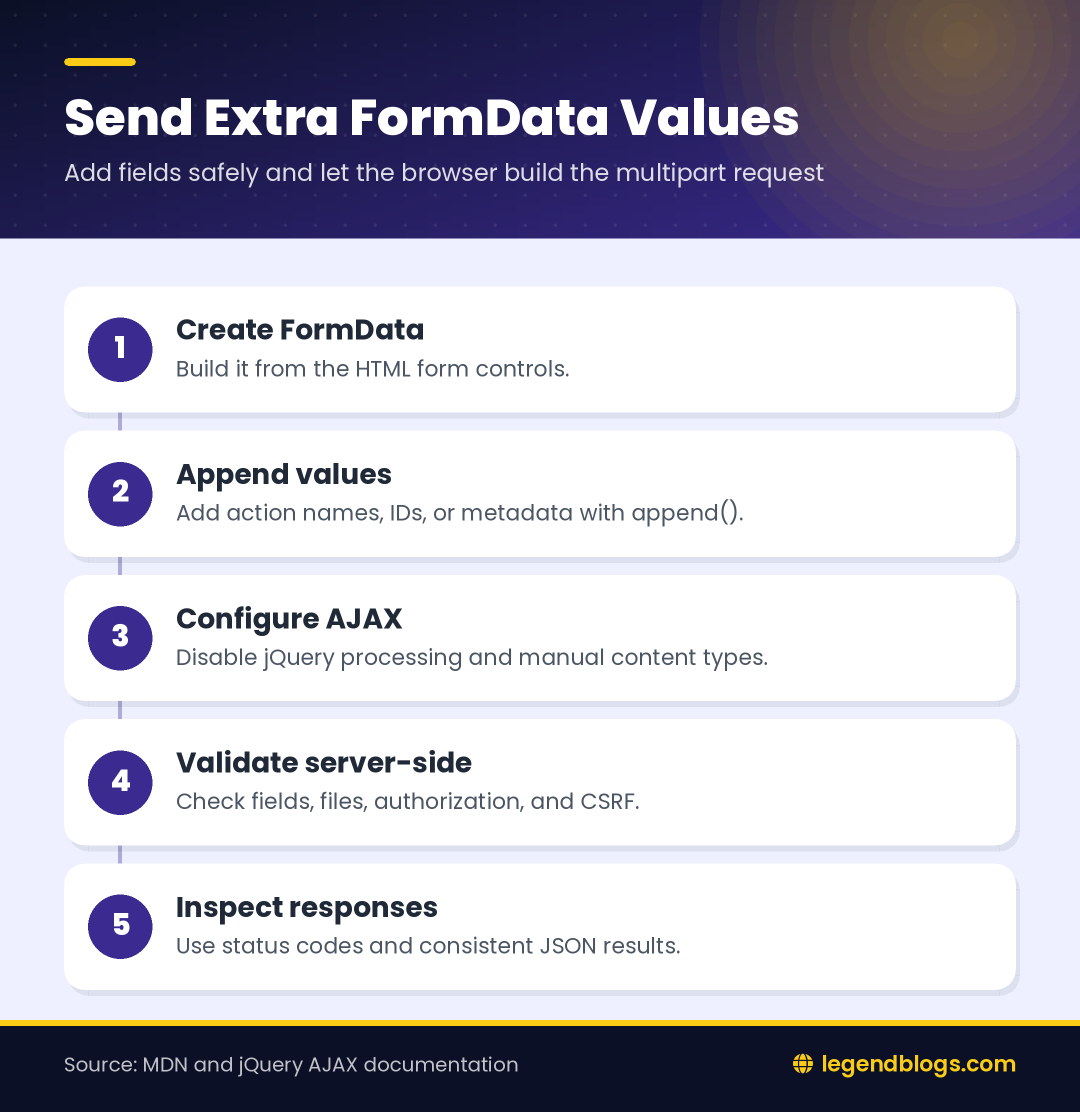
An AJAX FormData request can carry ordinary form fields and selected files in one multipart request. The browser builds the multipart boundaries when the FormData object is sent, so application code should not manually construct that body.
An AJAX FormData extra parameter is simply a key and value added after the form has been read. It can identify an action, carry a record ID, select a workflow, or provide metadata that does not have its own visible input.
Choose append or set
Use append() to add a value. If the same key is appended more than once, the request can contain multiple values under that key. Use set() when the application intends to replace existing values for that name. This distinction matters when a form already contains a control with the same name.
Create a Clear HTML Form
Name the controls
Every field that should be submitted needs a useful name. The name becomes the key received by the server. A label and required constraint improve the browser-side experience, but server-side validation is still required.
<form id="profileForm" enctype="multipart/form-data">
  <label>Name
    <input name="name" required>
  </label>
  <label>Avatar
    <input type="file" name="avatar" accept="image/*">
  </label>
  <button type="submit">Save</button>
</form>
Build FormData from the form
Passing the form element to the constructor includes its successful controls, including a selected file. The extra value can then be appended by name.
const form = document.querySelector('#profileForm');
const formData = new FormData(form);
formData.append('action', 'save_profile');
formData.append('source', 'settings');
Submit FormData with jQuery AJAX
Use the required request settings
When jQuery receives a FormData object, set processData: false so it does not convert the object into a query string. Set contentType: false so the browser can supply the multipart content type and boundary.
$('#profileForm').on('submit', function (event) {
    event.preventDefault();

    const formData = new FormData(this);
    formData.append('action', 'save_profile');
    formData.append('source', 'settings');

    $.ajax({
        url: '/ajax/profile.php',
        method: 'POST',
        data: formData,
        processData: false,
        contentType: false,
        dataType: 'json'
    }).done(function (response) {
        console.log(response.message);
    }).fail(function (xhr) {
        console.error('Request failed', xhr.status);
    });
});
Do not set the multipart boundary manually. The browser and XMLHttpRequest implementation need to generate it consistently with the body.
Show one completion result
Use either a success callback or a promise-style handler for the result. Avoid showing a success message in both success and complete, because complete also runs after failures and can incorrectly tell a user that the operation worked.
Send FormData with Modern Fetch
Use fetch without a manual content type
The native Fetch API accepts FormData directly. As with jQuery, leave the content type unset so the browser creates the correct multipart boundary.
const form = document.querySelector('#profileForm');

form.addEventListener('submit', async (event) => {
    event.preventDefault();

    const data = new FormData(form);
    data.append('action', 'save_profile');
    data.append('source', 'settings');

    const response = await fetch('/ajax/profile.php', {
        method: 'POST',
        body: data,
        headers: {
            'Accept': 'application/json'
        }
    });

    if (!response.ok) {
        throw new Error(`HTTP error ${response.status}`);
    }

    const result = await response.json();
    console.log(result.message);
});
Handle network and server errors
A successful network response does not necessarily mean the application accepted the data. Check the HTTP status and the JSON response fields. Catch network errors and restore the submit button so the user can try again.
Receive the Extra Parameter in PHP
Read posted fields
PHP exposes ordinary multipart form values through $_POST and uploaded files through $_FILES. Treat all of these values as untrusted input.
$action = $_POST['action'] ?? '';
$source = $_POST['source'] ?? '';
$name = trim($_POST['name'] ?? '');

if ($action !== 'save_profile') {
    http_response_code(400);
    exit('Invalid action');
}

if ($name === '') {
    http_response_code(422);
    exit('Name is required');
}
Read an uploaded file separately
if (isset($_FILES['avatar']) && $_FILES['avatar']['error'] === UPLOAD_ERR_OK) {
    $temporaryPath = $_FILES['avatar']['tmp_name'];
    $originalName = $_FILES['avatar']['name'];
    // Validate size and MIME type before storing the file.
}
Do not trust the original filename or extension. Check the upload error, size, detected MIME type, storage path, and authorization rules before moving a file.
Send Multiple Extra Parameters
Append separate keys
For independent values, append each key separately. Numbers and booleans are converted into request values, so validate and cast them on the server.
formData.append('record_id', String(recordId));
formData.append('send_email', sendEmail ? '1' : '0');
formData.append('note', note);
Send a list
For a list, repeat a key with brackets and read the resulting array on the server, or serialize a structured object as JSON and validate it after decoding.
selectedIds.forEach((id) => {
    formData.append('selected_ids[]', String(id));
});
Choose one convention and document it for the endpoint. Mixing bracketed fields and JSON without a reason makes validation harder.
Validate and Secure the Request
Validate on the server
HTML constraints can be bypassed, and JavaScript can be disabled. Check required values, allowed action names, numeric ranges, file type, and authorization on the server. Never use an extra parameter as proof that a user is permitted to perform an action.
Protect state-changing requests
Use the application's CSRF protection for authenticated state-changing requests. A CSRF token can be included as a hidden form field or appended to FormData, but the server must compare it with the session token. Escape returned text when inserting it into the page.
Debug FormData AJAX Requests
Inspect the request in browser tools
Open the Network panel and inspect the request payload, status, response, and uploaded file. Confirm that the extra key is present and that the request uses multipart form data. Logging the FormData object directly may not show its entries, so iterate through them during debugging.
for (const [key, value] of formData.entries()) {
    console.log(key, value);
}
Common configuration mistakes
- Setting
processDatato true causes jQuery to transform the data incorrectly. - Setting a manual JSON or multipart content type can break the boundary.
- Forgetting the input name means the field is not submitted.
- Reading a file from
$_POSTinstead of$_FILESproduces an empty result. - PHP upload limits can reject a large file before application code runs.
Response and Error Design
Return a consistent JSON shape
An endpoint can return a predictable status and message so the browser does not need to parse arbitrary text. Use an appropriate HTTP status for validation failures and server errors.
header('Content-Type: application/json');
echo json_encode([
    'success' => true,
    'message' => 'Profile saved'
]);
Disable repeated submissions
Disable the submit control while the request is pending and restore it in a finally-style completion path. This reduces duplicate uploads and duplicate actions when a user clicks twice.
FAQ
How do I add an extra parameter to FormData?
Create FormData from the form and call formData.append('key', value). Append the value before passing the object to jQuery AJAX or fetch.
Why is processData set to false?
It tells jQuery not to transform the FormData object into a query string. The browser must send the multipart body as it was created.
Why is contentType set to false?
It lets the browser generate the multipart content type and boundary. Manually setting it can cause the server to parse the request incorrectly.
How do I receive FormData values in PHP?
Read ordinary fields from $_POST and uploaded files from $_FILES. Validate every value before using or storing it.
Can FormData send files and normal fields together?
Yes. A FormData object can contain text values, files, and extra parameters in the same multipart request.
Conclusion
Appending an extra value to FormData is the simplest way to send metadata alongside ordinary fields and files. Use append(), keep jQuery's processing and content-type options disabled for FormData, or pass the object directly to fetch.
The browser code is only one part of the feature. Validate the extra parameter and uploads on the server, protect state-changing requests with CSRF controls, return clear responses, and inspect the Network panel when a value appears to be missing.







(1) Comments
Programmer
Really great solution as a beginner i am finding this kind of solution for my project.
Very helpfull.Thank You.
Write a comment