jQuery No-Conflict Method
Hello, I think that if you have used more than one jquery methods on the same page then you might have encountered the jQuery nickname conflict problem, and you already know, jQuery uses the dollar sign ($) as a shortcut or alias for jQuery. Thus, if you use another JavaScript library that also uses the $ sign as a shortcut, along with the jQuery library on the same page, conflicts could occur. So that, jQuery provides a special method named noConflict() to deal with such situation.
The jQuery.noConflict() method return the control of the alias $ identifier back to other libraries. The jQuery code in the following example will put the jQuery into no-conflict mode immediately after it is loaded onto the page and assign a new variable name $lb to replace the $alias in order to avoid conflicts with the prototype framework
<!DOCTYPE html>
<html lang="en">
<head>
<meta charset="utf-8">
<title>jQuery noConflict() Example</title>
<script src="js/prototype.js"></script>
<script src="js/jquery.js"></script>
<script type="text/javascript">
// Defining the new alias for jQuery
var $lb = jQuery.noConflict();
$lb(document).ready(function(){
    // Display an alert message when the element with ID foo is clicked
    $lb("#foo").click(function(){
        alert("jQuery is working well with prototype.");
    });
});

// Some prototype framework code
document.observe("dom:loaded", function(){
    // Display an alert message when the element with ID bar is clicked
    $(bar).observe('click', function(event){
        alert("Prototype is working well with jQuery.");
    });
});
</script>
</head>
<body>
    <button type="button" id="foo">Run jQuery Code</button>
    <button type="button" id="bar">Run Prototype Code</button>
</body>
</html>
Second option to avoid alias
However, if you don't want to define another shortcut for jQuery, may be because you don't want to modify your existing jQuery code or you really like to use $ because it saves time and easy to use, then you can adopt another quick approach — simply pass the $ as an argument to your jQuery(document).ready() function, see this exmpale:
<!DOCTYPE html>
<html lang="en">
<head>
<meta charset="utf-8">
<title>jQuery noConflict() Example</title>
<script src="js/prototype.js"></script>
<script src="js/jquery.js"></script>
<script type="text/javascript">
jQuery.noConflict();
jQuery(document).ready(function($){
    // The dollar sign in here work as an alias to jQuery
    $("#foo").click(function(){
        alert("jQuery is working well with prototype.");
    });
});

// Some prototype framework code
document.observe("dom:loaded", function(){
    // The dollar sign in the global scope refer to prototype
    $(bar).observe('click', function(event){
        alert("Prototype is working well with jQuery.");
    });
});
</script>
</head>
<body>
    <button type="button" id="foo">Run jQuery Code</button>
    <button type="button" id="bar">Run Prototype Code</button>
</body>
</html>
Including jQuery Before Other Libraries
The above solutions to avoid conflicts rely on jQuery is being loaded after prototype.js is loaded. However, if you include jQuery before other libraries, you may use full name jQuery in your jQuery code to avoid conflicts without calling the jQuery.noConflict(). But in this scenario the $ will have the meaning defined in the other library.
<!DOCTYPE html>
<html lang="en">
<head>
<meta charset="utf-8">
<title>jQuery noConflict() Example</title>
<script src="js/jquery.js"></script>
<script src="js/prototype.js"></script>
<script type="text/javascript">
jQuery(document).ready(function($){
    // Use full jQuery function name to reference jQuery
    jQuery("#foo").click(function(){
        alert("jQuery is working well with prototype.");
    });
});

// Some prototype framework code
document.observe("dom:loaded", function(){
    // The dollar sign here will have the meaning defined in prototype
    $(bar).observe('click', function(event){
        alert("Prototype is working well with jQuery.");
    });
});
</script>
</head>
<body>
    <button type="button" id="foo">Run jQuery Code</button>
    <button type="button" id="bar">Run Prototype Code</button>
</body>
</html>
Learn Also:
How to send additional parameter with form data with ajax
Create dynamic bootstrap modal with JQuery and php
https://www.legendblogs.com/blog/jQuery-ajax-POST-example-with-PHP/121737
What Is jQuery noConflict()?
Why the dollar sign can conflict
The jQuery noConflict method helps when more than one JavaScript library wants to use the global dollar sign. jQuery commonly exposes both jQuery and $; another library may use $ for a completely different function. Loading both libraries can cause code to call the wrong object.
The conflict is about a shared global name, not about the selector syntax itself. Releasing the global $ name lets the other library keep ownership while your code continues to use the full jQuery name or a private alias.
What noConflict() changes
Calling jQuery.noConflict() restores the $ identifier to the library that owned it before jQuery took it. The jQuery identifier remains available, so code can continue to call jQuery(selector) and jQuery(function(){}) directly.
This method does not merge libraries and does not convert one library’s methods into another’s. It only changes which global names jQuery keeps after loading.
How the noConflict() Method Works
Releasing the global dollar sign
Use jQuery.noConflict() after jQuery has loaded and before code that expects another library to use $. The order matters because the method needs to know the previous owner of the global name.
After the call, a statement such as $(selector) may refer to the other library or may be undefined, depending on the page. Use jQuery(selector) or a custom alias for jQuery code outside a protected callback.
Keeping the jQuery name available
The simplest pattern is to release $ and use the full jQuery name. This is explicit and easy to understand in a mixed-library page, although it can make long scripts more verbose.
Do not assume that every plugin will automatically work after the release. A plugin must be written to accept jQuery or be initialized in a scope where the correct alias is available.
Using a Custom jQuery Alias
Creating an alias
jQuery.noConflict() returns the jQuery function, so you can store that return value in a private variable. A name such as $jq or jq makes the ownership clear without taking the global $ name back from another library.
The alias should be consistent throughout the module. Mixing $jq, jQuery, and $ without a reason makes maintenance harder and can conceal the original conflict.
Using the alias in event handlers
Use the alias for selectors, event registration, traversal, and plugin calls. The alias behaves like the original jQuery function because it references the same function object.
Keep the alias inside a module or closure when possible. A private alias avoids creating another global variable that could conflict with application code.
Using the Dollar Sign Inside ready()
Passing the alias as a callback parameter
jQuery can pass itself to a ready callback. This allows the dollar sign to be used safely inside that function even after the global $ name has been released. Outside the callback, the global $ still belongs to the other library.
This pattern is useful when an existing jQuery block already uses $ extensively. It limits the shortcut to a known scope instead of changing global ownership again.
Understanding scope
A function parameter is local to that function. Code inside the callback can use $ for jQuery, while code outside it must use the other library’s API or the full jQuery name. This distinction prevents many confusing runtime errors.
When moving code into or out of the callback, check which alias the new location receives. A selector copied into the wrong scope may silently call another library.
Calling noConflict(true)
Releasing both global identifiers
The stronger form, jQuery.noConflict(true), releases both the $ and jQuery global identifiers. The return value still provides access to the jQuery function, so save it immediately if the application needs to use jQuery afterward.
This approach is appropriate when a page must not expose jQuery globals, when several versions need careful isolation, or when a module owns its dependencies. It is more disruptive than the normal noConflict call and should be chosen deliberately.
Working with plugins
Plugins loaded after the globals are removed may need to receive the saved jQuery reference. Check how the plugin defines itself and initialize it through the same alias. A plugin that expects window.jQuery may fail if the global was released completely.
Working with Multiple JavaScript Libraries
Load order and ownership
Load the libraries in a documented order and call noConflict after the libraries that need the global $ name have been loaded. The exact result depends on which library claims the name first.
Do not solve a conflict by randomly changing script order. A page may appear to work while one plugin is still using the wrong implementation. Identify the owner of $ and choose an explicit alias policy.
Using the full jQuery name
The full jQuery name is the clearest fallback when only a small amount of code uses jQuery. It avoids adding another alias and makes code review straightforward. It can also help diagnose whether a failure is caused by the global dollar sign.
Correcting Common noConflict() Errors
Undefined variables in selectors
A selector such as $(bar) may be interpreted as a JavaScript variable rather than an element ID. Use a string selector such as '#bar' when selecting an element by ID. This correction is separate from noConflict but often appears in the same old examples.
Also check that the element exists before attaching a handler. A valid alias cannot fix a selector that points to a missing element.
Mixing aliases and global references
Choose one reference inside each block and use it consistently. If a callback receives $, use that local parameter; if a module stores jQuery in $jq, use $jq throughout the module. Mixing the references makes it difficult to tell which library is being called.
Choosing the Best noConflict() Pattern
Pattern comparison
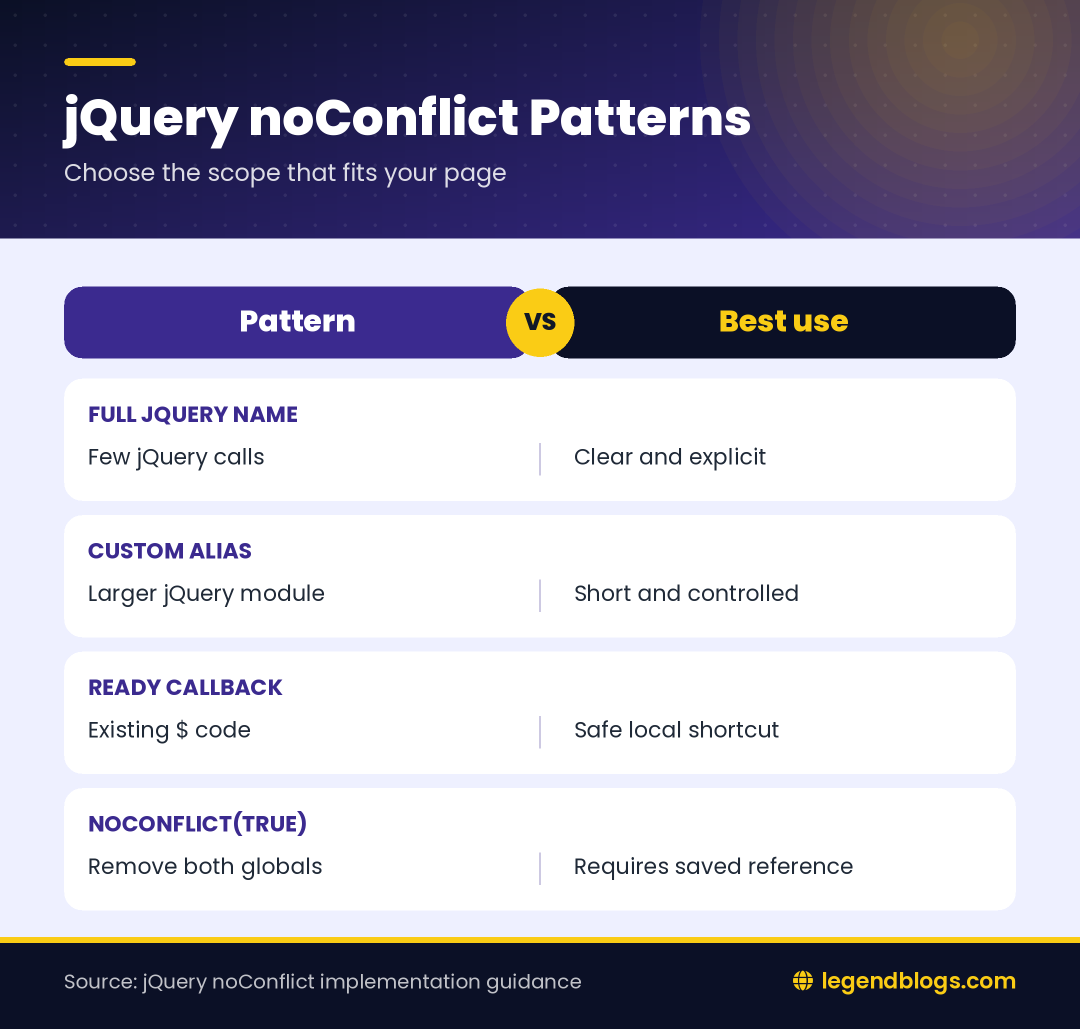
| Pattern | Useful when | Main consideration |
|---|---|---|
| Full jQuery name | Only a few jQuery calls exist | More verbose but very clear |
| Custom alias | A larger jQuery module needs a shortcut | Keep the alias scoped and consistent |
| ready callback parameter | Existing code already uses $ | The shortcut works only inside that callback |
| noConflict(true) | Global jQuery names must be removed | Plugins may need explicit injection |
Practical selection advice
Use the least disruptive pattern that solves the actual problem. A custom alias is often a good balance for a legacy page, while a module-based application may prefer dependency injection and no global names at all.
Testing jQuery After Releasing the Dollar Sign
Check handlers and plugins
Test document-ready code, click handlers, delegated events, AJAX calls, and every plugin initialized on the page. A conflict can appear only after a user interaction, so a successful initial page load is not enough.
Use the browser console to inspect the types and values of $, jQuery, and your alias. Do not expose sensitive data while logging; the goal is only to confirm which function each name references.
Debug load-order problems
Inspect the script order in the document and check whether a library is loaded more than once. Multiple jQuery versions can create confusing behavior even when no other library uses $. Remove unnecessary copies and document the version expected by each plugin.
Modern Maintenance Recommendations
Reduce global dependencies
New code should keep dependencies inside modules or closures when possible. Avoid adding another global shortcut merely to replace the one that was released. A small, local reference is safer than a new page-wide convention.
When maintaining older Prototype or jQuery code, change one scope at a time and test after each change. Large search-and-replace edits can accidentally change selectors, plugin calls, or unrelated uses of the dollar sign.
Document the integration rule
Add a short note near the script setup explaining which library owns $, which alias represents jQuery, and where noConflict is called. This prevents a future developer from reintroducing the conflict while adding a plugin.
FAQ
What does jQuery noConflict() do?
It releases the global dollar sign so another library can use it. The jQuery name normally remains available after the standard noConflict call.
How do I use jQuery after calling noConflict()?
Use the full jQuery name, save jQuery.noConflict() as a custom alias, or use the local dollar-sign parameter supplied to a ready callback.
Can I use the dollar sign inside jQuery ready()?
Yes. Pass the dollar sign as the ready callback parameter and use it only inside that function. The global dollar sign remains available to the other library.
What is the difference between noConflict() and noConflict(true)?
The normal method releases the global $ name. The true form releases both $ and jQuery, so you must retain the returned reference if the page still needs jQuery.
Can jQuery work with Prototype or another library?
Yes. Load the libraries deliberately, release the conflicting global name, and use a full name or private alias for jQuery code. Test plugins because some expect a global jQuery reference.
Conclusion
jQuery noConflict() solves a naming collision between jQuery’s dollar-sign shortcut and another library or application script. It does not remove jQuery functionality; it gives you a controlled way to access jQuery without taking ownership of a shared global name.
Choose a full jQuery reference, a private alias, a ready-callback parameter, or noConflict(true) according to the page’s needs. Then document the decision and test events, plugins, AJAX calls, and load order so the fix remains reliable.




(2) Comments
Devendra Singh
Thank you, my problem solved.
Mohit
helpful post....
Write a comment