
To force HTTPS in Laravel, you need to make sure that requests arriving over plain HTTP are sent to the secure HTTPS version of the same URL. HTTPS protects the connection between the visitor and the application, while the redirect gives browsers a consistent address to use.
There is more than one place to implement this behavior. A web server or hosting platform can redirect traffic before Laravel handles the request, while Laravel middleware can apply application-level rules. This guide explains both approaches, including proxy configuration, environment differences, redirect loops, secure URLs, and testing.
1. Understand the HTTP-to-HTTPS redirect
1.1 What the redirect changes
An HTTP-to-HTTPS redirect changes the requested scheme from http:// to https://. A request for http://example.com/account should become https://example.com/account, keeping the host and path whenever possible.
The redirect does not provide encryption by itself. Your domain must have a valid TLS certificate, the web server must be configured to serve HTTPS, and the application must generate secure links and assets after the redirect.
1.2 Use a permanent redirect only after testing
A temporary redirect is useful while checking a new deployment. Once the certificate, proxy, assets, forms, and API clients work correctly, the server can use a permanent redirect for the production policy. Test carefully before making a redirect permanent because browsers and intermediaries may cache that behavior.
2. Choose where to force HTTPS in Laravel
2.1 Prefer the web server or hosting layer
The web server is usually the most efficient place to redirect HTTP traffic. Apache, Nginx, a hosting control panel, a load balancer, or a CDN can handle the request before PHP and Laravel start.
This approach reduces application work and also covers routes that never reach Laravel, such as static files or requests rejected before the framework boots. It is especially useful when every application route on a domain must use HTTPS.
2.2 Use Laravel middleware for application rules
Laravel middleware is useful when HTTPS behavior depends on the application environment or when the application must make a decision during the request lifecycle. It can also be convenient on hosting where you cannot edit the virtual host configuration.
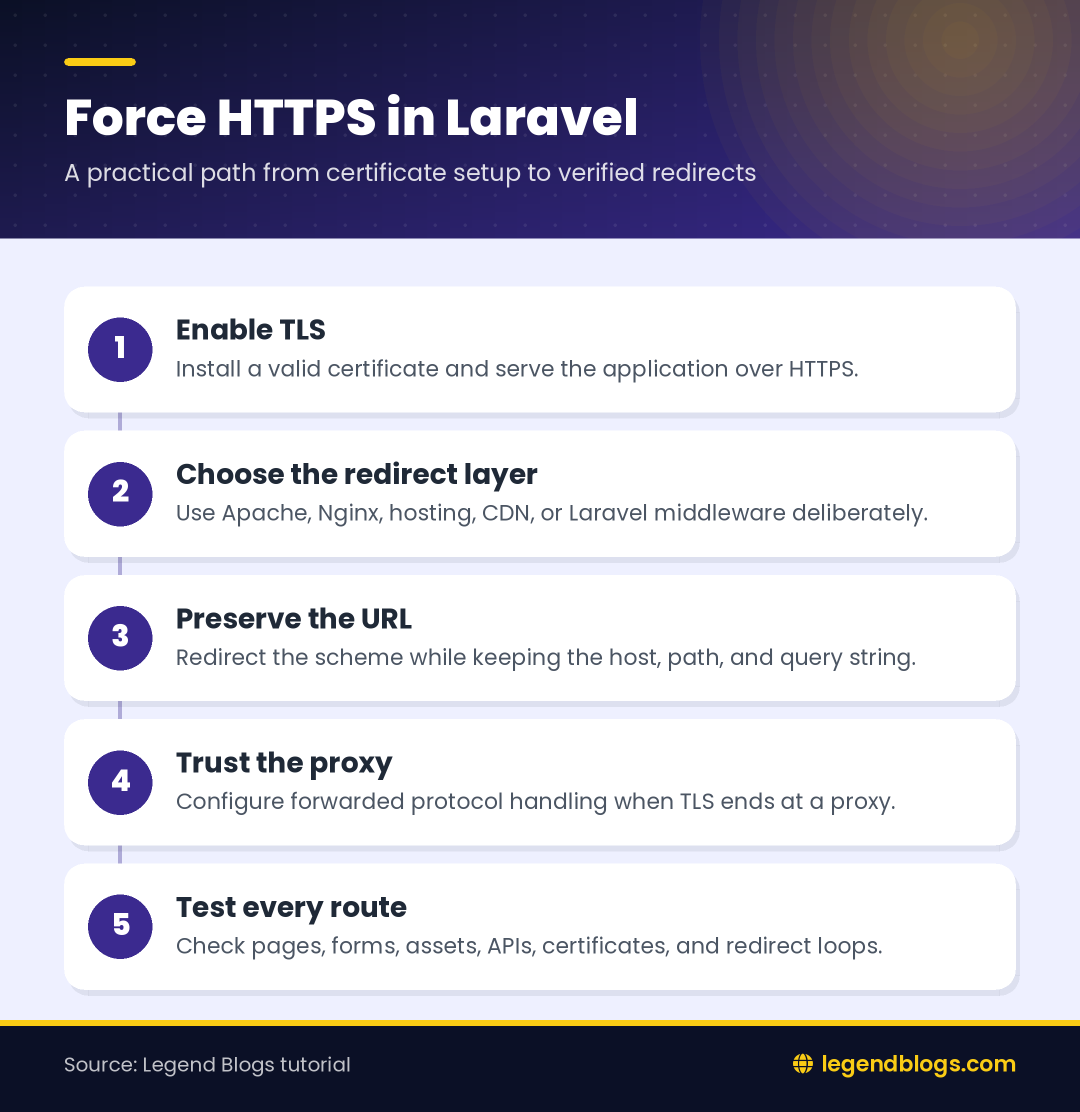
Do not create competing redirects at several layers without a reason. A server redirect and a middleware redirect can coexist, but duplicated rules make debugging more difficult and can produce extra hops.
3. Configure an Apache redirect
3.1 Redirect all traffic while preserving the path
On Apache hosting, an HTTPS rule can be placed in the virtual host configuration or, where supported, in the document root .htaccess file. A typical rule preserves the requested path:
RewriteEngine On
RewriteCond %{HTTPS} !=on
RewriteRule ^ https://%{HTTP_HOST}%{REQUEST_URI} [R=301,L]
The exact location and syntax depend on the hosting setup. Confirm that Apache has the rewrite module enabled and that overrides are permitted before assuming the rule is being ignored.
3.2 Keep the application front controller rules intact
Laravel installations commonly use additional rewrite rules to send requests to public/index.php. Place the HTTPS rule where it does not prevent the normal Laravel front-controller rules from running after the secure request arrives.
Do not remove existing hosting rules without understanding them. Make a backup through the hosting control panel or version control, then test the homepage, a nested route, a form submission, and a missing page.
4. Configure Nginx or a hosting platform
4.1 Redirect at the Nginx server block
Nginx deployments commonly use one server block for port 80 and another for TLS traffic. The HTTP block can redirect to the HTTPS host while retaining the original request URI:
server {
    listen 80;
    server_name example.com www.example.com;
    return 301 https://$host$request_uri;
}
Use the actual domains for the deployment and confirm that both names are covered by the certificate. The HTTPS server block should then point to the Laravel public directory and pass PHP requests to the configured PHP-FPM service.
4.2 Check managed hosting and CDN settings
Some hosting platforms provide a “force HTTPS” switch, while a CDN may offer an “always use HTTPS” rule. Use one clearly documented layer as the main redirect owner. If both the CDN and origin server rewrite the scheme incorrectly, the browser may receive repeated redirects.
After changing a platform setting, clear only the relevant cache and test from a private browser window or with a command-line request. A cached redirect can make a corrected configuration appear broken.
5. Create Laravel HTTPS middleware
5.1 Generate a middleware class
If the redirect must be handled by Laravel, create middleware in the application middleware directory:
php artisan make:middleware ForceHttpsThe generated class can check whether the incoming request is secure and redirect when it is not. Keep the production condition explicit so local development over HTTP remains possible when required:
namespace App\Http\Middleware;

use Closure;
use Illuminate\Http\Request;

class ForceHttps
{
    public function handle(Request $request, Closure $next)
    {
        if (app()->environment('production') && ! $request->secure()) {
            return redirect()->secure($request->getRequestUri());
        }

        return $next($request);
    }
}
The method names and imports should match the Laravel version and application structure. The important behavior is to redirect only an insecure production request and allow an already secure request to continue.
5.2 Avoid redirecting local development accidentally
Local projects often run at an HTTP address and may not have a trusted certificate. If middleware forces HTTPS in every environment, developers can receive a redirect loop or a certificate warning before reaching the application.
Use an environment condition, a local certificate, or a clearly documented development setting. Do not assume that production proxy headers exist on a laptop.
6. Register the middleware correctly
6.1 Add it to the web group
To apply the behavior to browser routes, register the middleware in the web middleware group used by the application. The exact Kernel structure can vary by Laravel generation, so place the class in the group that processes the routes requiring browser sessions and views.
protected $middlewareGroups = [
    'web' => [
        // Existing web middleware...
        \App\Http\Middleware\ForceHttps::class,
    ],
];
Do not paste a complete Kernel file from an unrelated Laravel version. Add the single class to the existing structure and preserve the application's current middleware order.
6.2 Decide between global, web, and route middleware
Global middleware runs for every request and can affect APIs, health checks, webhooks, and internal endpoints. The web group is more suitable when the rule applies to browser routes. Route middleware can be appropriate when only selected route groups require the redirect.
For a domain where every request must use HTTPS, a server-level rule is often simpler than manually assigning middleware to every route.
7. Configure trusted proxies
7.1 Why Laravel may see HTTP behind a proxy
In a reverse-proxy deployment, the browser may connect to the proxy over HTTPS while the proxy connects to PHP over HTTP. Without the correct forwarded-protocol information and trusted-proxy handling, Laravel may believe the original request was insecure.
That can cause Laravel to redirect an already secure browser request back to HTTPS repeatedly. The browser sees a loop because each request reaches the application with the wrong perceived scheme.
7.2 Review proxy headers and application configuration
Check that the proxy forwards the original protocol and that the application trusts the proxy addresses appropriate for the deployment. Do not blindly trust every incoming forwarding header on a public server; the trust configuration should match the actual load balancer, CDN, or hosting network.
After changing proxy settings, test a normal page, an authenticated page, a form, and an asset URL. A homepage that loads does not prove that every route is interpreting the scheme correctly.
8. Generate secure Laravel URLs
8.1 Set the application URL
Set the production application URL to the HTTPS address used by visitors. This helps commands, notifications, generated links, and other URL-producing code use the intended host and scheme.
APP_URL=https://example.comChanging the environment file may not take effect immediately when configuration is cached. Clear and rebuild the appropriate Laravel configuration cache using the deployment process for the project.
8.2 Check routes, assets, and forms
Use Laravel route helpers and asset helpers consistently rather than hard-coding HTTP URLs. Review image sources, JavaScript files, CSS files, form actions, canonical tags, sitemap URLs, and notification links.
A page can redirect correctly while still loading insecure resources. Browsers may block or warn about those resources as mixed content, so inspect the browser developer console after enabling HTTPS.
9. Diagnose redirect loops
9.1 Identify which layer is redirecting
Temporarily inspect the response headers with a command-line request:
curl -I http://example.com/test
curl -I https://example.com/test
Look at the status code and Location header. The target should move from HTTP to HTTPS, and the HTTPS request should return the page or the application's normal response rather than redirecting back to itself.
9.2 Common causes of a loop
- The proxy does not forward the original HTTPS scheme.
- Laravel does not trust the proxy that terminates TLS.
- Both a CDN and origin server rewrite the request inconsistently.
- The middleware checks the wrong request property.
- A cached configuration still contains an old application URL.
- The redirect target is built from an incorrect host or forwarded header.
Change one layer at a time and test after each change. This is faster than adding more redirect rules without knowing which component is producing the response.
10. Test an HTTPS migration safely
10.1 Test representative routes
Do not test only the homepage. Check a nested route, a route with query parameters, a login flow, a form submission, an uploaded-file page, an API endpoint, and a custom error page. Confirm that paths and query strings survive the redirect where they should.
10.2 Review certificates and browser behavior
Open the HTTPS site in a clean browser session and inspect the certificate warning, hostname, expiration, and page security indicator. A redirect is not successful if the certificate does not match the requested domain.
Also check canonical URLs and sitemap entries. After the migration, public URLs should consistently reference HTTPS rather than presenting search engines with mixed schemes.
11. Laravel version and deployment considerations
11.1 Do not rely on version labels alone
The original tutorial targets Laravel 6, 7, and 8, but middleware files, proxy configuration, dependencies, and deployment conventions may differ between projects. Read the existing application's structure before copying code from another version.
The general principles remain stable: terminate TLS correctly, detect the original scheme accurately, redirect insecure requests once, and generate secure URLs throughout the application.
11.2 Shared hosting versus managed servers
On shared hosting, a control-panel HTTPS setting or carefully placed .htaccess rule may be the practical solution. On a VPS, Nginx or Apache virtual-host configuration is usually easier to test and maintain. On a CDN deployment, coordinate the edge rule with the origin configuration.
Keep the final setup documented. Future developers should know where the redirect occurs, which proxy headers are trusted, and which cache commands are part of deployment.
FAQ
How do I force HTTPS in Laravel?
Configure an HTTP-to-HTTPS redirect at the web server or hosting layer, or use Laravel middleware when the application must control the rule. For most domains, the server layer is efficient and covers requests before Laravel runs.
Should HTTPS redirect happen in Laravel or Apache?
Use Apache, Nginx, a CDN, or the hosting layer when every request on the domain should be secure. Use Laravel middleware for application-specific behavior or when server configuration is not available.
Why is Laravel still detecting HTTP behind a proxy?
The proxy may not forward the original protocol, or Laravel may not trust the proxy that terminates TLS. Review forwarded headers and trusted-proxy configuration for the actual deployment.
How do I fix an HTTPS redirect loop?
Find which layer returns the redirect, then verify the proxy scheme, trusted-proxy settings, cached configuration, and duplicate redirect rules. The HTTPS request must be recognized as secure and allowed to continue.
How do I force secure asset URLs in Laravel?
Set the production application URL to HTTPS, use Laravel URL helpers, review hard-coded asset addresses, and clear stale configuration after deployment. Then inspect the browser console for mixed-content warnings.
Conclusion
To force HTTPS in Laravel safely, choose one primary redirect layer, configure the TLS endpoint, preserve the requested URL, and make sure Laravel understands the original protocol when a proxy is involved. Server-level redirects are often the simplest choice, while middleware is useful when the rule belongs to application logic.
After enabling the redirect, test more than the homepage. Verify certificates, routes, forms, APIs, assets, canonical URLs, and proxy behavior. A complete HTTPS migration requires both a working redirect and an application that consistently generates secure URLs.







(4) Comments
Kawal
It worked. Thanks alot!
Aysha
Plz tell me where can I put the first code for redirect http to https
Amit Pandey
1st Step: Add file HttpsProtocol.php
2nd Step: \App\Http\Middleware\HttpsProtocol::class,
Aras
Man you saved my life .. Big thanks, it works 100%
Just please try to make this section more clear (Look at the complete file of kernel.php)
i thought for a while that i have to add all codes you show .. then i saw that you are just showing how it'll look like
Again big thanks :)
Amit Pandey
Your welcome.
Mr. Nishad
ncie post
Write a comment