
Yes, it is possible to remove a year and month from the blogger post URL. Removing a date from the blogger post URL will make your website URL like WordPress URL. This will make your post URL professional URL like a WordPress site.
Remove Year and Month from Blogger URL Safely
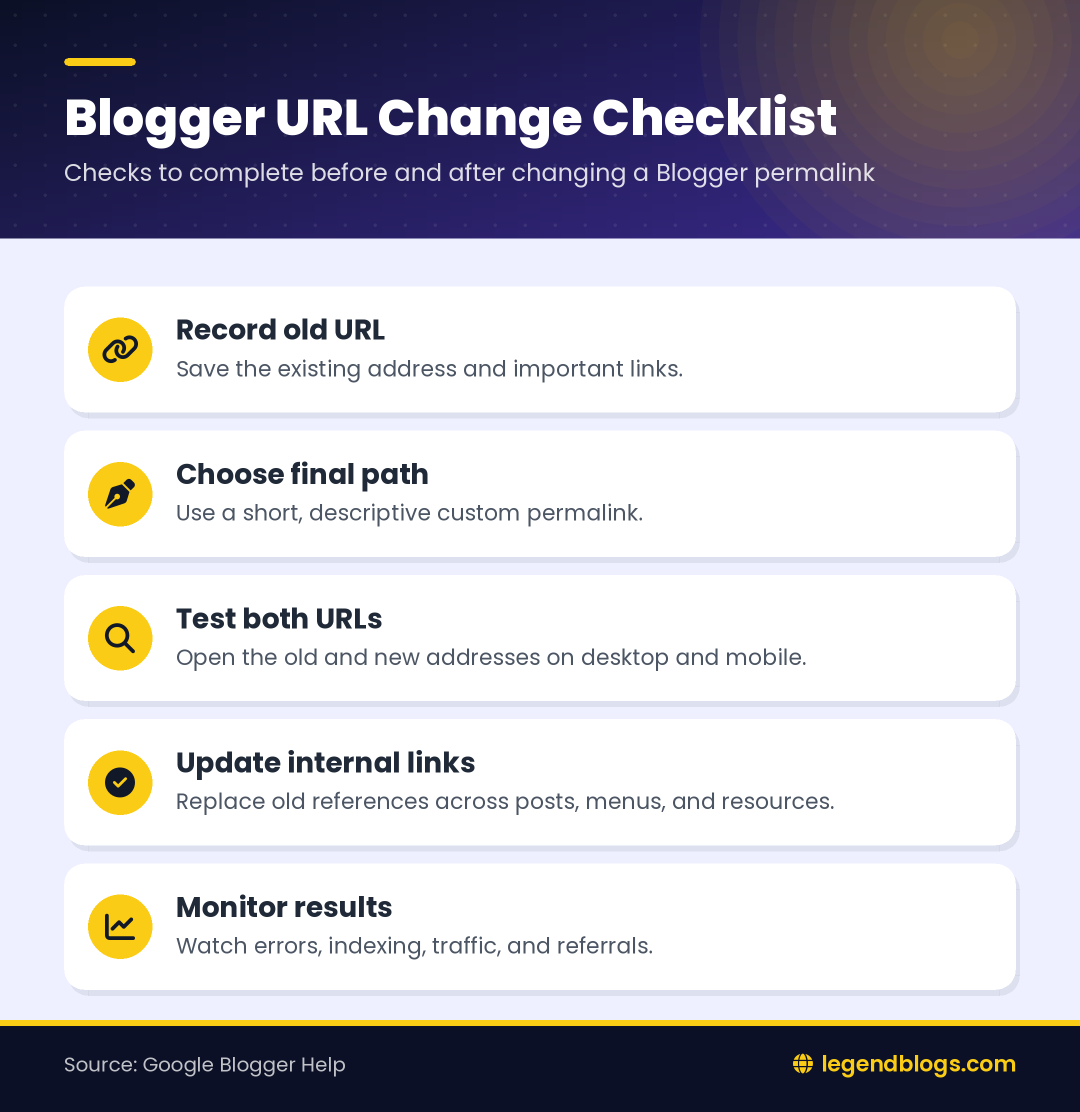
Before changing an established address, decide whether you need a cleaner URL for a new post or a migration for an existing post. A custom permalink can help with the first situation, but a historical migration also requires an inventory of old links, a redirect plan, updated internal links, and post-change monitoring.
A date in a URL does not automatically make an article thin or outdated. The title, content quality, page signals, links, and update history also matter. If an established post receives visits or has valuable external links, improving its content may be safer than changing its address.
New Posts and Existing Posts Need Different Decisions
For a new post, decide the permalink before publishing and use the same spelling when you mention the article elsewhere. For an existing post, first ask whether the change solves a real problem. A shorter URL may be easier to read, but it does not automatically improve rankings, restore a declining page, or replace the need for useful content.
If the purpose is to remove an outdated year from an evergreen tutorial, updating the title and body may provide the benefit you want without moving the page. If the date is part of a genuine migration, change only a small test group, compare the old and new addresses, and keep the test period separate from other redesign work.
Keep Evidence During the Change
Save screenshots of the relevant Blogger settings and keep a copy of the URL list before making edits. Note the date, the account or blog being changed, the old path, the new path, and the result of opening both addresses. This evidence makes it easier to reverse a decision or explain a traffic change later.
Keep that record with your analytics notes and review it after the first few days and again after several weeks. This separates a short transition effect from a persistent technical problem.
Use a Descriptive Custom Permalink
Choose a short path that describes the subject rather than placing several keyword variations in the URL. Use one consistent word separator, remove unnecessary filler, and avoid temporary claims that may become inaccurate later. Select the final address before sharing the post so bookmarks and social links do not point to several versions.
Record the Old Address First
Before editing an existing Blogger post, record its current URL, title, traffic importance, external references, internal links, and the date of the planned change. This simple inventory gives you something to compare when a visitor reports a broken link or search traffic changes.
Blogger by default includes the month and year in front of the permalink or URL of your blog posts, like this:
https://legendblogs-blogger.blogspot.com/2020/04/how-to-install-laravel-on-windows-using.html
So, if you prefer or want to remove the year and date from your blog posts URL. You can do it with ease by simply adding a code snippet.
But before heading, how to actually do it, let me describe what Permalink and URL is?
What is a Permalink?
Let’s think about this for a second, it’s a contraction of two words i.e. Permanent and Link and that does exactly what it sounds like.
Permalink is a permanent link to your blog posts or to a page of your website.
What is a URL?
URL stands for Uniform Resource Locator. It’s what you type in at the top of your browser when you wish to go to a website. It allows you to find a specific web page or file across the internet.
URL can also be called Web Address, just like a postal address, which enables us to mail its destination.
https://legendblogs-blogger.blogspot.com/
How to Remove Date from Blogger URL
Follow the below steps and you will be done within no time.
What to Test After Changing a Blogger Permalink
Saving the new permalink is only one part of the job. Open the published page in a private browser window, test it on mobile, and verify that images, comments, navigation, and embedded media still load. Then test the former URL from a separate browser session and record whether Blogger sends visitors to the new page or returns an error.
Update the Rest of the Blog
Search the blog for the old address and replace links in related posts, menus, widgets, author resources, newsletters, and downloadable documents. Link text should describe the destination, such as a safe Blogger URL migration guide, instead of using a generic phrase.
Also review canonical information, sitemap entries, feeds, and social previews. If a supported custom redirect is available, map the old path directly to the final path and avoid chains. Keep a record containing the old URL, new URL, date changed, redirect status, and any error observed.
When to Stop the Migration
Pause if the old address produces repeated errors, the new address is not being discovered, important backlinks are failing, or the platform does not provide a dependable redirect for the posts being changed. A stable existing URL is often more valuable than a shorter one. Fix the content and metadata first, then revisit the URL only when the technical path is clear.
- Check the old and new addresses.
- Confirm the preferred canonical address.
- Update internal links and navigation.
- Inspect indexing and traffic reports.
- Keep the original URL inventory for future troubleshooting.
Step 1. Login to your Blogger blog and select Theme/Template.
Step 2. Click on Edit HTML and paste the below code just above the <head> tag.
<script type='text/javascript'>
//<![CDATA[
// BloggerJS v0.3.1
// Copyright (c) 2019-2020
// Licensed under the MIT License
var urlTotal,nextPageToken,postsDatePrefix=!1,accessOnly=!1,useApiV3=!1,apiKey="",blogId="",postsOrPages=["pages","posts"],jsonIndex=1,secondRequest=!0,feedPriority=0,amp="&"[0];function urlVal(){var e=window.location.pathname,t=e.length;return".html"===e.substring(t-5)?0:t>1?1:2}function urlMod(){var e=window.location.pathname;"p"===e.substring(1,2)?(e=(e=e.substring(e.indexOf("/",1)+1)).substr(0,e.indexOf(".html")),history.replaceState(null,null,"../"+e)):(e=(e=postsDatePrefix?e.substring(1):e.substring(e.indexOf("/",7)+1)).substr(0,e.indexOf(".html")),history.replaceState(null,null,"../../"+e))}function urlSearch(e,t){var n=e+".html";t.forEach(function(e){-1!==e.search(n)&&(window.location=e)})}function urlManager(){var e=urlVal();0===e?accessOnly||urlMod():1===e?getJSON(postsOrPages[feedPriority],1):2===e&&(accessOnly||history.replaceState(null,null,"/"))}function getJSON(e,t){var n=document.createElement("script");if(useApiV3){var o="https://www.googleapis.com/blogger/v3/blogs/"+blogId+"/"+e+"?key="+apiKey+"#maxResults=500#fields=nextPageToken%2Citems(url)#callback=bloggerJSON";nextPageToken&&(o+="#pageToken="+nextPageToken),nextPageToken=void 0}else o=window.location.protocol+"//"+window.location.hostname+"/feeds/"+e+"/default?start-index="+t+"#max-results=150#orderby=published#alt=json-in-script#callback=bloggerJSON";o=o.replace(/#/g,amp),n.type="text/javascript",n.src=o,document.getElementsByTagName("head")[0].appendChild(n)}function bloggerJSON(e){var t=[];if(useApiV3||void 0===urlTotal&&(urlTotal=parseInt(e.feed.openSearch$totalResults.$t)),useApiV3){try{e.items.forEach(function(e,n){t.push(e.url)})}catch(e){}nextPageToken=e.nextPageToken}else try{e.feed.entry.forEach(function(n,o){var r=e.feed.entry[o];r.link.forEach(function(e,n){"alternate"===r.link[n].rel&&t.push(r.link[n].href)})})}catch(e){}urlSearch(window.location.pathname,t),urlTotal>150?(jsonIndex+=150,urlTotal-=150,getJSON(postsOrPages[feedPriority],jsonIndex)):nextPageToken?getJSON(postsOrPages[feedPriority]):secondRequest&&(nextPageToken=void 0,urlTotal=void 0,jsonIndex=1,secondRequest=!1,0===feedPriority?(feedPriority=1,getJSON("posts",1)):1===feedPriority&&(feedPriority=0,getJSON("pages",1)))}function bloggerJS(e){e&&(feedPriority=e),urlManager()}bloggerJS();
//]]>
</script>Step 3. Click on Save in order to save your settings and you are done.
Disclaimer
The author and the blog are not to be held responsible if, your blog or website SEO gets affected by using this code snippet. So, Use at your own risk.
Redirects, Canonicals, and Search Visibility
A redirect tells a browser and crawler that one address has moved to another. A canonical signal identifies the preferred version when similar pages exist. They solve different problems, so a canonical link should not be treated as a replacement for a redirect when visitors still use the old address.
After a change, check the canonical address, sitemap, feed, internal links, and social preview. Google’s Blogger guidance also recommends using relevant titles and headings, and it provides a custom permalink and custom redirect workflow. Review those controls in the current Blogger interface because labels and available options can change.
Common Mistakes to Avoid
- Changing every post before testing one small group.
- Assuming a date removal automatically preserves every old link.
- Using an unknown script that may create loops or duplicate pages.
- Deleting the old content before confirming the new address.
- Ignoring bookmarks, external backlinks, feeds, and email links.
- Changing URLs repeatedly while a previous migration is still being measured.
When the migration is complete, monitor broken URLs, indexing, search impressions, clicks, referral traffic, and mobile page behavior. Keep the old-to-new URL list for future maintenance.




(5) Comments
Adi
I'm trying to remove years and months of blogger permalinks using cloudflare workers like this demo buzz.my.id
Nicky Lalrochhara
It work perfectly, but, this script disable social og meta from our blog.
Saleem
Sir, Which plugin you use for commenting?
Amit Pandey
There is no plugin for commenting. Legend Blogs website runs over the self-developed Laravel Framework.
Ponsu
Sir,
agar existing blog mein use kare toh reindex karne se problem ko solve honga ya nahi sir?
Aur ek baat puchna hain sir Year Month agar remove nahi kare toh kya future mein problem honga ky sir?
Please reply sir..
Amit Pandey
First one : Existing blog me use na kare to jada behtar hoga. Agr exsting blog me use krenge to sare ULR new ho jayenge to fir se re-indexing krni pdegi aur site ki Ranking bhi down hogi..
Second one: Problem koi nhi aati. bas same article kisi aur ne aapke likhne ke baad likha to Search Engine aapki position ko down krega
Bhavik
Can you explain login behind code? How it works?
Amit Pandey
This thing works on to override the permalink of the same page.
Write a comment