
In this tutorial, you will learn two PHP unset() and array_search() methods to remove specific array elements.
Remove Array Element PHP: Start with the Key or Value
To remove an array element in PHP, identify whether your input is the key or the value. Use unset() when you know the key; use a strict value search when you need to locate a matching entry. Then choose whether the remaining keys should be preserved or reindexed.
Remove Specific Array Elements by Key or Value
To remove specific array elements correctly, first decide whether the target is identified by its key or by its value. Key-based removal uses unset(); value-based removal locates the key before removing it. This difference also determines whether one match or every duplicate is removed and whether the remaining keys stay unchanged.
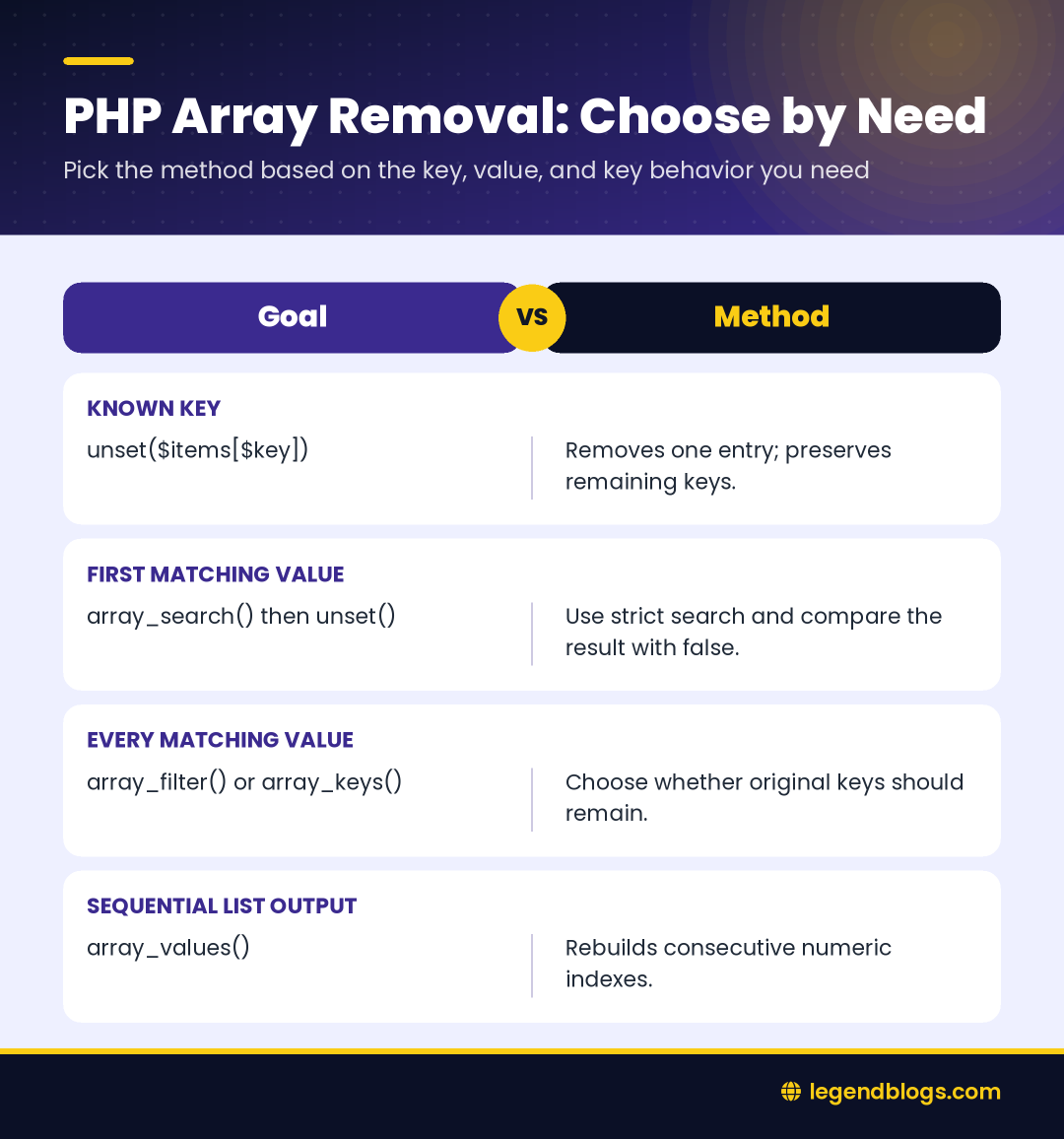
Pick the operation before writing the code
For a PHP array, “remove this element” can mean several different things: delete a known key, remove the first value that matches, remove every value that matches, or remove an entry that meets a custom condition. Those choices affect duplicate handling and key preservation. Decide the desired result first, then choose the least surprising operation.
It also helps to decide whether matching should be type-sensitive. If an integer and a numeric string represent different data in your application, use strict comparison. When the result is a positional list, reindex only after removal; when keys identify records or settings, preserve them.
Remove a Specific Element by Value or by Key?
The right PHP array operation depends on what you know about the entry. If you know its key, unset() removes that key directly. If you only know the value, array_search() can locate the first matching key, but a repeated value requires a separate all-matches approach. Before you change the array, decide whether its keys are identifiers that must stay intact or simple numeric positions that can be rebuilt.
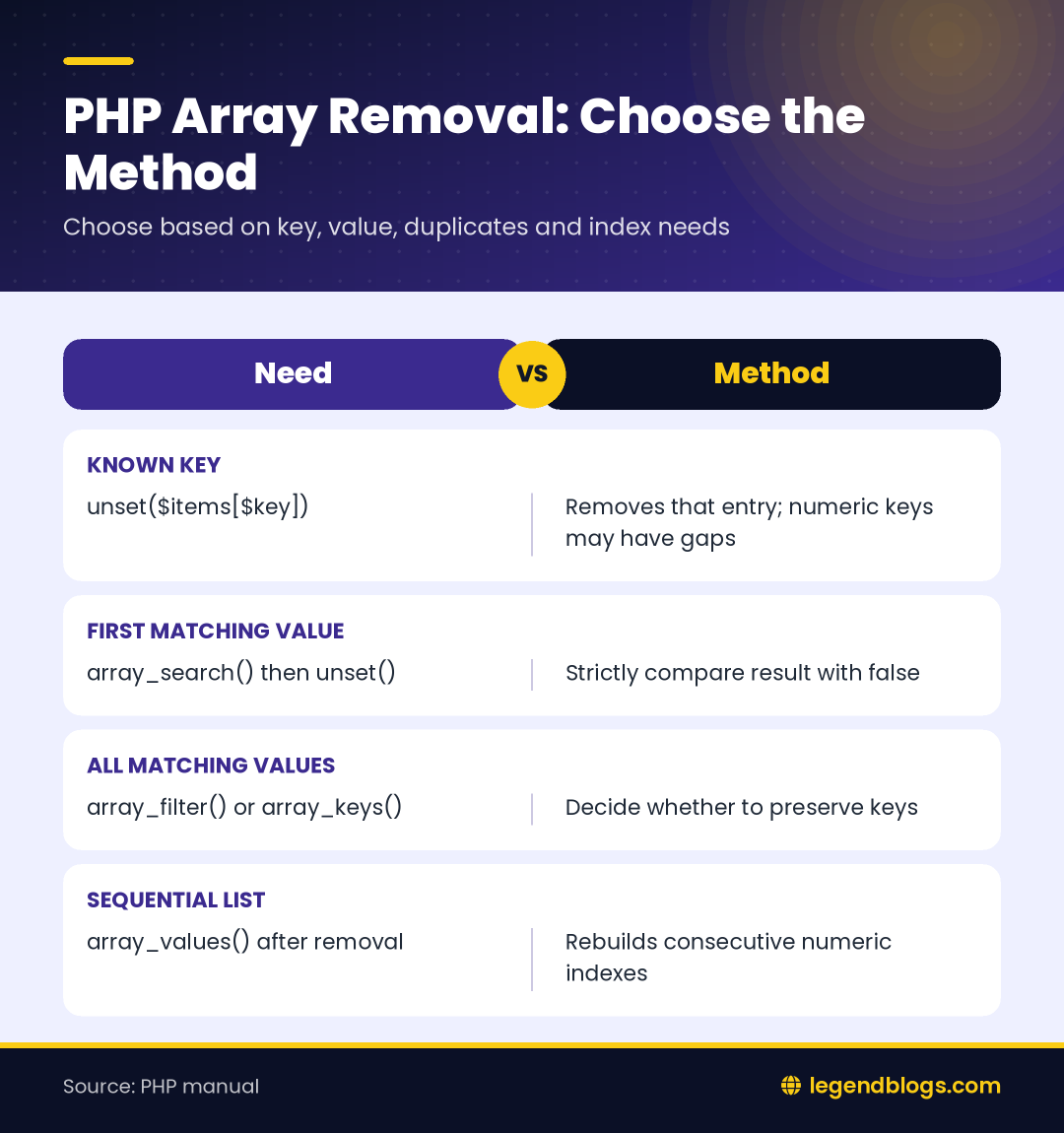
Decide What “Remove” Means for Your Array
Remove by key when you know the position
PHP arrays are ordered maps, so an array element has a key that may be an integer or a string. If you already know the key, removing that entry is direct: call unset($items[$key]). This removes only the matching key-value pair. It does not search the values, and it does not return a new array.
Remove by value when the key is unknown
If you know the value but not its key, first find a matching key with array_search(). Then pass that key to unset(). This removes the first match returned by the search, not every repeated value. Decide explicitly whether a single occurrence or all matching entries should disappear before choosing the method.
Remove an Array Entry by Key
Use unset() for one known key
For example, start with $items = ['first', 'second', 'third']; and call unset($items[1]);. The remaining values are still present, but the keys are now 0 and 2. PHP does not automatically renumber the remaining numeric keys after unset(). That is useful when the keys carry meaning, but it may surprise code that assumes the indexes are consecutive.
Check keys only when the distinction matters
You can call unset() for a key that is absent without needing a preliminary existence check in an ordinary array. Use array_key_exists() when your application needs to distinguish an existing key whose value is null from a key that is not present. Use isset() only when a null value should count as not set. Those checks answer different questions, so choose according to the data you need to preserve.
Remove the First Matching Value
Use array_search() and test its result strictly
A safe pattern is $key = array_search($target, $items, true); followed by if ($key !== false) { unset($items[$key]); }. The strict third argument asks for an identical value, including its type. The strict comparison with false is essential because array key 0 is a valid match and can otherwise be mistaken for failure.
Read the result as a key, not as a Boolean
Consider an array whose first value is the target. A search can return integer 0, which is a successful key even though it behaves as false in a loose condition. Store the search result, compare it with false using !==, and only then call unset(). This makes the missing-value case distinct from a match at index zero and works for string keys as well.
For example, if $items = ['pear', 'plum', 'pear'];, then $key = array_search('pear', $items, true); finds the first pear. After unsetting that key, the other pear remains. If you need every pear removed, use a filter or gather all matching keys instead of repeating a condition that treats zero as a failed search.
Examples for One Match and All Matches
Remove only the first exact match
A reusable helper can follow this shape: function removeFirstValue(array $items, mixed $target): array { $key = array_search($target, $items, true); if ($key !== false) { unset($items[$key]); } return $items; }. The mixed type declaration requires a PHP version that supports it; in an older project, omit that declaration and use the type rules supported by the project’s PHP version. The helper returns the array with its surviving keys preserved.
Remove all exact matches and reindex if required
For every occurrence, filter with a strict comparison: $filtered = array_filter($items, fn($value) => $value !== $target);. This preserves original keys. If the result represents a simple ordered list and consumers expect consecutive indexes, use $filtered = array_values($filtered);. Arrow functions require a compatible PHP version; a conventional anonymous function can express the same test in older code.
Test both examples with a match at key zero, a value that is absent, a duplicate, and a value with a different type. Those cases expose the common mistakes: a loose false check, removing only one when all were intended, or unintentionally changing keys. For nested arrays or objects, define the comparison rule explicitly; equality may not mean that two separate objects are the same instance.
Understand which duplicate is removed
array_search() returns the key of the first matching value it finds. If the same value appears more than once, unsetting that key leaves the other occurrences untouched. This is often exactly right for removing one selected item from a list, but it is not a “remove every match” operation.
Remove Every Matching Value
Filter values when you want a clean result
To remove every value matching a condition, array_filter() is often easier to read than repeatedly searching and unsetting. For a simple strict value comparison, use a callback that keeps entries where the value is not identical to the target, then assign the filtered result back to the variable. By default, filtering preserves the original keys, so check whether those keys should remain meaningful in your application.
Use array_keys() when you need all matching keys
Another option is to find all matching keys with array_keys($items, $target, true), then unset each returned key. The strict argument keeps type-sensitive matching. This approach makes the “remove all matches” intention visible, while filtering can be clearer when the removal rule is more complex than simple equality.
Preserve or Reindex Numeric Keys
Keep keys when they identify records
Associative keys often represent IDs, names, or other stable identifiers. Reindexing such an array would change how callers access its entries, so preserve the remaining keys after removal. The same may apply to numeric keys if they are identifiers rather than positions in a display list.
Reindex when the array is a sequential list
If the remaining values should be a zero-based sequence, pass the result through array_values($items). This creates new consecutive numeric keys in iteration order. Do not reindex automatically if another part of the program relies on the original keys; key preservation is part of the data’s meaning, not merely formatting.
Choose Comparison Rules Deliberately
Strict and loose matching are different
Without strict mode, PHP may compare values using type conversion rules, so a numeric-looking string and an integer can behave as matches in situations where you expected distinct values. Use strict search when the type matters. If your application intentionally treats values as equivalent after normalization, normalize both the target and stored values in a defined way before comparing them.
Be careful with null, false, and zero
Values such as 0, '0', false, and null can be confused by loose comparisons or by truthiness tests. Never test an array_search() result with a bare if ($key). Use $key !== false instead. If null is a valid value to remove, strict search helps distinguish it from other values that PHP might otherwise compare loosely.
Write a Reusable Function with Clear Behavior
Return the updated array
A helper can accept an array and a target value, search strictly, remove the first found key, and return the resulting array. Give it a name that says whether it removes one occurrence or every occurrence. Passing and returning an array is straightforward for ordinary list utilities; avoid giving a helper an ambiguous name that hides key reindexing or comparison behavior.
Document duplicate and key expectations
When writing a reusable function, document whether it preserves keys, whether it uses strict comparison, and what happens if the target appears multiple times. These details affect the caller’s result. A function that quietly reindexes keys or removes all matches can break code even though it seems to remove the requested value correctly.
Common Mistakes to Avoid
Do not treat key zero as “not found”
The result of array_search() can be integer zero. A truthiness check can therefore skip a valid first entry. Compare the result to false strictly, and test with a target stored at the first key as well as a target that is absent.
Test the boundary cases that change the result
Before using an array-removal helper in application code, try a target at key zero, a target that does not exist, duplicate values, and values with similar but different types such as an integer and a numeric string. Also include an associative key if the array can contain string identifiers. These cases reveal whether the function removes the intended number of matches and preserves the expected key structure.
For arrays of records, avoid searching for an entire nested value unless that is the actual comparison you need. A clearer approach is often to inspect a named field in a loop or filter callback, then preserve or rebuild keys deliberately. Keep the removal rule close to the data structure so future changes do not silently alter what counts as a match.
Do not expect unset() to return the modified array
unset() is a language construct that removes a variable or array entry in the current scope; it does not produce a replacement array value. If a function should return a modified copy, perform the removal on its local array and return that array. Make the function’s behavior clear rather than assuming a direct return from unset().
Quick Method Comparison
| Need | Approach | Key behavior |
|---|---|---|
| Known key | unset($items[$key]) | Leaves gaps in numeric keys |
| First value match | array_search() then unset() | Strictly check against false |
| All value matches | array_filter() or array_keys() | Choose whether to preserve keys |
| Sequential numeric list | array_values() after removal | Creates fresh numeric indexes |
Removing items from your array by value, here’s an easy way to remove a specific element from a PHP array by key instead of index.
Using unset() function
Use the PHP unset() function to delete an element from an array. The behavior of unset() inside of a function can vary depending on what type of variable you are attempting to destroy.
Using array_search() function
If the array contains only a single element with the specified value, you can use the array_search() function with unset() function to remove it from an array.
function my_remove_array_item( $array, $item ) {
	$index = array_search($item, $array);
	if ( $index !== false ) {
		unset( $array[$index] );
	}
	return $array;
}
Usage:
$items = array( 'first', 'second', 'third');
$items = my_remove_array_item( $items, 'second' ); // remove item called 'second'
This works by searching the array for the specified item, returning its key, and then unset that key.







Write a comment