PHP Session
PHP sessions preserve small pieces of server-side state between related requests. They are useful for login status, carts, temporary notices, and multi-page forms, but they do not replace authorization checks.
PHP Sessions: How the Request Flow Works
Session identifiers and stored values
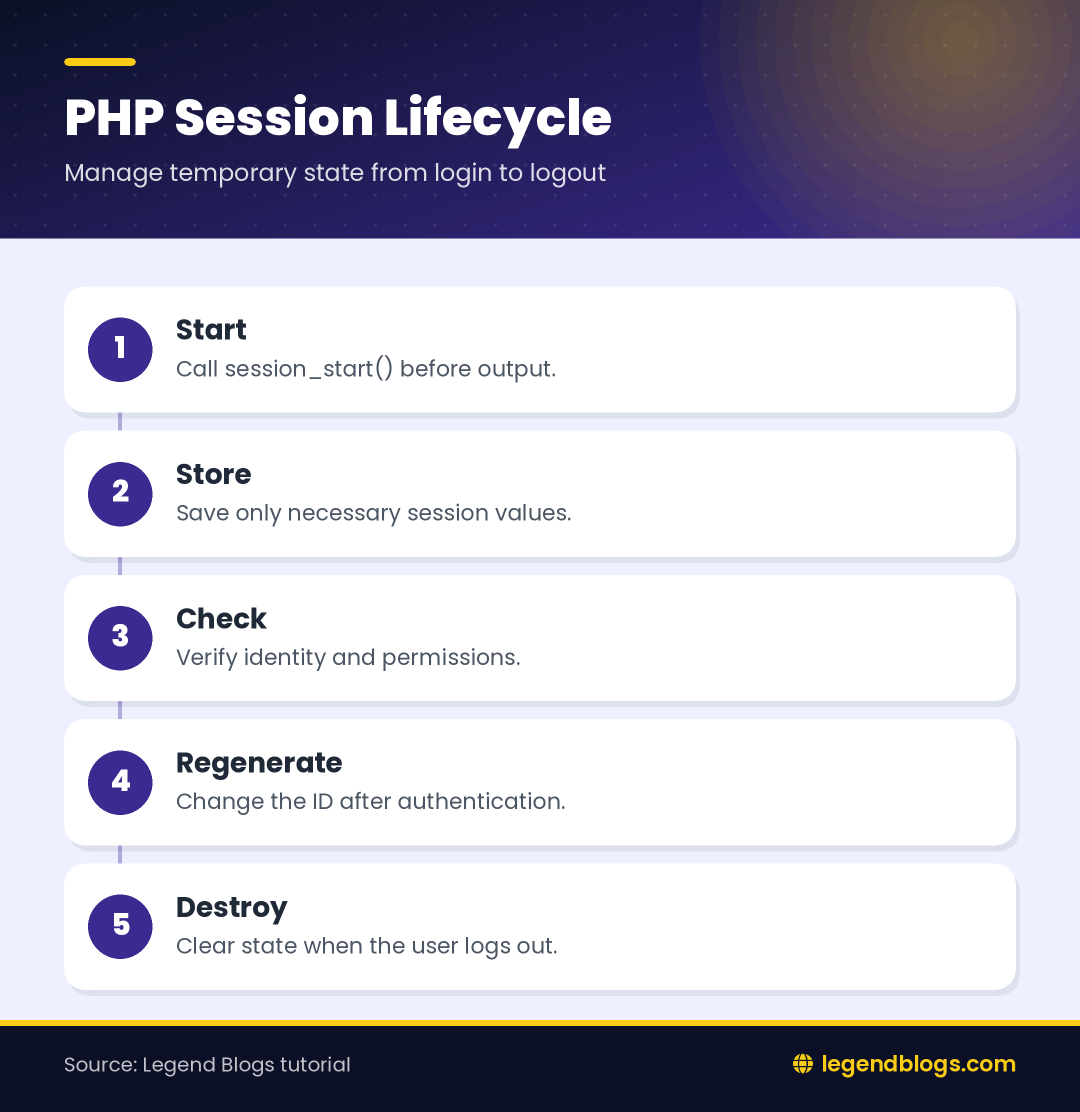
When PHP starts a session, it reads a session identifier from the request and loads the matching server-side data. If no valid identifier is available, PHP creates one. The browser normally stores the identifier in a cookie while the application stores the values on the server.
Keep session data small and purposeful. Store an account ID or a short preference, not a password, a complete database row, or a large file. A session identifier can identify a browser session, but it does not prove that a visitor is allowed to perform every action.
Starting before output
Call session_start() before HTML, whitespace, warnings, or headers are sent. A shared bootstrap file can make this order consistent across pages.
<?php
session_start();
$_SESSION['cart'] = $_SESSION['cart'] ?? [];
?>
The “headers already sent” warning usually means that an included file emitted output first. Check whitespace before the opening PHP tag, accidental output, warnings, and closing-tag whitespace.
Store and Read Session Values Safely
Save values with clear names
$_SESSION['user_id'] = 42;
$_SESSION['display_name'] = 'Asha';
$_SESSION['logged_in'] = true;
Read optional values with a fallback. Use isset() when a null value should count as missing, or array_key_exists() when null has a meaning.
$name = $_SESSION['display_name'] ?? 'Guest';
$isLoggedIn = $_SESSION['logged_in'] ?? false;
Protect private pages
Every private page should start the session and stop if the required authenticated state is absent.
<?php
session_start();
if (empty($_SESSION['user_id'])) {
    header('Location: /login.php');
    exit;
}
$userId = (int) $_SESSION['user_id'];
?>
Use the ID only after authorization checks. A hidden form field or session value must never be treated as proof that the visitor owns a record.
Update and Remove Session Data
Change one key
Assign a new value to update a key. Use unset($_SESSION['notice']) to remove one value, such as a message that should be displayed only once.
Use flash messages
Save a message before redirecting, display it on the next request, and then unset it. This avoids repeating a success message when the visitor refreshes the page.
Build a Safer Login State
Regenerate after authentication
After verifying credentials, regenerate the session identifier before storing the authenticated user ID. This helps reduce session fixation risk.
if ($passwordIsCorrect) {
    session_regenerate_id(true);
    $_SESSION['user_id'] = $user['id'];
    $_SESSION['logged_in'] = true;
}
Never store a plaintext password or reusable authentication secret in a session. Keep only the minimum state needed by the application.
Check current permissions
A session can identify a user, but sensitive operations should also check the current role, ownership, and record-level permission on the server. Do not rely on a button being hidden in the interface.
Logout and Session Destruction
Clear the server-side state
<?php
session_start();
$_SESSION = [];
session_destroy();
header('Location: /login.php');
exit;
?>
For applications using a session cookie, expire that cookie during logout as well, using the same path and cookie settings used when it was created. Clearing only one key can leave a visitor appearing authenticated.
Cookie and Request Security
Use safer cookie attributes
Production applications should use HTTPS and configure cookies with Secure, HttpOnly, and an appropriate SameSite policy. Set session options before starting the session and test redirects, login, logout, and embedded flows.
Protect state-changing requests
AJAX endpoints use the same session cookie as normal pages, but an AJAX request is not automatically trusted. Use a CSRF token stored in the session, compare it safely, validate every submitted value, and check authorization again in the endpoint.
Common PHP Session Problems
Values disappear
Confirm that each page calls session_start(), cookies are enabled, the host and HTTPS scheme are consistent, and no cache is serving a private response publicly.
Unexpected users or changing sessions
Inspect cookie scope, proxy settings, and application domains. Never place session identifiers in URLs because they can leak through history, logs, bookmarks, and referrers.
Test expiration and concurrent requests
Session problems can appear only after a timeout, a second browser window, or two requests arriving close together. Test an expired login, a logged-out tab submitting an old form, and a user whose permissions changed after the session was created.
When a request finds no valid session, return a clear redirect or JSON response appropriate to that request type. Do not silently treat a failed authentication check as an anonymous update. For sensitive actions, require the current account state and record an audit event without storing secrets in the log.
Keep session data easy to review
Use consistent names such as user_id and logged_in, document the meaning of each value, and remove temporary keys after their purpose is complete. A small session makes debugging easier and reduces the impact of an exposed identifier.
- Test private URLs directly, not only through visible navigation.
- Check logout in every browser tab.
- Verify that cached pages do not reveal private content.
- Review cookie scope when moving between subdomains.
FAQ
What is a PHP session?
It is server-side data associated with a browser through a session identifier, allowing related requests to share temporary state.
Where should session_start() be placed?
Place it before all output. A shared bootstrap file helps maintain the correct order.
How do I check a session variable?
Use isset() for normal presence checks and a fallback when reading optional values.
How do I destroy a PHP session?
Start it, clear the session array, destroy the server-side data, expire the cookie when appropriate, and redirect with exit.
How can PHP sessions be secured?
Use HTTPS, safe cookie attributes, ID regeneration, authorization checks, CSRF protection, timeouts, and minimal stored data.
Conclusion
PHP sessions are simple to use, but dependable applications need more than session_start(). Start before output, validate values, regenerate after login, check permissions on every sensitive action, and clear the state during logout.
Test expired sessions and direct requests to private URLs. Combining careful session handling with secure cookies and server-side authorization gives you a reliable foundation for login flows, carts, and multi-page forms.
PHP session is used to store information in a variable temporarily to be used across multiple pages. PHP session creates unique user id for each browser to recognize the user and avoid conflict between multiple browsers.
Before store information in a session, you have to start PHP’s session handling. This is start at the beginning of your PHP code (top of the page), and must be done before any text, HTML, or JavaScript is sent to the browser.
To start the session, you call the session_start() function in your each file:
<?php
session_start(); // start session!
?>
session_start() starts the session between the user and the server, and allows to store value in $_SESSION which can be accessible in other pages. In your second file, you call session_start() again which this time continues the session, and you can then retrieve values from $_SESSION with the variable name of session. For example:
First Page:
<?php
session_start(); // start session!
$_SESSION['userName'] = 'Tony';
?>
Second Page:
<?php
session_start(); // start session!
echo 'User Name is :'.$_SESSION['userName'];
?>
Output of second page is:
User Name is : TonyWhen you create the logout page then you have to remove all global session variables and destroy the session, use session_unset() and session_destroy():
<?php
// remove all session variables
session_unset();
// destroy the session
session_destroy();
?>




Write a comment