
If you have multiple options, then you want to get the checked values to store them in variable on form submit, Then you can use this technique.
A good method which is a favorite of mine and for many developers, is to make use of foreach which will output each value you chose, and appear on screen one underneath each other.
Here is an example using $_POST. You can however use $_GET to work properly.
<form action="#" method="POST">
<input type="checkbox" name="check_list[]" value="C/C++"><label>C/C++</label><br/>
<input type="checkbox" name="check_list[]" value="Java"><label>Java</label><br/>
<input type="checkbox" name="check_list[]" value="PHP"><label>PHP</label><br/>
<input type="checkbox" name="check_list[]" value="jQuery"><label>jQuery</label><br/>
<input type="checkbox" name="check_list[]" value="Android"><label>Android</label><br/>
<input type="checkbox" name="check_list[]" value="SQL"><label>SQL</label><br/>
<input type="checkbox" name="check_list[]" value="Laravel"><label>Laravel</label><br/>
<input type="submit" name="submit" value="Submit"/>
</form>
if(isset($_POST['submit'])){//to run PHP script on submit form
 if(!empty($_POST['check_list'])){
  //Loop to store and display values of individual checked checkbox.
  foreach($_POST['check_list'] as $selected){
   echo $selected."</br>";
  }
 }
}
In our example, there is a form contains some checkboxes, User checks them and when user hits submit button, multiple values of checkboxes will be display.
How PHP Checkbox Values Work
Checked and unchecked controls
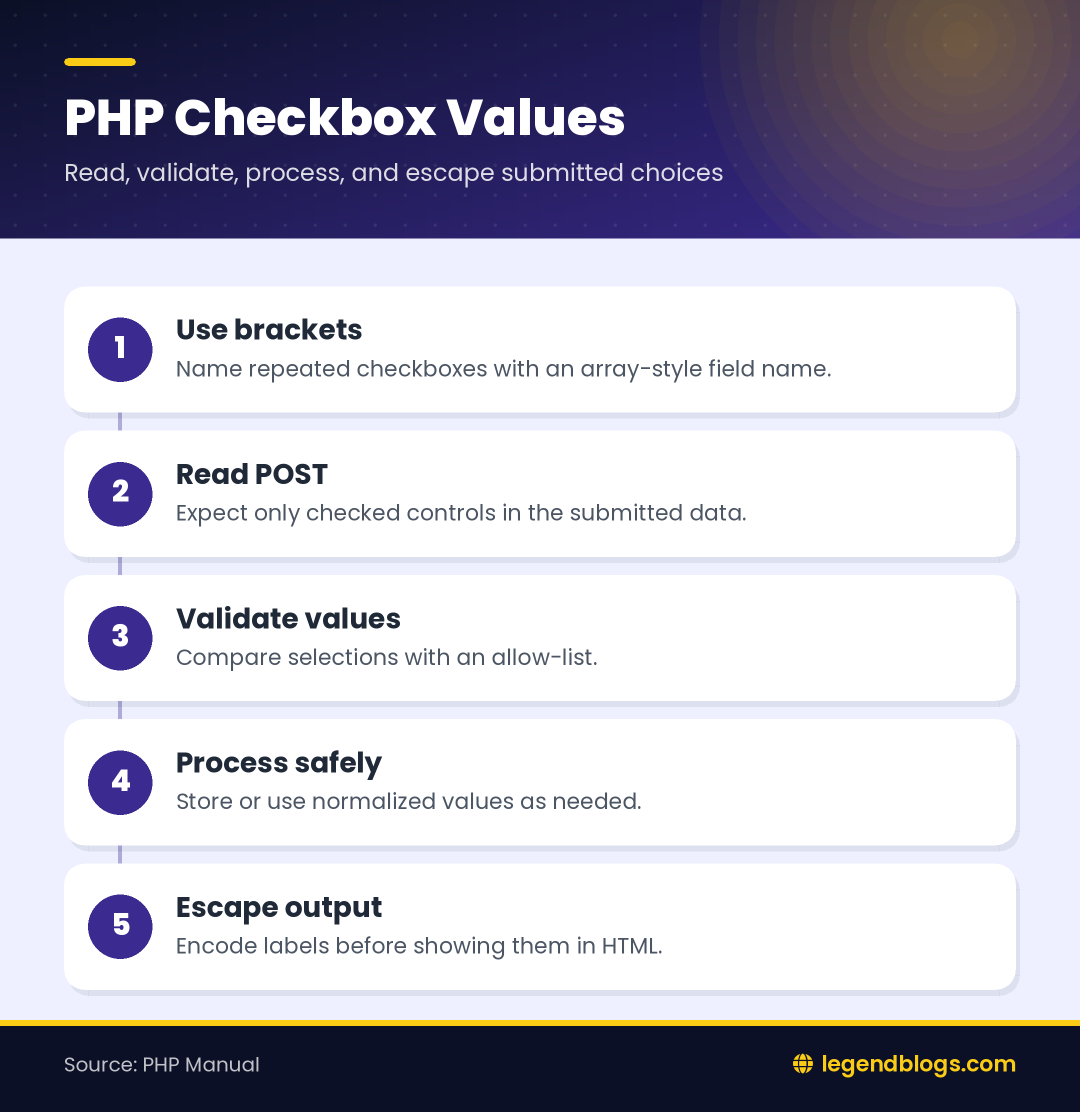
PHP checkbox values are sent only for boxes that are checked when the form is submitted. An unchecked checkbox normally has no entry in the submitted data, so server-side code must handle a missing key rather than assuming every option exists.
Why the name uses brackets
When several checkboxes represent one list, use the same name followed by square brackets, such as check_list[]. PHP interprets the submitted fields as an array. Without the brackets, repeated names can overwrite each other and you may receive only one value.
Create the HTML Checkbox Form
Match names and values
The existing form gives every checkbox the name check_list[] and a different value. The label text helps the user understand the option, while the value is what PHP receives. Keep values stable and meaningful, especially when they will be validated or stored.
Use labels correctly
A label can wrap an input or use a for attribute that matches the input ID. This improves the clickable area and makes the form easier to use with assistive technology. The name attribute is what PHP uses for form data; an ID alone does not create a POST key.
Read Multiple Values With $_POST
Check the submit request
For a standard POST form, PHP exposes URL-encoded or multipart form fields through the $_POST superglobal. Check that the expected field exists and that its value is an array before looping through it.
Loop over the submitted array
The original foreach example prints each selected option. A loop can instead build a validated list, calculate a result, or pass the values to another function. Keep processing separate from display so output escaping is not forgotten.
Handle No Checkbox Selection
Expect a missing key
If the visitor submits the form without selecting a box, check_list may not exist in $_POST. Use isset, an array check, or a default empty array. Display a helpful message when at least one selection is required.
Do not rely only on the submit button
The original code checks $_POST['submit']. A request can be submitted in different ways, and a button name may be absent in some browser or keyboard flows. Check the request method and the checkbox field itself when that better represents the operation.
Validate Submitted Values
Use an allow-list
Never assume that submitted checkbox values came from your own HTML. A visitor can send a modified request. Define the values the application accepts, compare each submitted item against that allow-list, and reject or ignore unexpected values according to the application’s rules.
Remove duplicates and normalize
Repeated values can be submitted manually even when the form shows each option once. Normalize the array, remove duplicates where appropriate, and preserve the intended order only if order matters to the feature.
Escape Values Before Display
Separate validation from output
Validation answers whether a value is allowed. Escaping answers how a value can safely appear in HTML. You need both when displaying data that came from a request, even when the values normally come from a fixed list.
Use htmlspecialchars
Before echoing a selected label into an HTML page, use htmlspecialchars with an explicit encoding and suitable quote flags. This converts special characters to safe entities for the HTML context. Do not concatenate untrusted values directly into markup.
Use filter_input Carefully
Read the array input
filter_input can make the source of external input explicit, but array filtering requires a filter configuration that matches the expected structure. Test the result because a missing field and an invalid field are different cases.
Keep the accepted shape simple
For a short checkbox list, reading $_POST and validating each item against an allow-list is often easier to audit. For a complex nested form, define a clear input-normalization layer before business logic runs.
Store Checkbox Values
Choose a data model
If selections are properties of one record, separate database columns may be appropriate. If a record can have many changing selections, a related table with one row per selection is usually easier to query than storing a single opaque string.
Do not trust storage input
Validate before saving and use parameterized database queries. Escaping for HTML does not replace database safety, and database escaping does not make a value safe for HTML. Apply the protection required by each output context.
Use $_GET Carefully
Understand the method difference
The original post notes that $_GET can also work. A GET form places values in the URL, making them visible in browser history and shareable links. Use GET for non-sensitive filters and searches, and POST for actions or data that should not be placed in the URL.
Keep the server logic consistent
Whichever method you choose, validate the resulting array in the same way. Do not assume that GET data is safe merely because it came from a link or that POST data is trustworthy because it came from a form.
Handle a Single Checkbox
Model it as a boolean
A single checkbox often represents an on-or-off choice such as accepting terms or enabling a preference. Because an unchecked control is absent, convert the presence of the field into a deliberate boolean after checking the request.
Do not use it for consent without records
For consent or agreement flows, the application may need to record the policy version and time, not just a true value. The checkbox is an input control, not proof that a complete compliance process has been implemented.
Troubleshoot Checkbox Forms
Only one value arrives
Check that every option uses the same name with square brackets. Confirm that the inputs are inside the form, have values, and are checked at submission. A missing bracket or duplicate non-array name is a common cause.
The values are empty
Inspect the value attribute and verify that the server is reading the correct key. The label text is not automatically submitted. Also confirm that the form uses the method your PHP code expects.
Output appears unsafe
Do not print the submitted string directly. Validate the value, map it to a trusted display label where possible, and escape the final label for HTML.
Testing Checklist
- Submit with no boxes selected.
- Select one option.
- Select several options.
- Submit using keyboard controls.
- Send a duplicate or unexpected value.
- Test a missing field and a wrong field type.
- Display selected values with HTML escaping.
- Test the form on a small screen and with labels activated.
FAQ
How do I get checked checkbox values in PHP?
Give related checkboxes the same name with square brackets, read the resulting array from $_POST, validate each item, and loop through the accepted values.
Why does PHP return only one checkbox value?
The inputs may be using the same name without [], or the code may be reading the value as a scalar. Use a shared array-style name and inspect the received data.
What does name="check_list[]" mean?
It tells PHP to collect repeated fields into an indexed array named check_list. Each checked input contributes one value to that array.
How do I handle no selected checkbox?
Expect the field to be missing, provide an empty-array default, and show a validation message if the feature requires at least one choice.
How do I safely display checkbox values?
Validate against an allow-list, map values to trusted labels where possible, and use htmlspecialchars with the correct encoding before placing them in HTML.
Conclusion
Getting PHP checkbox values is straightforward when the form uses an array-style name and the server expects that an unchecked field will be absent. The reliable workflow is to read, normalize, validate, store or process, and escape the selected values for their output context.
Start with the original foreach example, then add no-selection handling and an allow-list before using the data in a real application. These small checks prevent many form bugs and unsafe output problems.
Build a Safer Processing Pipeline
Normalize at the boundary
Convert the incoming field into a predictable array as soon as the request is received. Reject scalar data when the endpoint expects a list, remove empty entries, and then pass the normalized values to validation and business logic.
Map values to labels
For display, keep a server-side map of accepted values and human-readable labels. This prevents a modified request from controlling the wording shown in the response and lets you change labels without changing stored identifiers.
Final Implementation Review
Before releasing a checkbox form, test no selection, one selection, several selections, unexpected input, and escaped output. Also decide whether the endpoint should accept GET or POST and document the expected field shape for future developers.






Write a comment