
We know an array is a special variable, which can hold more than one value in one single variable. In php array can be used multiple types which can be single or simple array and multidimensional array.
Single or simple array :
<?php
$array = array("Jhon","Tony","Hulk","Ram");
echo  '<pre>';
print_r($array);
?>
Result of this array is:
Array
(
    [0] => Jhon
    [1] => Tony
    [2] => Hulk
    [3] => Ram
)
And multidimensinal array have array of array:
Choose a Shape for Your PHP Multidimensional Array
Represent records as a list of associative rows
A common PHP multidimensional array is a list of records, where each row is an associative array with the same field names. For example, a product list can contain rows with an id, name, and category. This regular shape is easier to loop through and validate than a collection where every row uses different keys.
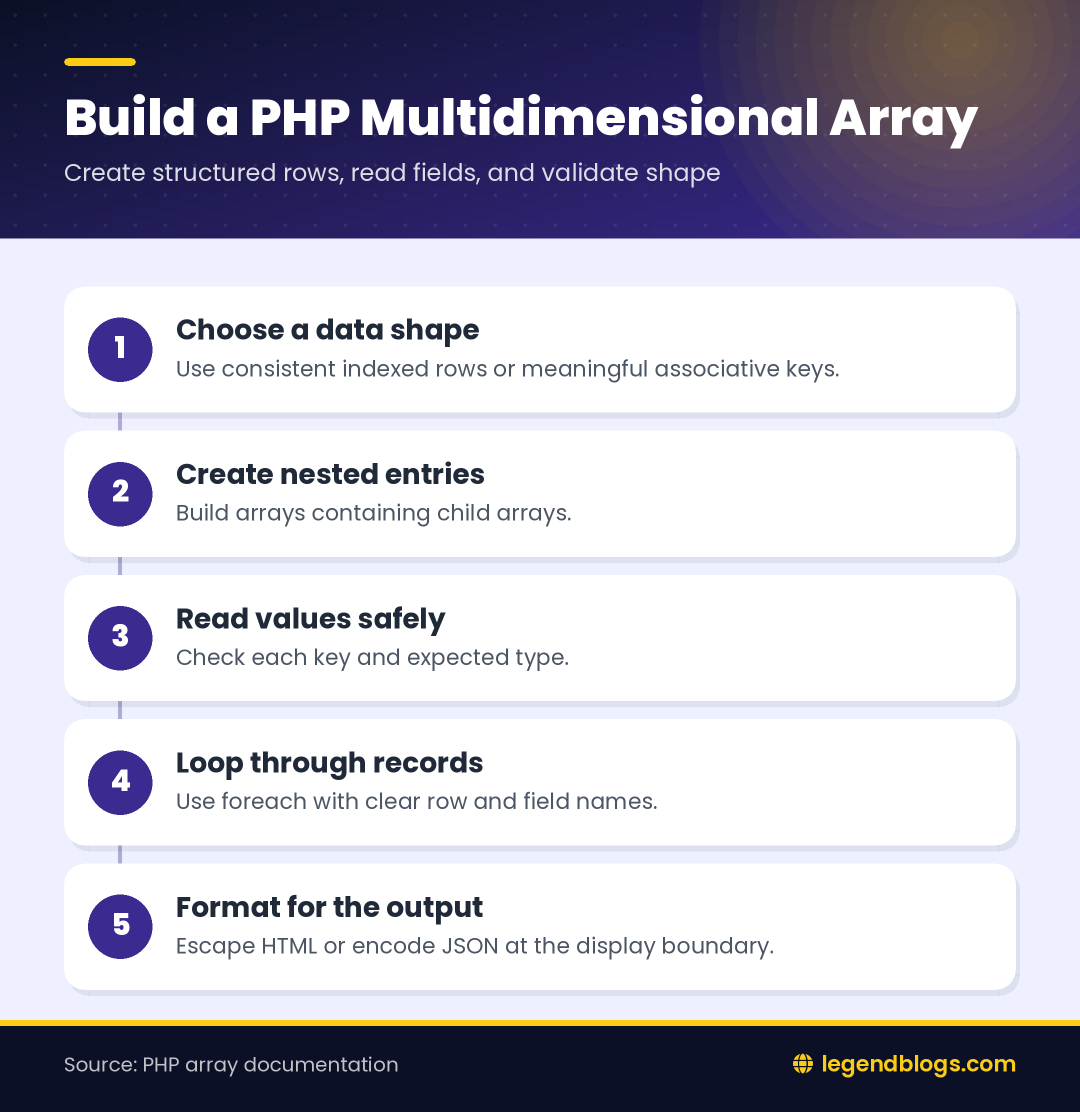
Use nested keys for grouped data
Nested associative keys are useful when the grouping itself matters, such as departments containing employees or categories containing items. Choose keys that explain the relationship and keep the depth manageable. If accessing a value requires many layers of indexes, consider whether the data should instead be normalized into a simpler list or represented by a dedicated object in application code.
Read Nested Values Without Warnings
Follow the key path one level at a time
To read a nested value, each key in the path must exist and each parent value must be an array. Check the row key and field key before using them when data may be incomplete. The null coalescing operator can provide a default for an absent path in supported PHP versions, but a default should not conceal invalid input when the field is required.
Distinguish missing values from empty values
An array entry can exist with a value of null, an empty string, or zero. Those values can have different meanings. Use array_key_exists() when you need to know whether a key exists even if its value is null; use isset() when a null value should be treated as absent. Match the check to the intended data contract.
Loop Through Rows and Fields
Use an outer loop for records
A foreach loop can visit each row, giving you its key and value when both are useful. Check or validate that a row is an array before reading its fields if the input may be malformed. Named keys make output code easier to understand than relying on several numeric positions whose meaning is not obvious.
Use a nested loop for arbitrary groups
If the structure has an unknown number of nested groups, a second foreach can walk each child array. Keep the outer and inner key variables distinct so one does not overwrite the other. When the data has a fixed known shape, direct access may be simpler than nested loops; use iteration when the number of rows or child values can vary.
Avoid references unless you intend to mutate
Normal foreach iteration gives your loop a value to inspect. Adding an ampersand makes the loop variable a reference to the underlying element, so assignments can change the original array. If you use a reference loop, unset the loop variable after the loop to avoid accidentally retaining a reference to the last element.
Add and Update Nested Entries
Append a complete row with a consistent shape
Append a new associative row with the same expected keys as existing rows. A consistent shape makes rendering, validation, and database mapping less error-prone. If some fields are optional, decide whether to omit the key, set it to null, or provide a default and apply that convention consistently.
Update one value by its path
When changing a nested field, make sure each parent array exists before assigning into it. If the row might not exist, decide whether to create it or reject the update. Explicitly validate the target identifier rather than assuming an incoming numeric position is the same as a record ID.
Search and Filter Nested Records
Find a row by a field
Loop through the records and compare the field you care about, such as a product code or user name. Be clear about whether the comparison should be case-sensitive and whether the field is expected to be a string or another type. Return the matching row or a clear “not found” result instead of relying on a magic array index.
Build a filtered array without changing the source
Create a new result array for rows that meet the condition when the original data should stay intact. Preserve keys if they identify records, or reindex if the output is a simple ordered list. Filtering does not validate that every row has the required fields, so validate input before applying business rules.
Validate Data Before Building Nested Arrays
Check type and required fields at the boundary
When data comes from a form, API, or decoded JSON document, treat its structure as untrusted. Confirm the top-level value is an array and that required rows and fields have the expected types. A value that looks like a record in one request may be missing fields or contain a scalar instead of an array in another.
Keep output escaping separate from array structure
Storing a text value in an array does not make it safe to display as HTML. Escape values for the output context when rendering a page, and encode structured responses with an appropriate JSON encoder when returning an API response. Avoid changing stored values by HTML-encoding them prematurely; handle output safety where the data is displayed.
Debug and Display Nested Arrays
Use print_r or var_dump for development
Diagnostic output can help you understand keys and nested levels while developing. Do not leave unrestricted dumps in a public page: they can reveal personal data, internal identifiers, or application details. Remove or protect debug output before deploying, and use server-side logging for sensitive diagnostic cases.
Format the array for its destination
HTML, JSON, and database storage each have different requirements. Build a table or list using escaped text for a web page, encode the result as JSON for an API, and use parameterized queries if individual values are stored in a database. An array is only an in-memory structure; the output format is a separate decision.
Common Nested-Array Mistakes
Do not confuse a row index with a record identifier
A numeric index often indicates position in the current list, not a permanent identity. Sorting or filtering can change positions, so use an explicit id field when records need stable references. Do not assume that index 2 always means the same record.
Do not assume every row has identical data
Records built from several sources may have missing or differently typed fields. Validate the shape once at the boundary or handle optional fields explicitly while processing. Consistent input rules make errors easier to diagnose than repeated warnings from deep inside a template.
Do not let nesting obscure the model
Nested arrays are convenient for structured values, but very deep nesting can make the code difficult to review. Give intermediate arrays clear names, document the expected shape, and consider a class or data-transfer object when the structure has stable fields and behavior. Pick the simplest representation that keeps the relationships clear.
<?php
$array = array("Jhon" => array("age" => 32,
							   "department" => "IT"
							  ),
			   "Tony" => array("age" => 42,
							   "department" => "science"
							  ),
			   "Hulk" => array("age" => 46,
							   "department" => "security"
							  ),
			   "Mohan" => array("age" => 22,
							   "department" => "sales"
							  )
			  );
echo  '<pre>';
print_r($array);
?>
Result of this array:
Array
(
    [Jhon] => Array
        (
            [age] => 32
            [department] => IT
        )
    [Tony] => Array
        (
            [age] => 42
            [department] => science
        )
    [Hulk] => Array
        (
            [age] => 46
            [department] => security
        )
    [Mohan] => Array
        (
            [age] => 22
            [department] => sales
        )
)






Write a comment