When an Activity changes data, you may need to refresh a fragment from activity so the visible list shows the latest state. A button press, completed form, filter change, or result from another screen can all create this requirement.
The original solution uses an interface callback owned by the Activity. This updated guide keeps that approach, explains why it works, improves the Java example, and shows when a shared ViewModel or another communication pattern is a better choice.
1. Understand the refresh problem
1.1 A Fragment owns its view
A Fragment is attached to an Activity, but its view can be created and destroyed several times during the Fragment lifecycle. The Activity may still exist while the Fragment's list view is not currently available.
For that reason, refreshing is not simply a matter of finding a view and calling an adapter method. The update must reach the Fragment only when the Fragment is registered and its list objects are ready.
1.2 Refresh the data, not only the screen
A reliable refresh usually has three parts: obtain the latest data, update the Fragment's data source, and notify the list UI. Calling notifyDataSetChanged() without changing the underlying collection does not fetch new data.
- Change or reload the list data.
- Update the adapter's collection safely.
- Notify the adapter or submit a new list.
- Show loading, empty, and error states where appropriate.
2. Choose communication between Activity and Fragment
2.1 Use a callback when the Activity owns the event
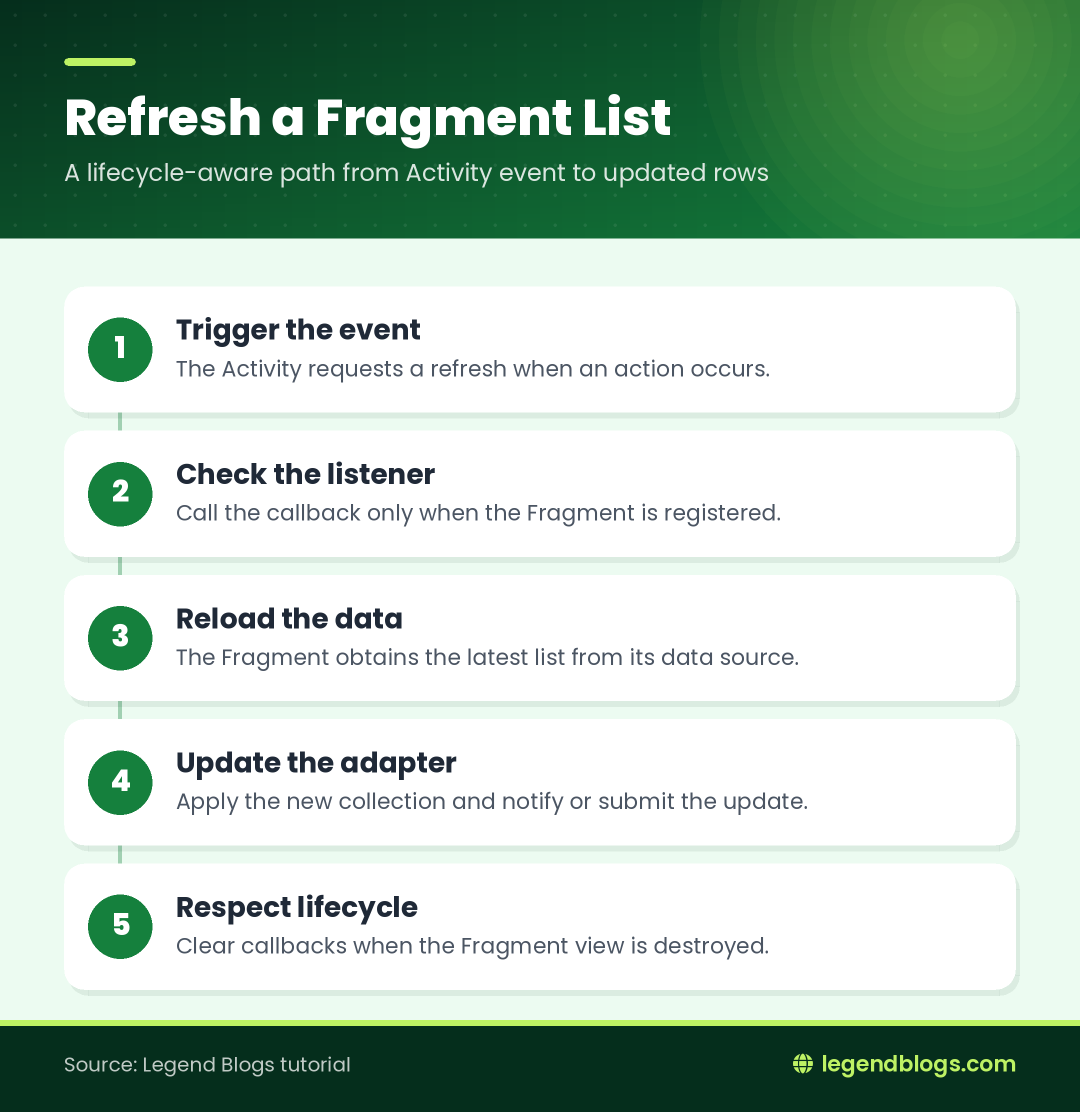
An interface is a practical choice when a specific Activity event must tell the currently displayed Fragment to perform a small action. The Activity exposes a callback, and the Fragment registers an implementation that calls its refresh method.
This keeps the Activity from needing to know every detail of the Fragment's list implementation. It also makes the event explicit: the Activity announces that a refresh was requested, while the Fragment decides how its own view should respond.
2.2 Consider shared state for shared data
If several Fragments need the same data, a shared state holder is often clearer than several direct callbacks. A shared ViewModel can expose data to the Activity and its Fragments while respecting their lifecycles.
Use the simplest pattern that fits the feature. A one-off button event can use an interface; shared screen data or repeated updates usually deserves a state-based design.
3. Define a Fragment refresh interface
3.1 Declare the callback in the Activity
The Activity can hold a reference to an interface with one method:
public interface FragmentRefreshListener {
    void onRefresh();
}

private FragmentRefreshListener fragmentRefreshListener;

public void setFragmentRefreshListener(
        FragmentRefreshListener listener) {
    fragmentRefreshListener = listener;
}
The method name is not special. What matters is that the callback describes the event clearly and that the Activity checks whether a listener is currently registered.
3.2 Avoid treating the listener as permanent
A Fragment listener should be registered when the Fragment view is created and cleared when that view is destroyed. Holding a stale listener can call a destroyed view or keep references longer than necessary.
The exact cleanup location depends on the Fragment implementation, but the principle is consistent: callbacks should follow the lifecycle of the view that consumes them.
4. Call the callback from the Activity
4.1 Trigger the refresh from a user event
In the Activity, call the listener only when it exists:
actionButton.setOnClickListener(new View.OnClickListener() {
    @Override
    public void onClick(View view) {
        if (fragmentRefreshListener != null) {
            fragmentRefreshListener.onRefresh();
        }
    }
});
The null check matters because the Fragment may not be attached, may be off-screen, or may not have registered its view callback yet. A refresh request can also occur while the Activity is restoring its state.
4.2 Keep Activity code focused
The Activity should not reach into the Fragment's adapter, private views, or database query. It should send the event. The Fragment should decide whether to reload from a repository, update local data, or postpone the operation until its view is available.
5. Register the listener in the Fragment
5.1 Register after the Fragment is attached
The original sample registers the listener in onCreateView():
((MainActivity) getActivity()).setFragmentRefreshListener(
    new MainActivity.FragmentRefreshListener() {
        @Override
        public void onRefresh() {
            refreshList();
        }
    });
This works when the Fragment is always hosted by MainActivity, but the cast makes the Fragment tightly coupled to that Activity. A safer design can use a shared interface implemented by the host or use a shared ViewModel for broader reuse.
5.2 Use the Fragment's view lifecycle
Register the callback after inflating the view and before the Activity can reasonably trigger the event. If the callback needs an adapter or view binding, make sure those objects have already been initialized.
When the view is destroyed, clear the callback if the Activity remains alive:
@Override
public void onDestroyView() {
    super.onDestroyView();
    ((MainActivity) requireActivity()).setFragmentRefreshListener(null);
}
Use the access method supported by the Android and Fragment versions in your project. If the Fragment is not attached, do not call a host method.
6. Refresh the list inside the Fragment
6.1 Reload and apply the data
The callback should call a method with one responsibility: update the list state. A simple adapter-backed example looks like this:
private void refreshList() {
    List<Item> latestItems = repository.loadItems();
    items.clear();
    items.addAll(latestItems);
    adapter.notifyDataSetChanged();
}
Do not perform a slow database or network operation on the main thread. Load data through the architecture already used by the application, then apply the result to the adapter on the UI thread.
6.2 Prefer targeted or submitted updates
notifyDataSetChanged() is easy to understand, but it tells the list that everything may have changed. For larger lists, use the update mechanism supported by the adapter, such as a diff-based list submission, so insertions, removals, and changed rows can be handled more precisely.
If the list is empty after refreshing, update the empty-state view as well. A successful refresh can still produce zero rows, and that should not look like a failed update.
7. Complete Java example
7.1 MainActivity implementation
The following example shows the core Activity pattern without tying the callback to a particular database:
public class MainActivity extends AppCompatActivity {
    private FragmentRefreshListener fragmentRefreshListener;

    public interface FragmentRefreshListener {
        void onRefresh();
    }

    public void setFragmentRefreshListener(
            FragmentRefreshListener listener) {
        fragmentRefreshListener = listener;
    }

    private void requestFragmentRefresh() {
        if (fragmentRefreshListener != null) {
            fragmentRefreshListener.onRefresh();
        }
    }

    private void configureButton() {
        Button actionButton = findViewById(R.id.action);
        actionButton.setOnClickListener(view -> requestFragmentRefresh());
    }
}
If the project uses a Java level that does not support the lambda expression, replace it with an anonymous View.OnClickListener, as in the original example.
7.2 Fragment implementation
The Fragment owns the refresh operation and its list objects:
public class MyFragment extends Fragment {
    private List<Item> items = new ArrayList<>();
    private ItemAdapter adapter;

    @Override
    public View onCreateView(LayoutInflater inflater,
            ViewGroup container, Bundle savedInstanceState) {
        View view = inflater.inflate(
                R.layout.fragment_advance_search, container, false);

        adapter = new ItemAdapter(items);
        ((MainActivity) requireActivity()).setFragmentRefreshListener(
                this::refreshList);
        return view;
    }

    private void refreshList() {
        // Load or request the latest data, then update the adapter.
        adapter.notifyDataSetChanged();
    }

    @Override
    public void onDestroyView() {
        ((MainActivity) requireActivity())
                .setFragmentRefreshListener(null);
        super.onDestroyView();
    }
}
This is a communication example, not a complete data layer. Replace the comment with the repository or ViewModel operation used by the application.
8. Handle lifecycle and configuration changes
8.1 The callback can be temporarily unavailable
Rotation, back-stack navigation, and Fragment replacement can destroy and recreate the view. During that period, a listener may be null. The Activity should tolerate that state instead of assuming that a Fragment is always visible.
If the refresh event represents a lasting state change rather than a momentary command, store the state in a ViewModel or repository. A recreated Fragment can then observe the state and render it after restoration.
8.2 Avoid memory leaks and stale views
Do not keep a reference to a destroyed Fragment view in a long-lived Activity callback. Clear listeners and view bindings at the appropriate lifecycle boundary. Also avoid starting work that tries to update a view after the Fragment has been detached.
9. Modern alternatives to a direct callback
9.1 Shared ViewModel
A shared ViewModel is useful when the Activity and one or more Fragments observe the same screen-level state. The Activity can update a request or data source, while the Fragment observes the result and updates its list when it is in a suitable lifecycle state.
This avoids a direct cast to MainActivity and makes configuration changes easier to handle. It is more structure than a tiny callback requires, so use it when shared state justifies the additional layer.
9.2 Fragment Result API
When one Fragment needs to send a small result to another Fragment, the Fragment Result API can be more appropriate than reaching through the Activity. It makes the sender and receiver relationship explicit and is suited to one-time results such as a selected item or completed form.
10. Troubleshoot a fragment list that does not refresh
10.1 The listener is null
Check that the Fragment registers the listener after it is attached and that the Activity triggers the event after the Fragment view is created. If the Fragment is not the current screen, a null listener can be the expected result.
10.2 The callback runs but the rows do not change
Log or inspect the data returned by the refresh operation. Make sure the adapter uses the collection that was changed, and call the correct notification or list-submission method after the data is applied.
10.3 The app crashes after navigation
Review calls to getActivity(), requireActivity(), and view references. A callback that runs after onDestroyView() can access objects that no longer exist. Clear the listener and cancel work that is no longer needed.
FAQ
Can an Activity call a Fragment method directly?
It can, but a direct Fragment reference creates tighter coupling and can fail when the Fragment is not available. An interface, shared state, or a result API usually communicates the intent more safely.
Why is my fragment callback null?
The Fragment may not have registered it yet, its view may have been destroyed, or another Fragment may have replaced the listener. Register and clear the callback according to the view lifecycle.
How do I refresh a RecyclerView in a Fragment?
Update the data used by the adapter, then submit the new list or notify the appropriate adapter change. Refreshing the RecyclerView alone does not retrieve new data.
Should I use an interface or a shared ViewModel?
Use an interface for a small host-to-Fragment event when the relationship is simple. Use a shared ViewModel when multiple components need the same state or when the data must survive view recreation.
How can I refresh data after returning to a Fragment?
Represent the changed data as state and reload it when the Fragment becomes active, or send a result from the screen that made the change. Avoid relying only on a view reference that may have been destroyed.
Conclusion
To refresh a fragment from activity, send a clear event through an interface, let the Fragment own its data and adapter, and guard the callback against missing or destroyed views. The original listener pattern is a useful small solution when the Activity and Fragment have a straightforward relationship.
For shared or long-lived data, move the refresh state into a ViewModel or repository. Whichever approach you choose, test navigation, rotation, empty results, and delayed data so the list remains correct throughout the Fragment lifecycle.





Write a comment