Hi, sometimes we need to execute my method or we can say my function after a time delay. In that situation what can I do? So the answer is - Use Handler() for that. A Handler is a utility class that facilitates interacting with a Looper.
Android Handler postDelayed is useful when a small piece of in-process work should run after a delay on a particular message queue. This guide explains what the Handler is actually doing, how the Looper affects the callback, how to cancel scheduled work, and when another Android API is a better choice.
What Handler and Looper Do
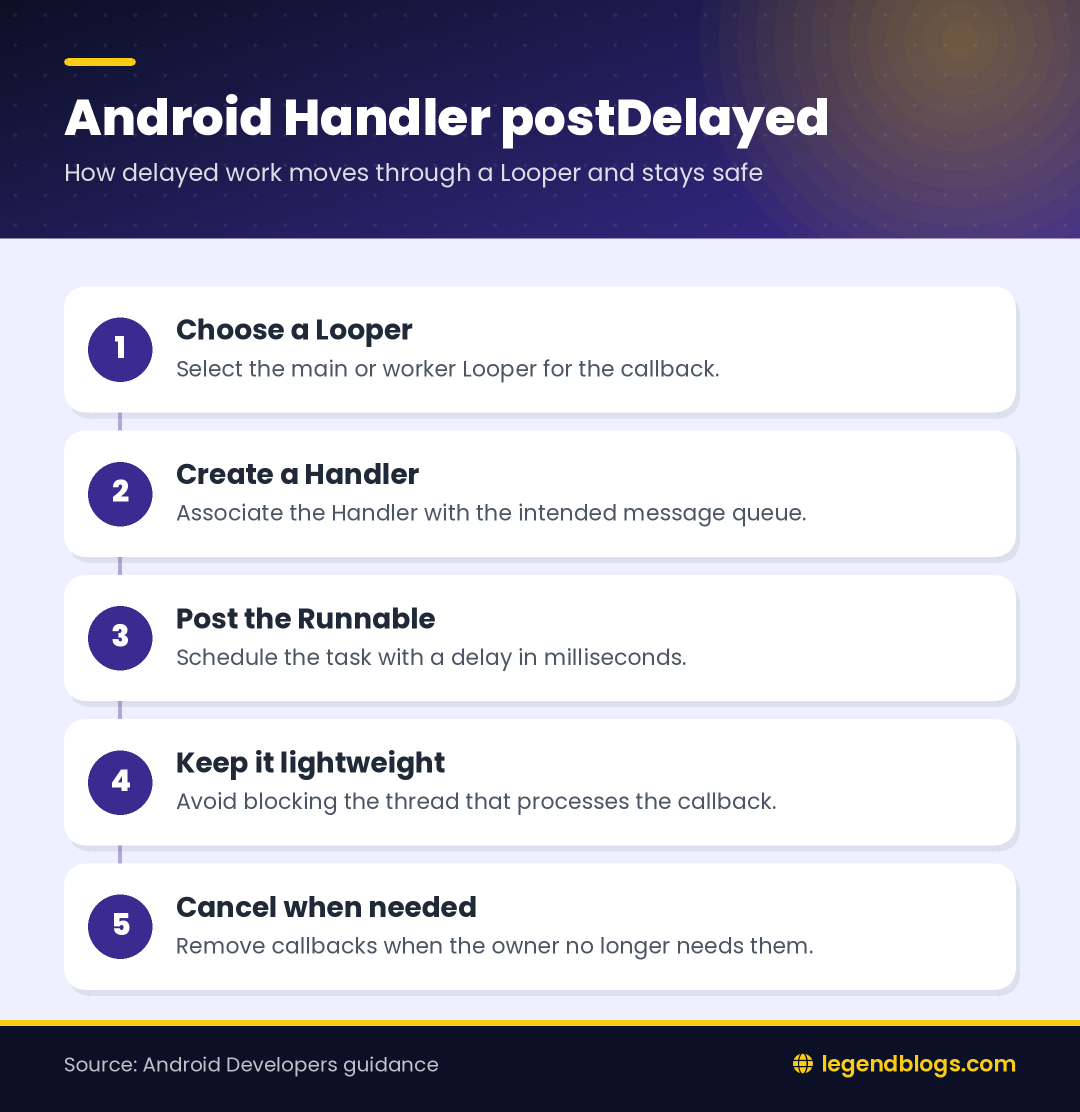
A Handler is associated with a Looper and its message queue. When you call postDelayed(), Android places a Runnable in that queue with a time at which it may be processed. The Handler does not create a new thread by itself; the Looper’s thread is the thread that eventually runs the callback.
Handler Is Not a Background Thread
The original explanation often says that a Handler is a background thread, but that is not accurate. A Handler is a communication and scheduling object. A Handler connected to the main Looper runs its callback on the main thread, while a Handler connected to a worker Looper runs on that worker thread.
Why the Main Looper Matters
UI components must normally be changed from the main thread. A Handler created with the main Looper can therefore be useful for a short delayed UI action, such as hiding a message or starting a small transition. It is not a reason to perform database queries, network calls, or expensive image processing on the main thread.
Call a Method After a Delay in Android
The two examples below use the same scheduling idea. The first keeps a Handler reference, which is usually more useful when the callback may need to be cancelled later.
Keep a Handler Reference
private final Handler handler = new Handler(Looper.getMainLooper());
private final Runnable delayedTask = new Runnable() {
    @Override
    public void run() {
        // Update a small piece of UI or call a short method.
    }
};

handler.postDelayed(delayedTask, 200);
Keeping the Runnable in a field gives you the same object when you call removeCallbacks(). The delay value is expressed in milliseconds, so 200 means the Runnable becomes eligible after approximately 200 milliseconds.
Use a Direct Call for One-Off Work
new Handler(Looper.getMainLooper()).postDelayed(new Runnable() {
    @Override
    public void run() {
        // Your delayed task.
    }
}, 200);
This compact form is acceptable for a tiny one-off callback that does not need cancellation. If the screen can close or the callback may be scheduled repeatedly, keep references instead. A named Runnable also makes testing and cleanup clearer.
How the Delay Actually Works
A delay is a minimum scheduling time, not a promise that the method will run at an exact instant. If the target thread is busy processing another task, the callback waits until the Looper can process it. Long work on the main thread can therefore make a delayed UI action appear late.
Milliseconds and Readability
Use a named constant when the delay has meaning, such as a search debounce or a temporary message timeout. This prevents unexplained values from spreading through the code:
private static final long MESSAGE_DELAY_MS = 500L;
handler.postDelayed(delayedTask, MESSAGE_DELAY_MS);
Repeated Delayed Actions
Calling postDelayed() several times schedules several callbacks unless you remove or guard them. For a countdown or repeated polling task, decide how the next run is scheduled and how the sequence ends. Avoid creating an uncontrolled chain that continues after the user leaves the screen.
Cancel Delayed Work Safely
Cancellation is one of the most important parts of using a Handler. If a delayed callback refers to an Activity, Fragment, View, or adapter, it may run after that object is no longer the active screen. Remove callbacks when the owner no longer needs them.
Remove One Runnable
handler.removeCallbacks(delayedTask);This works when you retain the same Handler and Runnable instances. Creating a new anonymous Runnable when removing it will not identify the previously posted object, so the old callback may remain queued.
Remove All Work from a Handler
handler.removeCallbacksAndMessages(null);Use this broader cleanup only when all pending work on that Handler belongs to the owner being cleared. If the Handler is shared, removing everything may cancel work that another component still expects.
Lifecycle and Memory Considerations
Android components can be destroyed and recreated because of navigation, rotation, low-memory conditions, and other lifecycle events. A delayed Runnable that captures an Activity can keep references alive longer than intended or attempt to update a screen that is no longer valid.
Clean Up with the Owner
For a screen-level callback, pair scheduling with cleanup in the appropriate lifecycle method. The exact method depends on whether the work is tied to a View, Fragment view, Activity, or another owner. The important rule is to stop callbacks when that owner no longer receives UI updates.
For longer-lived state, keep the work in a lifecycle-aware component rather than storing application state inside an Activity. The official Android architecture guidance recommends separating UI responsibilities from stable data and state holders.
Check State Before Updating the UI
Even with cleanup, a callback should not assume that every view is still available. Check the relevant state before touching a view, and keep the callback small. If the operation needs a result from a repository or network request, move that work outside the UI thread and expose the result to the UI through an appropriate state mechanism.
When to Use Another Android API
Handler is suitable for short, in-process scheduling tied to a Looper. It is not a replacement for every kind of background work.
- Use a coroutine or another structured asynchronous approach for work that should be cancellable with a screen or scope.
- Use WorkManager when work must remain scheduled if the app leaves the visible state or restarts, such as reliable data synchronization.
- Use an alarm-oriented API only when the requirement is genuinely an alarm or time-based notification.
- Use a worker thread or executor for CPU-heavy or blocking work instead of the main Handler.
For another Android and Java example involving calling methods across a WebView boundary, see calling native Java methods from WebView JavaScript.
Common Handler Errors
Missing or Incorrect Looper
Some Handler construction patterns depend on the current thread having a prepared Looper. Prefer an explicit Looper, such as the main Looper when you need UI scheduling, so the target queue is clear. Do not assume that every worker thread automatically has a message queue.
Doing Heavy Work in the Callback
The callback runs on the Handler’s Looper thread. If that is the main thread, expensive work blocks drawing and input. Use the callback to trigger a small action or hand work to an appropriate background mechanism.
Updating a Dead View
A delayed callback may outlive the view that created it. Cancel it during cleanup and avoid holding unnecessary references to views or Activities. This is especially important for repeated callbacks and long delays.
FAQ
How do I call a method after a delay in Android?
Create a Handler associated with the intended Looper, then call postDelayed() with a Runnable and a delay in milliseconds. Keep references if the work may need to be cancelled.
Does Handler create a background thread?
No. Handler schedules work on a Looper’s queue. The callback runs on the thread that owns that Looper.
How do I cancel Handler postDelayed?
Keep the Handler and Runnable, then call removeCallbacks(runnable). Use removeCallbacksAndMessages(null) only when all pending work on that Handler can be cancelled.
Can a delayed Handler callback update the UI?
Yes, when it runs on the main Looper and the screen is still valid. Cancel callbacks when the owner is destroyed and keep heavy work off the main thread.
Should I use Handler or WorkManager?
Use Handler for short in-process delays. Choose WorkManager when the task should be reliably scheduled beyond the visible screen or across process and device conditions.
Conclusion
Handler postDelayed is a simple way to schedule a small method for later execution on a Looper. The key details are selecting the correct thread, keeping the callback lightweight, retaining references for cancellation, and cleaning up work when the screen no longer owns it.
For durable background tasks, use an API designed for persistence instead of extending a UI Handler’s lifetime. For short UI delays, an explicit main Looper and a removable Runnable make the behavior easier to understand and maintain.
Handlers, on the other hand, are background threads that allow you to communicate with the UI thread.
It's so simple, you can create an Object of Handler() method or you can use directly. Let's see both portions.
First Option:
Handler handler = new Handler();
handler.postDelayed(new Runnable() {
                @Override
                public void run() {
                    //your task
                }
}, 200);
Second Option:
new Handler().postDelayed(new Runnable() {
                @Override
                public void run() {
                    //your task
                }
            }, 200);
Both handlers are same, and both will execute your code after 200 milliseconds.





Write a comment