
If you want to replace the whole word with the word boundaries in a string. For this, we use "\b" regular expression token which is called a word boundary. It usually matches at the start or the end of a word.
How to replace a word in a sentence in java
You just need to place the word between word boundaries
Example:
package com.legendblogs.test;
public class TestApps {
    /*
      *@param args
     */
    public static void main(String[] args){
        String s = "A man is an Ironman like manpower";
        //It will replace if the first character is a word character or not
        String d = s.replaceAll("\\bman", "tony");
        System.out.println(d);
        //It will replace if  if the last character is a word character or not
        String b = s.replaceAll("man\\b", "tony");
        System.out.println(b);
        //It will replace whole word only
        String c = s.replaceAll("\\bman\\b", "tony");
        System.out.println(c);
   }
}
Output:
A tony is an Ironman like tonypower
A tony is an Irontony like manpower
A tony is an Ironman like manpower
When a Literal Replacement Is Better
Do not use regex automatically
Regular expressions are useful when the input has a pattern, but they add escaping rules and can make simple code harder to read. If the target is a fixed phrase and partial matches are acceptable, the literal replace() method may be the clearest choice.
Choose based on the requirement
Start by writing down whether the target is a complete word, a prefix, a suffix, or an arbitrary sequence. That small decision determines whether you need two boundaries, one boundary, a literal replacement, or a different parsing strategy. Clear requirements prevent a technically valid regex from producing the wrong business result.
What Does Whole-Word Replacement Mean?
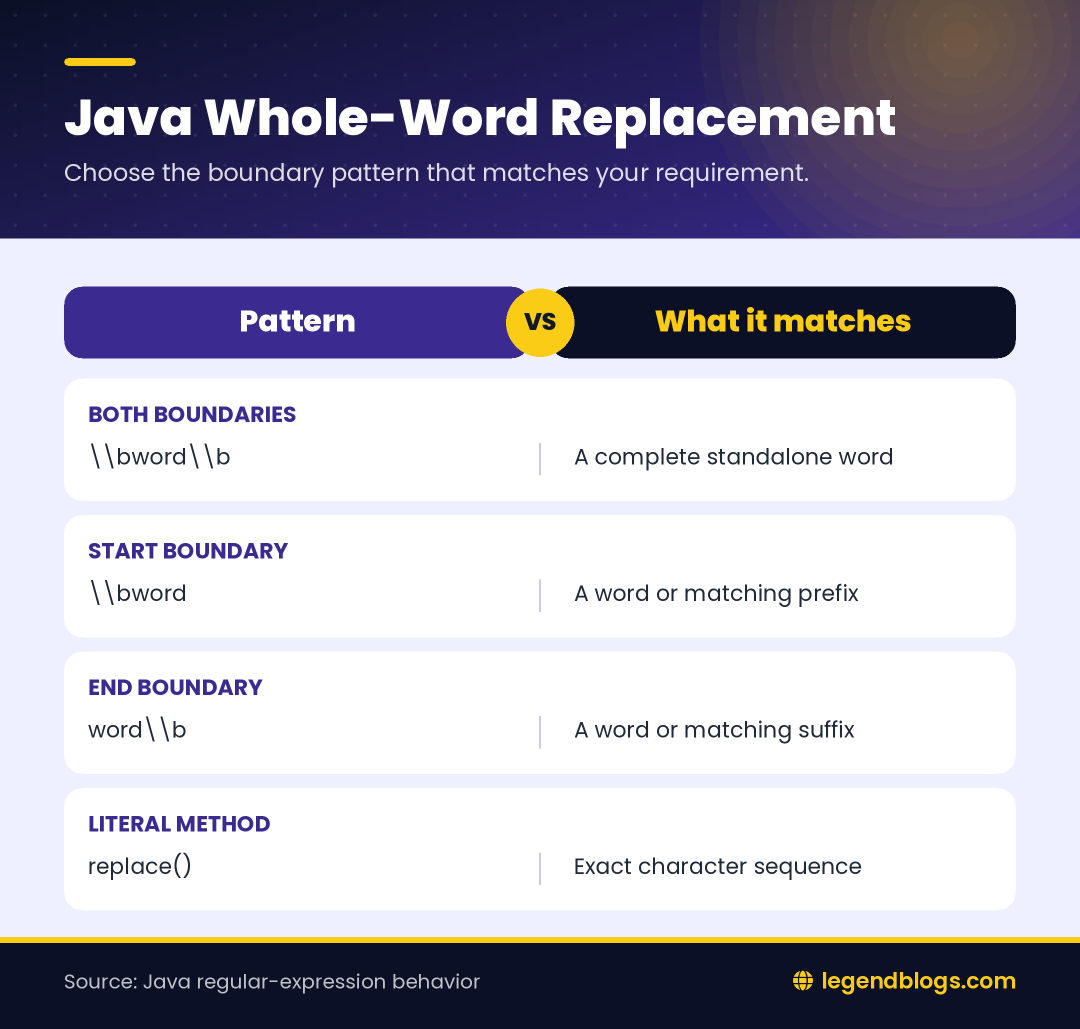
Complete tokens versus substrings
When a requirement says to replace a word, the application normally should change a complete token and preserve larger words that merely contain the same letters. This difference is easy to miss in a short example but becomes important in search indexes, generated messages, identifiers, and imported text.
For instance, a replacement for cat should usually affect cat and cat,, but not catalog. A boundary describes the position around the token so the regular expression can make that distinction.
Plan the matching rule first
Before writing a pattern, decide whether matching should be case-sensitive, whether punctuation should count as a separator, and whether underscores belong to a word in your application. These decisions affect the result more than the replacement method itself.
- Use two boundaries for an ordinary standalone word.
- Use one boundary for an intentional prefix or suffix match.
- Use case-insensitive mode only when capitalization should not matter.
- Quote variable input before placing it into a regular expression.
Java String Escaping in Regex Patterns
Two parsers are involved
A Java regex is first read by the Java compiler as a string literal. The resulting string is then read by the regex engine. A backslash may therefore need escaping once for Java and still have meaning in the regular expression.
String regex = "\\\\bcat\\\\b";
String output = input.replaceAll(regex, "dog");
The regex engine receives a boundary, the letters cat, and another boundary. If you print the pattern while debugging, remember that the printed value is the string after Java has processed the source literal.
Replacement strings have rules too
The pattern and replacement are separate parts of the operation. Capturing-group references such as $1 can be meaningful in a replacement, and a backslash may escape the next character. When replacement text comes from a user or external file, use Matcher.quoteReplacement() so its characters remain literal.
Whole Words in Punctuation and Markup
Most punctuation creates a boundary
Commas, periods, parentheses, quotation marks, and spaces normally separate a word from its surroundings. A boundary pattern can therefore handle ordinary prose without listing each punctuation mark individually.
Still, test the real input format. HTML entities, markup tags, URLs, and programming identifiers do not always follow natural-language expectations. Replacing inside markup can alter an attribute or tag name even when the regular expression is behaving exactly as written.
Underscores need special attention
The underscore is treated as a word character by the usual boundary rule. As a result, a target next to an underscore may not be considered separate. If your application treats snake_case separators as boundaries, write a domain-specific lookaround or character-class rule and document it for the next developer.
Case and Locale Considerations
Case-insensitive matching
The inline flag (?i) is convenient for a small expression. A compiled Pattern is clearer when the expression is reused or when flags are configured beside other options.
Pattern p = Pattern.compile(
        "\\\\bstatus\\\\b",
        Pattern.CASE_INSENSITIVE
);
String result = p.matcher(input).replaceAll("state");
Test uppercase, lowercase, and mixed-case examples. If text comes from several languages, review the behavior required by the application and use the appropriate Unicode-aware options or tokenization approach.
Do not assume visual words are regex words
A reader may regard accented letters, joined scripts, or an apostrophe as part of a word even though a basic boundary pattern may divide them differently. For international content, create tests from real user text and consider a tokenizer when linguistic word detection matters.
Dynamic Search Terms
Quote the target
A dynamic target must be escaped before it becomes part of a pattern. Otherwise characters such as a period, plus sign, question mark, or parentheses may act as regex operators rather than ordinary text.
String target = "v1.2";
String regex = "\\\\b" + Pattern.quote(target) + "\\\\b";
String result = input.replaceAll(regex, "current");
Quoting prevents accidental pattern behavior, but it does not change whether the boundary is appropriate for the target. A phrase containing punctuation may not behave like a single word, so test it separately.
Validate external input
Do not let arbitrary user input create an extremely complex regular expression. Quoting prevents operators from being interpreted, and length limits or input validation can prevent unnecessary processing. For a simple exact replacement, a literal method may be easier to explain and maintain.
Testing Strategy
Positive cases
Include the target at the beginning, middle, and end of a sentence. Add whitespace, punctuation, brackets, quotation marks, and line breaks around it. These cases confirm that the boundaries work at common transitions.
Negative cases
Include longer words with the target as a prefix, suffix, and middle. Include identifiers with underscores, different capitalization, and text with no match. Tests should assert the complete output, not merely that a replacement occurred.
assertEquals("A dog is here", "A cat is here"
        .replaceAll("\\\\bcat\\\\b", "dog"));
assertEquals("catalog remains", "catalog"
        .replaceAll("\\\\bcat\\\\b", "dog"));
Performance and Maintainability
Use the simplest suitable operation
For one literal replacement, String.replace() is often easier to read. Use a regex when the boundary or another pattern rule is genuinely needed. The goal is not to use a more powerful tool than the requirement demands.
Reuse compiled patterns
If many strings use the same expression, compile a Pattern once and create matchers for each input. Keep the pattern in a well-named constant when it represents a stable application rule. Add a comment explaining why both boundaries are present.
FAQ
How do I replace a whole word in Java?
Use replaceAll() with boundaries around the target, represented in Java as "\\\\bword\\\\b".
What does \\b mean?
It identifies a transition between a word and non-word character or an edge of the input. It does not consume text.
Why does Java need two backslashes?
Java processes the string literal first, so one backslash must be escaped before the regex engine receives it.
How do I avoid matching part of another word?
Place a boundary before and after the target, then test longer words that contain the same letters.
Should I use replace() or replaceAll()?
Use replace() for a literal replacement and replaceAll() when the requirement needs regex behavior.
Conclusion
Use boundaries when the requirement is to replace whole word Java text without changing larger words. Account for Java string escaping, case behavior, punctuation, underscores, and dynamic input before finalizing the pattern.
Small tests covering both matches and non-matches will catch most mistakes. If the rule is not really a regex problem, choose the simpler literal method and keep the code easy to review.
Review the Final Output
Inspect before saving or displaying
When replacement text comes from a larger workflow, print or log a safe sample of the result during development. Confirm that standalone targets changed, embedded targets stayed unchanged, and punctuation remained intact. This is especially useful when the input contains generated markup or data from several sources.
Keep tests beside the rule
A short unit-test table describing expected matches and non-matches protects the pattern during future edits. If someone later changes the replacement to a case-insensitive expression or a custom character class, the tests will show whether the whole-word contract still holds.







Write a comment