Hmm, I think you want to show the background image in your open activity view. But you want to show this one from your gallery and it should be selected randomly from your gallery. If Iam right then you are in right place.
Using a random Android gallery image as a background sounds simple, but the storage APIs have changed over time. Older examples read a filesystem path from MediaStore and decode it directly. Current Android applications should prefer content URIs, the system photo picker, or a carefully scoped MediaStore query.
The complete solution has four parts: obtain permission or a user-selected URI, collect usable image references, choose one without assuming that the list is non-empty, and load it without allocating an unnecessarily large bitmap. Each part needs an error path because a device may contain no images or may remove an image between the query and the decode operation.
How the Random Background Flow Works
Collect image references
Query only the columns required by the app and keep the result in a list of URIs or other stable references. Avoid loading every full-size bitmap into memory just to decide which one to display.
Choose one result
Use a random index only after checking that the list contains at least one item. An empty gallery must produce a fallback background rather than an exception from the random-number generator.
Display the selected image
Decode the selected image at a suitable size and apply it to the layout. Scaling and cropping should match the design, especially when photographs have different aspect ratios.
You just need to fetch data from gallery, your code should be like this:
Why the Original Gallery Approach Is Outdated
Filesystem paths are not universal
The older example uses MediaStore.Images.Media.DATA and then passes the resulting path to BitmapFactory.decodeFile. That column was convenient on older devices, but an application should not assume that every provider exposes a directly readable filesystem location. A content URI is a more durable abstraction for reading media.
Storage rules vary by Android version
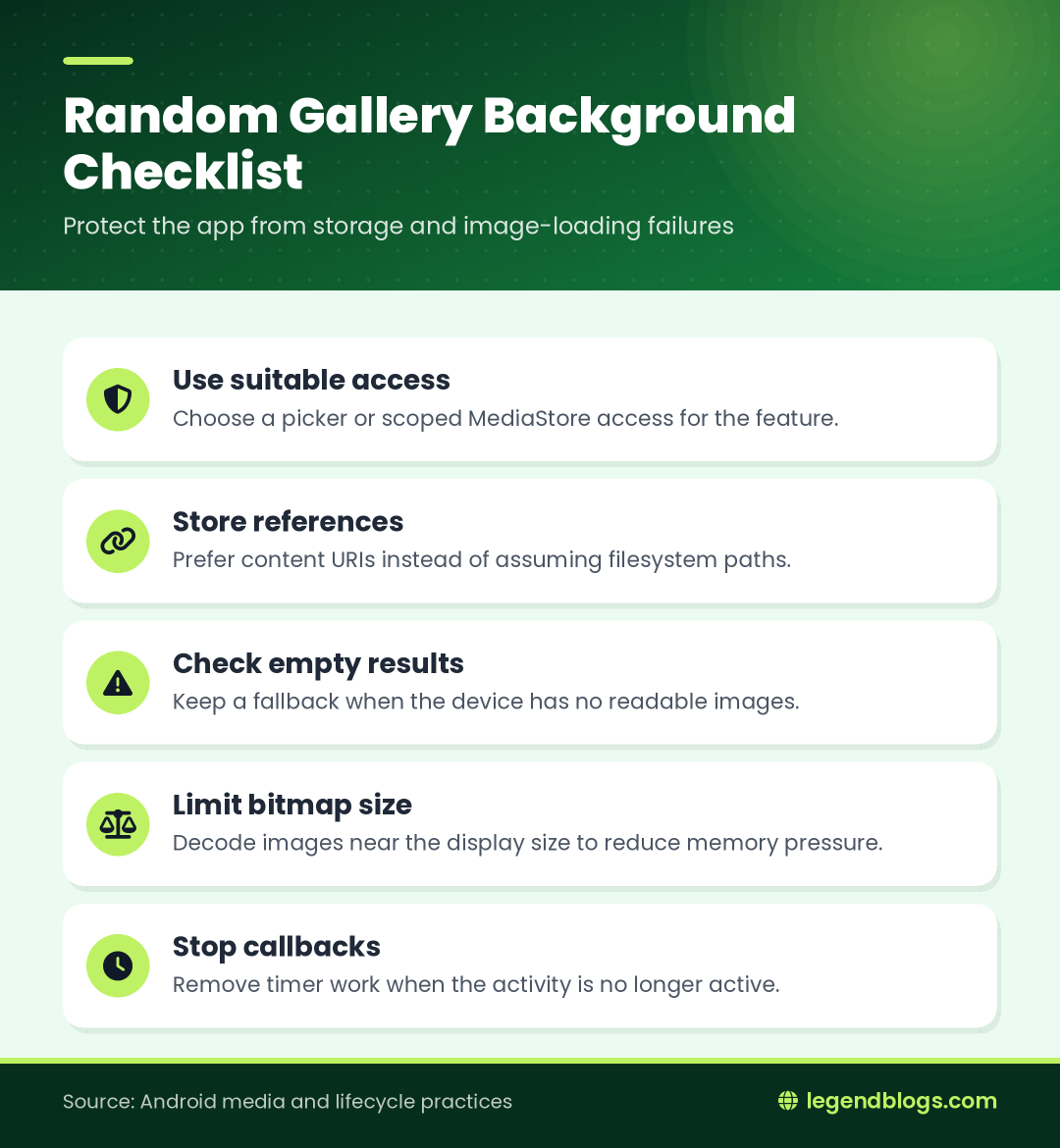
Permission behavior depends on the device and target SDK. Some versions use broad external-storage permissions, while newer versions provide more selective photo access. Avoid requesting more access than the feature needs.
Prefer user selection when possible
If the user only needs to choose a picture, the system photo picker or an open-document style flow can reduce permission handling. If the feature truly chooses from the device's collection automatically, use the appropriate MediaStore access for the Android versions you support.
String[] projection = new String[]{
    MediaStore.Images.Media.DATA,
};
Uri images = MediaStore.Images.Media.EXTERNAL_CONTENT_URI;
Cursor cursor = managedQuery(images,
                projection,
                "",
                null,
                ""
);
Selecting a Random Image
Guard the empty result
Before calling a random-number method with the list size, check whether the size is zero. If no image is available, keep a solid color, bundled drawable, or previously selected image as the fallback.
Use one random generator appropriately
Create the generator at a suitable scope instead of constructing a new generator repeatedly inside a fast timer. If the background changes frequently, a single generator avoids predictable repeated seeds and makes the behavior easier to test.
Decide whether repeats are acceptable
Pure random selection can choose the same image twice. If repeated backgrounds look awkward, remember the previous URI and select again when the list contains more than one item. For a slideshow, shuffle a list and move through it rather than repeatedly drawing from the same pool.
Choosing the Image Access Method
MediaStore for an application-managed collection
MediaStore is useful when the app needs to read a collection of images and select one itself. Keep the projection small, request a stable identifier or URI-related column, and sort only when a predictable order is required.
The system photo picker for one-time selection
For a wallpaper or profile-image choice, letting the user select an image is often clearer than silently scanning the entire gallery. The picker returns a URI that can be opened through the content resolver.
Permissions should match the feature
Explain why access is needed before requesting it. Handle denial, limited access, and a user who has no images. A permission result is not proof that a readable image exists.
Querying Images Safely
Use a content resolver query inside a managed block, read only valid rows, and close the cursor even when an exception occurs. Store URIs rather than retaining a cursor or a large bitmap for every result.
So, don't waste your time, let's see the code:
Your Manifest.xml:
<?xml version="1.0" encoding="utf-8"?>
<manifest xmlns:android="http://schemas.android.com/apk/res/android"
    package="com.legendblogs.showbackground">
    <application
        android:allowBackup="true"
        android:icon="@mipmap/ic_launcher"
        android:label="@string/app_name"
        android:supportsRtl="true"
        android:theme="@style/AppTheme">
        <activity android:name=".MainActivity">
            <intent-filter>
                <action android:name="android.intent.action.MAIN" />
                <category android:name="android.intent.category.LAUNCHER" />
            </intent-filter>
        </activity>
    </application>
</manifest>
Activity_main.xml
package com.legendblogs.showbackground;
import android.content.Context;
import android.support.v7.app.AppCompatActivity;
import android.os.Bundle;
import android.view.View;
import android.widget.Button;
import android.widget.EditText;
import android.graphics.BitmapFactory;
import android.graphics.Color;
import android.graphics.drawable.BitmapDrawable;
import android.graphics.drawable.ColorDrawable;
import android.graphics.drawable.Drawable;
public class MainActivity extends AppCompatActivity {
    Context context;
    private RelativeLayout main_layout;
    @Override
    protected void onCreate(Bundle savedInstanceState) {
        super.onCreate(savedInstanceState);
        setContentView(R.layout.activity_main);
        this.context = this;
        main_layout = (RelativeLayout) findViewById(R.id.main_layout);
        String[] projection = new String[]{
                MediaStore.Images.Media.DATA,
        };
        Uri images = MediaStore.Images.Media.EXTERNAL_CONTENT_URI;
        Cursor cursor = managedQuery(images,
                projection,
                "",
                null,
                ""
        );
        final ArrayList<String> imagesPath = new ArrayList<String>();
        if (cursor.moveToFirst()) {
            int dataColumn = cursor.getColumnIndex(
                    MediaStore.Images.Media.DATA);
            do {
                imagesPath.add(cursor.getString(dataColumn));
                if(imagesPath.size() > 100) break;
            } while (cursor.moveToNext());
        }
        cursor.close();
        final Random random = new Random();
        final int count = imagesPath.size();
        handler.post(new Runnable() {
            @Override
            public void run() {
                int number = random.nextInt(count);
                String path = imagesPath.get(number);
                if (currentBitmap != null)
                    currentBitmap.recycle();
                currentBitmap = BitmapFactory.decodeFile(path);
                final int sdk = android.os.Build.VERSION.SDK_INT;
                if(sdk < android.os.Build.VERSION_CODES.JELLY_BEAN) {
                    BitmapDrawable ob = new BitmapDrawable(getResources(), currentBitmap);
                    main_layout.setBackgroundDrawable(ob);
                } else {
                    Drawable drawable = new BitmapDrawable(getResources(), currentBitmap);
                    main_layout.setBackground(drawable);
                }
                handler.postDelayed(this, 1000);
            }
        });
    }
}
Testing and Common Mistakes
Test permission states
Test first launch, denied access, limited access, revoked access, and an empty media collection. The app should remain usable in every case.
Test lifecycle transitions
Rotate the device, move the app to the background, return from Recents, and leave the screen while a decode is running. Confirm that callbacks stop and that a destroyed activity is not updated.
Avoid unbounded lists
The original code limits the collection, which can protect memory, but the limit should be deliberate. Query only what the feature needs, use pagination or a bounded result set when appropriate, and avoid retaining large objects in the list.
FAQ
How do I get a random image from the Android gallery?
Collect readable image URIs, verify that the collection is not empty, choose a random index, and load the selected URI through the content resolver or an image-loading library.
Why should I avoid MediaStore.Images.Media.DATA?
It exposes a path-oriented approach that is unreliable across modern storage providers. Content URIs are a better abstraction for opening media.
How do I avoid a crash when the gallery is empty?
Check the collection size before choosing a random index and use a fallback drawable or color when no image is available.
Can I change the background every few seconds?
Yes, but stop scheduled callbacks when the activity stops, avoid decoding oversized images, and choose an interval that does not waste battery or make the interface distracting.
Which permission is needed to read images?
The required access depends on the Android version, target SDK, and whether the app uses a system picker or direct MediaStore access. Request only the access required and handle denial gracefully.
Conclusion
A random gallery background needs more than a random index and a bitmap decoder. The app must account for storage rules, content URIs, permissions, empty results, image size, lifecycle cleanup, and failures caused by media changing while the app is running.
Use the simplest access method that fits the feature. For user-selected images, prefer a system picker; for an automatic collection, query MediaStore carefully, load one image at a time, and always keep a fallback background available.
Changing the Background on a Timer
Stop callbacks when the screen stops
The original example posts a runnable repeatedly. If the activity is destroyed or moves out of use, remove its callbacks so the timer does not retain the old activity or continue decoding images in the background.
Use a sensible interval
A very short interval increases decoding work and can make the interface feel unstable. A user-controlled change button or a moderate interval is usually easier to understand and kinder to battery and memory.
Preserve the current selection
If the device rotates or the activity is recreated, decide whether to restore the selected URI or choose another image. Save only a small reference, not a large bitmap, when state restoration is needed.
Handling Missing or Unsupported Images
- Use a fallback when the query returns no rows.
- Catch failures when a URI has been deleted after the query.
- Skip items that cannot be decoded or are not valid images.
- Show a stable background while the next image loads.
Applying the Image to a Layout
Choose a scale mode
A background can be cropped to fill the layout, fitted with empty space, or rendered with a custom transformation. The correct choice depends on whether the image is decorative or contains important information that must remain visible.
Handle rotation and aspect ratio
Camera images may include orientation metadata. Use an image-loading component that respects that metadata, or apply the required transformation before displaying the bitmap. Test portrait and landscape images on different screen sizes.
Keep the UI thread responsive
Querying and decoding a large collection should not block the main thread. Move expensive work off the UI thread, then update the background on the main thread only after the selected resource is ready.
Loading the Selected Image Efficiently
Do not decode the original size blindly
Phone photographs can be much larger than the display area. Decoding a full-resolution image just to fill a small background can cause memory pressure or an application crash. Determine a target size and sample the image during decoding where the chosen API allows it.
Use content resolver streams for URIs
When the selected value is a content URI, open it with the content resolver rather than converting it into a guessed filesystem path. Catch missing-provider and permission errors and retain the fallback background.
Release old resources
If the app repeatedly replaces a bitmap, release or replace the previous drawable according to the image-loading library and lifecycle being used. Do not hold references to an activity from a long-lived handler or worker.
activity_main.xml
<?xml version="1.0" encoding="utf-8"?>
<RelativeLayout xmlns:android="http://schemas.android.com/apk/res/android"
    xmlns:tools="http://schemas.android.com/tools"
    android:layout_width="match_parent"
    android:layout_height="match_parent"
    android:id="@+id/main_layout"
    android:paddingBottom="@dimen/activity_vertical_margin"
    android:paddingLeft="@dimen/activity_horizontal_margin"
    android:paddingRight="@dimen/activity_horizontal_margin"
    android:paddingTop="@dimen/activity_vertical_margin"
    tools:context="com.legendblogs.asynctask.MainActivity">
    <TextView
        android:layout_width="wrap_content"
        android:layout_height="wrap_content"
        android:text="Welcome to Legend Blogs Exmpale"
        android:layout_alignParentTop="true"
        android:layout_centerHorizontal="true"
        android:textStyle="bold"
        android:textSize="20dp" />
</RelativeLayout>






Write a comment