You can get the value of #hashtag from the URL if user click on any link in your page. There are two ways to find the id, First by using Javascript and the second is by jQuery.
Javascript:
By using onhashchange event we can get the hash value, let's see the example:
window.onhashchange = callMyFunction;
function callMyFunction() {
    var hash = window.location.hash;
    alert(hash);
}
jQuery:
In the jQuery we can get the hash value by hashchange event, let's see the example:
$(window).on('hashchange', function (e) {
    alert(location.hash);
});
What Is the JavaScript Hashchange Event?
Understand the URL fragment
The fragment is the part of a URL after the hash symbol. In https://example.com/docs#install, the fragment is #install. JavaScript can read this value and use it to select content, update a panel, or preserve a user’s place in a page.
When the event runs
The hashchange event runs when the fragment identifier changes through normal hash navigation. It is useful for small client-side navigation systems because changing the hash can update the address and browser history without requesting a new document.
Read the Current URL Hash
Use window.location.hash
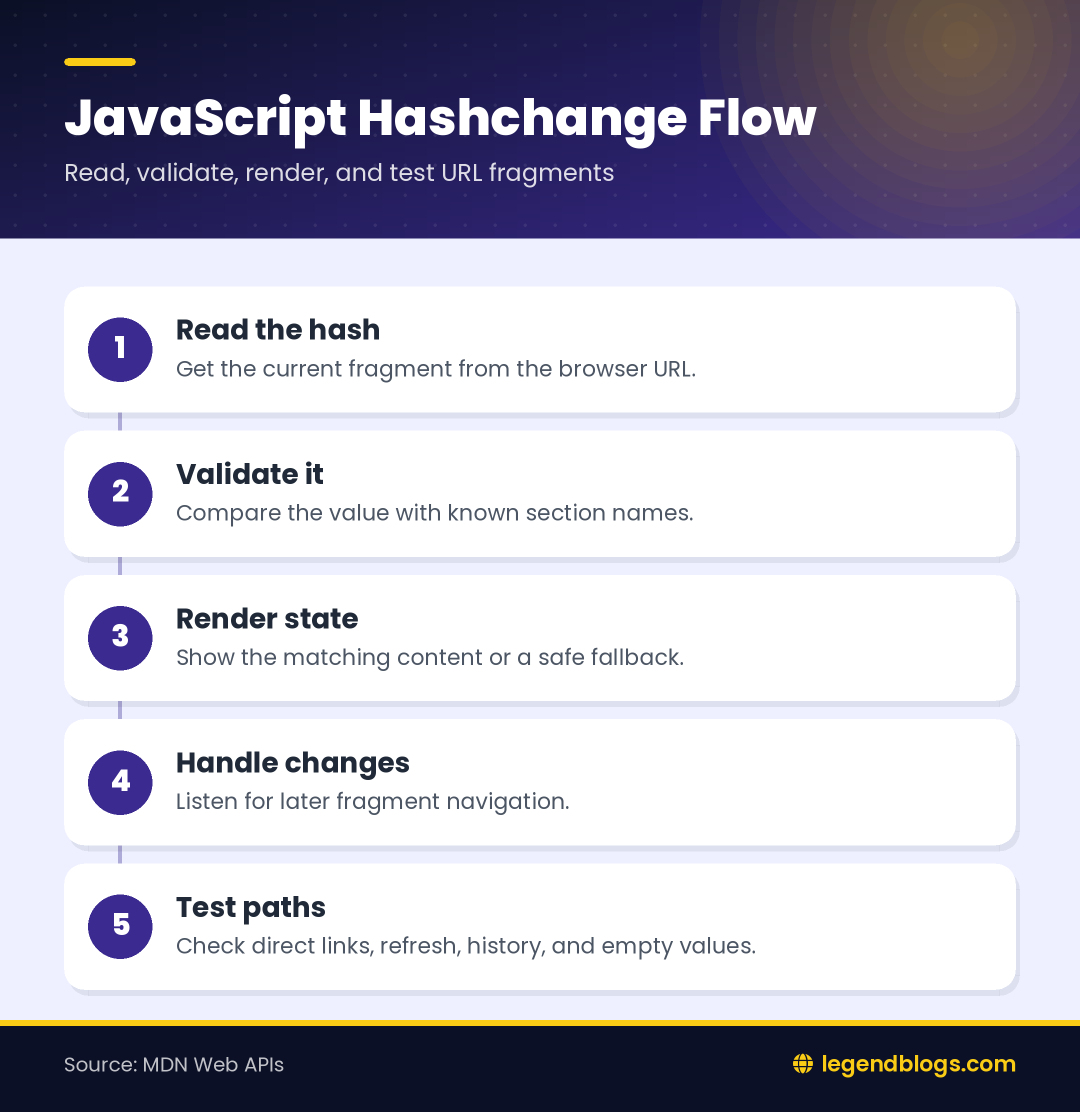
The simplest way to read the current fragment is window.location.hash. The returned value normally includes the leading hash symbol. If your application needs only the name, remove that first character after checking that a hash exists.
Keep the value safe
A URL fragment is user-controlled input. Do not place it into HTML with an unsafe insertion method. Compare it with known section names, then update text or attributes through safe DOM properties.
Use addEventListener
Prefer a listener for new code
The addEventListener approach keeps registration close to other browser events and allows more than one listener when separate parts of a page need to react. A handler can read location.hash each time the address fragment changes.
Share one handler
Put page update logic in a named function and call it from the listener. This makes the same behavior available for the first page load and later changes. It also gives you one place to handle empty or unknown fragments.
Use the onhashchange Property
Understand the short syntax
The onhashchange property is compact and works well in a small demonstration. The existing example assigns a function to window.onhashchange and displays the current value. Assigning the property again replaces the previous property handler.
Choose one registration style
Do not attach several copies of the same handler during repeated initialization. Duplicate handlers can update the interface multiple times and make debugging confusing. If a view is mounted and unmounted, keep track of its listener so it can be removed.
Handle the Initial Hash
Hashchange is not the first-load solution
If someone opens a URL that already contains a fragment, the page should inspect the hash during initialization. The listener is for a later change; it should not be the only code deciding which section is visible.
Use a render function
Create a function that reads the current fragment and renders the matching state. Call it once after the page is ready and again from the hashchange listener. This avoids maintaining two different versions of the selection logic.
Build Hash-Based Navigation
Connect links with section names
Navigation links can point to fragments such as #features and #pricing. Give destination sections stable identifiers and use descriptive link labels. Avoid changing an identifier casually because bookmarks and shared URLs may depend on it.
Show the selected section
Your handler can hide inactive panels and reveal the panel whose identifier matches the fragment. If no matching section exists, display a clear default state rather than leaving the page blank.
Decode and Validate Fragment Text
Fragments may contain encoded characters
Spaces and special characters can be represented in encoded form. If your application supports more than simple identifiers, decode carefully and handle malformed input. For tabs and sections, names using letters, numbers, and hyphens are easier to maintain.
Use an allow-list
Compare the decoded value against known names before selecting an element. Never assume every string after the hash corresponds to an element on the page. This prevents confusing states and reduces unsafe selector usage.
Use jQuery for Hash Changes
Understand the existing example
The jQuery example listens on window for hashchange and reads location.hash. It is suitable for a page that already depends on jQuery and needs a small amount of event handling.
Do not add jQuery only for this event
Modern browsers provide the native event directly. If a project has no other jQuery requirement, native JavaScript avoids an extra dependency. If the project already uses jQuery consistently, retain that style and keep the handler maintainable.
History and Programmatic Changes
Hash links create history entries
When a user moves between hash links, the browser can preserve those changes in history. The back and forward buttons may move through earlier sections. Test this behavior because it is often useful for documentation and tab interfaces.
Know the History API difference
Changing the URL with history.pushState or history.replaceState is not the same as changing the fragment. Those methods do not trigger hashchange. If your application uses them, handle state changes in your own routing logic.
Accessibility and User Experience
Manage focus when needed
Changing visible content should not leave keyboard and assistive-technology users unsure about what changed. For documentation, normal fragment behavior may be enough. For a custom panel, move focus to an appropriate heading only when it improves the experience.
Keep navigation understandable
Use visible labels, maintain a clear selected state, and ensure the page still makes sense when JavaScript is delayed or unavailable. A hash should identify a useful destination, not act as an unexplained internal code.
Common Errors and Debugging
Check empty and missing values
Test a URL with no hash, a hash containing only the symbol, and a value that matches no section. Log the raw value while developing, but remove noisy logs from production. A fallback section is better than an exception.
Test every navigation path
- Open a page directly with a hash.
- Click links that change the fragment.
- Use browser back and forward buttons.
- Refresh after selecting a section.
- Try an unknown and encoded fragment.
- Confirm handlers are not registered twice.
FAQ
What is the JavaScript hashchange event?
It is a browser event that runs when the fragment portion of the current URL changes. The fragment begins with the hash symbol and can identify a section or application state.
How do I get the value after the hash symbol?
Read window.location.hash, verify that it is not empty, and remove the first character when you need the fragment name without the symbol.
Does hashchange fire when the page first loads?
Do not rely on it for initial rendering. Read the current hash during page initialization and use the event for later changes.
How do I detect an empty hash?
Check whether window.location.hash is empty or equals only the hash symbol, depending on how the URL was created. Then render a default state.
Can jQuery listen for hash changes?
Yes. The window can listen for hashchange through jQuery’s event method. Native JavaScript is also sufficient when the project does not otherwise use jQuery.
Conclusion
The JavaScript hashchange event is useful for fragment navigation, tabs, documentation sections, and lightweight client-side state. Read the current hash, validate it, handle the initial page state, and update the interface through one reusable function.
Keep fragment names stable, test browser history, and choose native JavaScript unless an existing jQuery project gives you a reason to use its event syntax.
Practical Rendering Pattern
Separate reading from display
Keep the function that reads the fragment separate from the function that changes classes, text, and focus. This makes it easier to test a URL value without depending on the whole interface.
Preserve a useful fallback
If a visitor follows an old bookmark or types an unknown fragment, show the default section and leave the navigation usable. Avoid throwing an error simply because the URL contains a value your current page does not recognize.
Final Review
Before shipping a hash-based interface, inspect direct links, refresh behavior, keyboard navigation, browser history, encoded characters, and duplicate listener registration. These checks catch most problems that are hidden by testing only a single click path.






Write a comment