In today’s digital landscape, businesses are constantly seeking innovative ways to engage with their customers effectively. AiSensy, leveraging the powerful WhatsApp Business API, offers a comprehensive solution to transform customer engagement. This blog will explore AiSensy’s features, benefits, and implementation strategies that can help your business enhance communication and drive growth.
Introduction
Customer engagement is crucial for business growth and retention. With over 2 billion active users, WhatsApp provides a unique platform for businesses to connect with customers. AiSensy, built on the WhatsApp Business API, is designed to optimize this engagement through features like chatbots, broadcasting, and CRM integrations.
What is AiSensy? check it now
AiSensy is a WhatsApp engagement platform that integrates seamlessly with the WhatsApp Business API. It allows businesses to automate customer interactions, send broadcast messages, and manage multiple human-agent chats. AiSensy’s platform is user-friendly and provides a range of tools to enhance customer engagement and streamline communication processes (AiSensy Help Center).
Key Features of AiSensy WhatsApp Business API
- Real-Time Messaging: Instantly connect with customers, improving response times and satisfaction.
- Automation: Automate routine queries and responses, freeing up resources for more complex tasks.
- Personalization: Tailor messages based on customer data for a personalized experience.
Decide where automation should stop
Automation works best for repeatable requests with a clear answer, such as store hours, order status, or appointment instructions. It is less suitable when a customer needs judgment, a sensitive explanation, or help outside the rules you have written. Design a visible route to a person and tell customers what the automated flow can and cannot do.
Before enabling a response, check that its information comes from an approved source and that someone owns updates when policies, availability, or products change. Test conversations with misspellings, incomplete questions, and requests that should be handed to an agent. Record whether the system answers correctly, asks a useful follow-up, or escalates safely.
Features of AiSensy
- WhatsApp Chatbots: Automate responses and handle common customer queries 24/7 using AI-powered chatbots. This ensures that your customers always receive prompt replies.
- Broadcast Messages: Send notifications, updates, and promotional messages to a large audience simultaneously. This feature is particularly useful for marketing campaigns and customer updates.
- CRM Integration: AiSensy offers an in-built CRM to manage customer interactions and track customer journeys. This helps in providing personalized experiences and improving customer satisfaction (AiSensy).
- Multiple Agent Support: Manage multiple human-agent conversations on a single WhatsApp number, ensuring that customer inquiries are handled efficiently by the appropriate team members.
- Verified Business Accounts: Obtain a verified green tick on your WhatsApp business account, which adds credibility and trust among customers.
Benefits of Using AiSensy with WhatsApp Business API
Plan WhatsApp Business Messaging Responsibly
Use permission-based communication
Businesses should contact people who have a legitimate reason to receive the message and should explain what they are opting into. Keep records of consent where appropriate, provide an understandable way to stop promotional messages, and avoid treating a phone number collected for one purpose as permission for every campaign.
Separate support, utility, and marketing messages
A delivery update, appointment reminder, customer-support reply, and promotional broadcast may have different requirements. Define the purpose of each template, keep promotional language separate from essential updates, and check the current WhatsApp and provider rules before sending a campaign.
Protect customer information
Chat histories and contact lists can contain personal, financial, health, or business information. Limit staff access, use strong account protection, review integrations, define retention periods, and confirm how the platform and connected services store and process data.
Test an AiSensy-Style Workflow Before Launch
- Map the customer question or business event.
- Choose whether a human, automation, or handoff should respond.
- Write a short message that does not overpromise.
- Add fallback replies for unknown questions.
- Test opt-out, escalation, language, links, and delivery failures.
- Review the campaign with support, legal, privacy, and marketing owners where necessary.
- Start with a small approved audience and monitor replies.
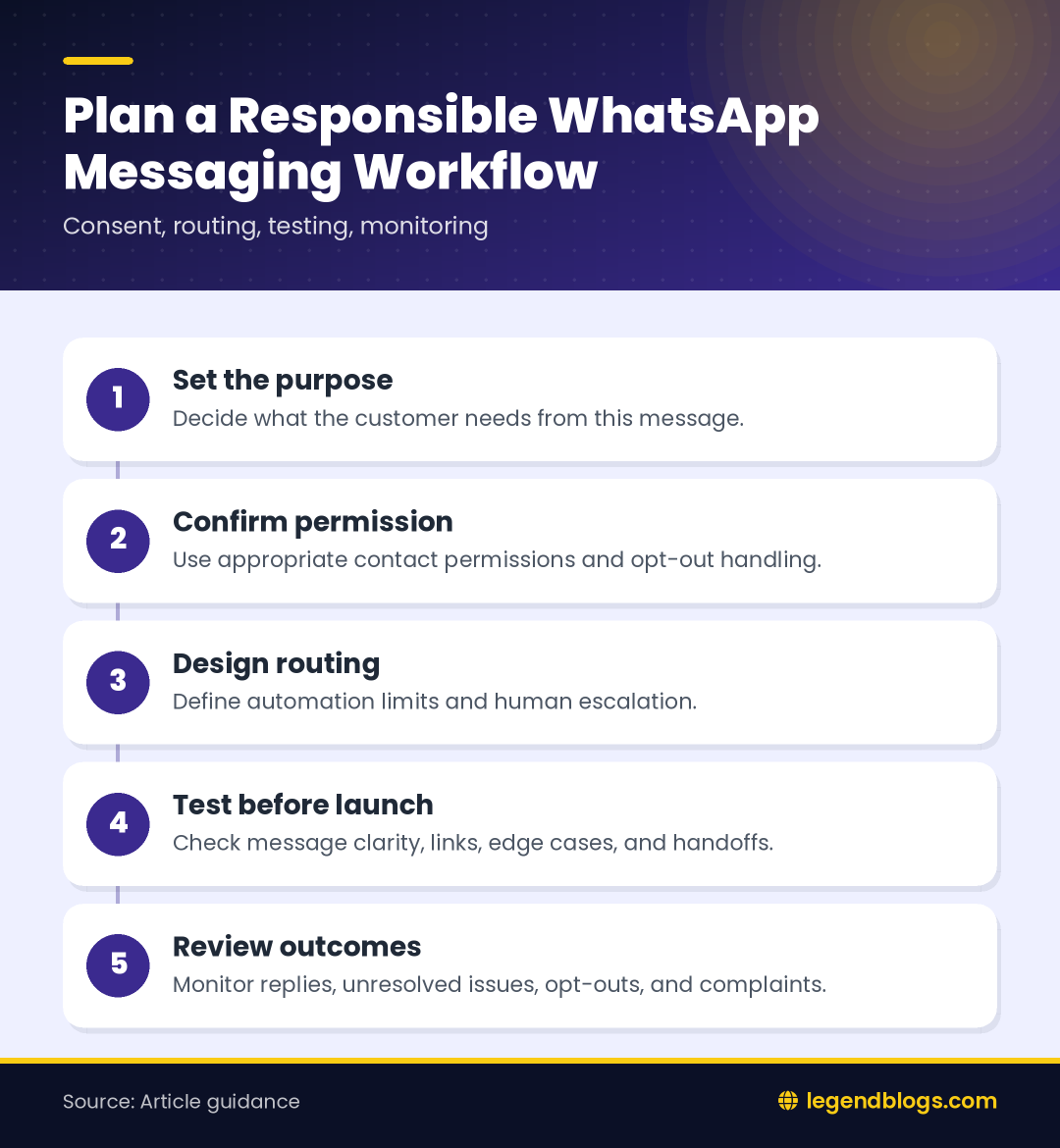
Automation should make it easier for a person to get help, not create a maze that prevents contact with a human. Track response quality, unresolved questions, opt-outs, complaints, and conversions rather than relying only on delivery or open metrics.
Run a controlled pilot with an escalation plan
Before broad rollout, test the complete journey with a small, suitable audience. Include routine questions, unclear messages, requests outside business hours, and situations where the system should hand off to a human. Check that links work, instructions are understandable, and users can stop promotional messages or reach support where appropriate.
Document who approves campaign content, who monitors replies, and who can pause a workflow if it creates confusion. Keep a record of what was tested and review customer feedback after launch. Improve the flow based on actual support needs instead of relying only on campaign delivery metrics.
Enhanced Customer Engagement
Using AiSensy, businesses can engage with their customers more effectively through personalized messages and timely responses. The high open rates on WhatsApp ensure that your messages are seen and acted upon promptly.
Define service measures before automating
Decide what a better customer experience means before activating automated replies or broadcasts. Track a small set of measures tied to the customer need, such as time to first useful response, successful agent handoffs, unresolved requests, opt-outs, or repeat contacts. Message volume alone does not tell you whether an interaction helped.
Review conversation examples, especially cases where the automation failed or a customer requested a person. Update messages when policies, availability, or product details change, and assign an owner to review routing and templates. This keeps the workflow useful as the business changes.
Automation and Efficiency
Automating routine tasks like answering common queries, sending reminders, and providing updates can save time and resources. This allows your team to focus on more complex customer interactions and strategic tasks.
Increased Reach
Broadcasting messages to a large audience helps in expanding your reach and ensuring that important updates and promotions are communicated effectively. This is crucial for businesses looking to scale their operations and reach a global audience. You can check how to Use AI to Generate Trending Video Ideas for YouTube.
Customer Engagement Measures to Review
Track outcomes that reflect the customer experience
Set a small group of measures before launch. Depending on the use case, these may include how quickly customers receive a useful answer, how often an agent needs to take over, whether a request is resolved, and whether people choose to stop receiving promotional messages. Compare results with a clear baseline and interpret them alongside the purpose of each message.
Use feedback to improve the journey
Review customer replies, unresolved questions, complaints, and opt-outs in addition to campaign delivery data. Look for confusing prompts, repeated questions, or steps that force people to provide information more than once. Make changes gradually and check whether they improve the experience without increasing unwanted contact. A simple, respectful conversation is often more valuable than sending more messages.
How to Get Started with AiSensy

Applying for WhatsApp Business API
To get started, businesses need to apply for the WhatsApp Business API. AiSensy simplifies this process and provides the necessary tools and support to integrate the API with your existing systems.
Steps to Apply:
- Prepare Your Business Information: Ensure you have a business website, an active phone number, and a verified Facebook Business Manager ID.
- Apply Through AiSensy: Visit AiSensy’s platform and fill out the application form. The process is straightforward, and AiSensy offers support to help you through each step.
Setting Up AiSensy
Once you have access to the WhatsApp Business API, you can set up AiSensy by following these steps:
Prepare ownership and operating rules
Assign owners for templates, contact permissions, automation logic, and agent access before a campaign goes live. Decide who approves each message, handles customer replies, and monitors failures. A simple responsibility map prevents marketing, support, and technical teams from assuming that another group is watching for an issue.
Keep a launch checklist with the approved audience, message purpose, response route, opt-out handling, and escalation contact. Test links and interactive elements on common devices, and confirm that customers can reach a person when automation does not resolve a request. After launch, review real conversations and complaints, then adjust the parts that evidence shows are confusing or ineffective.
- Sign Up: Create an account on the AiSensy platform.
- Configure Settings: Customize the platform settings to align with your business needs. This includes setting up chatbots, broadcast messages, and CRM integrations.
- Launch Your Campaigns: Start sending messages, automating responses, and engaging with your customers through the AiSensy platform.
Examples of AiSensy in Action
E-commerce Store
An e-commerce store used AiSensy to send abandoned cart reminders and promotional messages to customers. This led to a significant increase in daily orders and customer engagement.
Hospitality
A hotel chain integrated AiSensy to handle booking confirmations and guest queries, streamlining operations and enhancing guest experience.
Customer Support Automation
A company implemented AiSensy’s chatbot to handle common customer queries. This reduced the workload on customer support agents and ensured that customers received prompt responses, improving overall customer satisfaction.
Pros and Cons of AiSensy
Questions to ask before choosing a platform
Compare the exact features and terms currently offered for your intended account and region. Ask how contacts and message history are managed, which integrations are available, what access controls administrators can configure, and what happens if your business changes providers. Do not assume a feature described in an older article is still included or configured the same way.
Estimate the work required to maintain templates, train agents, review automated answers, and keep contact records accurate. A platform can centralize messaging while still requiring clear internal processes. A short pilot with a defined audience and success criteria is a safer basis for a decision than committing to a full rollout after a demonstration.
Pros
- High Engagement Rates: WhatsApp’s high open and click-through rates ensure effective communication.
- Automation: Reduces manual workload and improves efficiency.
- Multi-agent Support: Allows multiple agents to handle customer queries on a single platform.
Cons
- Initial Setup: Requires some initial setup and integration effort.
- Dependency on WhatsApp: Businesses are dependent on WhatsApp’s policies and updates.
FAQs on AiSensy
What is AiSensy?
AiSensy is a comprehensive WhatsApp engagement platform that helps businesses automate customer interactions, send broadcast messages, and manage multiple human-agent chats.
How does AiSensy integrate with WhatsApp Business API?
AiSensy is built on top of the WhatsApp Business API, providing tools and features to enhance customer engagement and streamline communication processes.
Is AiSensy suitable for small businesses?
Yes, AiSensy is scalable and offers pricing plans suitable for businesses of all sizes, including small enterprises.
How does AiSensy handle data privacy?
AiSensy prioritizes data security, adhering to stringent privacy policies to protect customer information.
What are the benefits of using AiSensy?
AiSensy offers high engagement rates, automation of routine tasks, and efficient management of customer interactions, which collectively enhance customer satisfaction and business growth.
How can I apply for the WhatsApp Business API?
You can apply for the WhatsApp Business API through AiSensy’s platform by preparing your business information and filling out the application form.
Does AiSensy offer support for setup?
Yes, AiSensy provides support for the setup and integration of the WhatsApp Business API with your existing systems.
Conclusion
AiSensy, leveraging the WhatsApp Business API, offers a powerful solution for businesses to enhance customer engagement and drive growth. By automating responses, broadcasting messages, and integrating CRM tools, AiSensy helps businesses communicate effectively and efficiently. Start using AiSensy today and transform the way you engage with your customers.
Feel free to leave a comment below with any questions or experiences you’d like to share!



Write a comment