Can AI replace human video editors? This is one of the most debated questions in creative tech today. With rapid advances in artificial intelligence, software can now cut footage, match music, stabilize shaky clips, and even edit pacing. But can it truly replace the creativity, intuition, and nuanced decision-making of human editors? In this article, we examine the latest technologies, compare strengths and limitations, and assess where AI stands in 2026.
What Is AI Video Editing?
1. Fundamentals of AI in Editing
AI video editing uses machine learning algorithms and pattern recognition to analyze footage and make editing decisions such as identifying key moments, syncing audio, and balancing visual elements.
AI video editing is best understood as a set of features, not one autonomous editor that makes every creative choice well. A tool might transcribe speech, find pauses, suggest clips, or create captions, while a person still chooses the story, the intended audience, and the final timing. The practical question is which parts of a specific project can be delegated without weakening its meaning.
AI video editing vs human editing: a task-by-task comparison
Automation helps most with repetitive operations
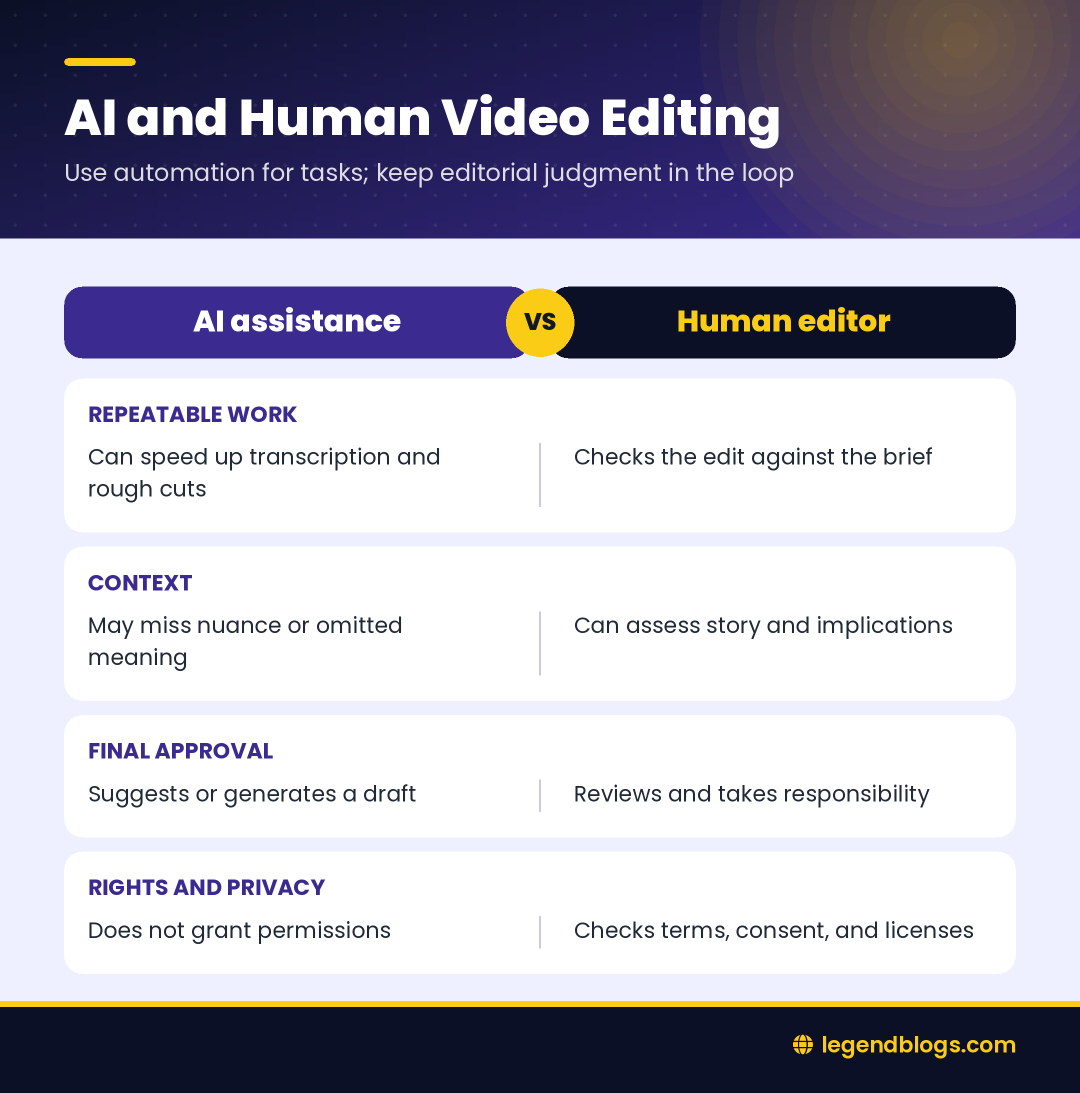
When a project follows a predictable pattern, automation can reduce repetitive work. For example, a creator producing a regular series of short interviews may use transcription and silence detection to make a first pass, then review every cut. The editor can spend more attention on the answer that matters instead of manually locating every spoken sentence.
That advantage depends on good input and clear criteria. Poor audio, overlapping speakers, multiple languages, specialized vocabulary, fast movement, or deliberately unconventional pacing can lead to mistakes. Automation can save time on a first pass, but it does not remove the need to check what the tool selected and what it discarded.
Human judgment shapes meaning and tone
A human editor can ask why a shot belongs in the piece, whether a pause communicates emotion, and whether juxtaposing two moments could mislead the audience. These are editorial decisions rather than simple pattern matching. A technically smooth cut can still feel wrong if it changes the speaker’s meaning or removes a necessary qualification.
People also collaborate with clients, producers, and contributors. They can interpret feedback, explain trade-offs, and adapt the cut to an emerging creative goal. AI assistance may speed up options, but the responsibility for choosing and approving the final version belongs to the production team.
How video editors retain creative control
Video editors remain responsible for deciding which automated suggestions serve the intended story. They can preserve a meaningful pause, restore context, and align pacing with the audience and purpose. The best workflow treats machine-generated selections as editable proposals rather than final decisions.
2. Core Technologies Behind AI Editors
Modern AI editors rely on deep learning, computer vision, natural language processing, and predictive models to understand content, context, and stylistic cues in videos.
How Current AI Video Editing Tools Work
1. Automated Cuts and Scene Detection
AI tools can scan raw footage, detect cuts, and select the most engaging moments based on motion, expression, or audio cues. Check how Ai AI and War conflict Is reshaping the IT Sector.
2. Intelligent Transitions and Effects
Using trained models, AI suggests or applies transitions, color grading, and visual effects that match the style and mood of a project.
3. Audio Enhancement and Syncing
AI can reduce noise, balance levels, transcribe speech, and automatically sync clips with audio, dramatically reducing manual labor.
4. Template-Driven and Guided Editing
Many tools offer templates where AI adapts footage to a chosen style, making quick editing accessible to beginners.
Strengths of AI Video Editing
1. Speed and Efficiency
AI dramatically speeds up repetitive tasks like trimming, tagging, and rendering, enabling faster turnaround times for basic edits.
2. Cost-Effectiveness for Simple Projects
For basic social media content, promotional clips, or short videos, AI can deliver acceptable results without the cost of a professional editor.
3. Accessibility for Beginners
AI offers intuitive interfaces and guided workflows that help non-experts produce polished videos without steep learning curves.
Limitations of AI Compared with Human Editors
1. Lack of Creative Intuition
AI lacks the instinctive understanding of narrative arc, emotional cues, and pacing that human editors develop through experience.
Review risks in an automated edit
Check context, not only technical errors
A transcript-based edit might remove a phrase that looks repetitive but changes the meaning of an answer. A highlight generator can select an energetic reaction without the preceding question that explains it. A silence-removal tool may make an interview sound abrupt or remove a deliberate beat. These errors can make the piece confusing even if the footage and sound remain technically clean.
Review the cut against the original recording whenever accuracy matters. Confirm that quotes preserve context, the sequence of events is fair, and any narration or captions do not overstate what the footage shows. For journalism, documentary, education, client work, and sensitive topics, assign a named human reviewer with authority to reject the automated edit.
Check captions, audio, and rights
Automated captions can miss names, specialist terms, accents, or punctuation that changes interpretation. Listen while reading the captions and check that timing, speaker labels, and translations are correct. Captions are part of the viewer’s information, not a cosmetic decoration.
Also verify music, stock footage, logos, likenesses, and voice permissions. An AI editing feature does not provide a license for material in an uploaded video, nor does it make a generated voice or image automatically safe to publish. Keep records of rights and use only assets cleared for the intended distribution.
Protect footage and project files
Understand what happens to uploads
Before sending client or unreleased footage to a cloud service, review the provider’s current terms. Check how long files are retained, who can access them, whether uploads may be used for model improvement, and how to remove a project. Confidential interviews, personal footage, unreleased campaigns, and customer data may require stronger controls or an offline workflow.
Use the least access needed for each collaborator, and avoid sharing project links publicly. Keep original camera files, project files, audio, captions, licenses, and exports in an organized backup. If a tool’s privacy terms do not fit the project’s obligations, choose a different workflow rather than uploading first and checking later.
2. Context and Cultural Sensitivity
Understanding subtleties like humor, irony, or cultural references remains challenging for AI, often leading to tone mismatches.
3. Customization and Artistic Vision
Human editors integrate client intentions, brand identity, and nuanced feedback in ways that AI currently cannot fully replicate.
4. Error Handling and Unpredictable Footage
AI may struggle with footage that is messy, incomplete, or intentionally unconventional—areas where human judgement excels.
Case Studies: AI Tools in Real Workflows
1. AI for Social Media and Short-Form Content
Creators increasingly use automated tools to produce engaging short videos with minimal effort, relying on AI to format to platform specs.
2. Hybrid Workflows in Professional Studios
Professional editors often use AI to accelerate rough cuts, allowing them to focus on fine-tuning and creative decisions.
3. Automated News and Event Coverage
Some broadcast and news platforms use AI for basic clipping, tagging, and assembly, feeding into human review stages.
Can AI Fully Replace Human Editors? Expert Perspectives
1. The Consensus in Creative Industries
Experts generally agree that AI enhances productivity but does not replace the need for human creativity, especially in high-stakes or narrative-driven work.
2. Scenarios Where AI Might Dominate
AI is most effective in standardized, template-based, or high-volume editing scenarios where creativity is less critical.
The Future of Video Editing Jobs
1. Shifting Skill Requirements
Editors who embrace AI tools and learn to leverage them in creative ways will remain valuable in the job market.
2. New Roles Emerging
As automation increases, new roles like “AI workflow specialist” or “creative director of AI tools” may emerge.
Best Practices for Combining AI and Human Editing
Build a Safe AI-Assisted Video Editing Workflow
Organize and back up the original footage
Keep the camera files, audio, project files, captions, licenses, and final exports in an organized location before uploading anything to an AI service. Confirm whether the tool stores uploads, uses them to improve models, or allows deletion when the project ends.
Use AI for predictable operations
Transcription, silence detection, rough assembly, noise reduction, caption timing, resizing, and format conversion can be useful places to start. Review every automatic cut because a model may remove a pause, reaction, cultural reference, or visual detail that matters to the story.
For examples of specific AI video editing tools and their common creator workflows, see the separate tools overview.
Keep a human approval stage
A person should approve the narrative, pacing, music, graphics, captions, color, factual claims, and final export. Check names, faces, permissions, logos, music licenses, subtitles, and accessibility before publishing.
Choose AI or a Human Editor by Project Risk
AI may be appropriate for a low-risk social clip, internal draft, or repetitive format when the result is reviewed. Human editorial control becomes more important for journalism, documentary work, client campaigns, sensitive subjects, regulated industries, children, public figures, or videos where an editing mistake could mislead viewers.
A hybrid workflow often provides the best balance: use automation to reduce repetitive work, then use human judgment for meaning, context, emotion, and responsibility. Measure turnaround time and quality together; a faster export is not useful if it creates corrections, complaints, or a misleading impression.
AI Video Editing Review Checklist
- Confirm upload, retention, and training terms.
- Keep original files and project backups.
- Check footage, audio, captions, and translations.
- Review cuts for missing context or accidental edits.
- Verify music, images, logos, voices, and likeness rights.
- Test mobile, desktop, and accessibility presentation.
- Have a human approve the final version.
1. Use AI for Preliminary Tasks
Leverage AI for rough cuts, tagging, and organizing footage to reduce manual work.
Build a human-approved hybrid workflow
Start with a brief and a reversible first pass
Write down the goal, audience, platform, duration, tone, and any claims that need verification before editing. Keep the source media untouched and work on a copy. Use AI for a reversible task such as transcription, clip labeling, or a rough assembly, then compare its choices with the brief.
Do not lock the project to an automated cut before review. Maintain a way to restore the original timing and context. If a tool makes destructive changes or exports only a flattened file, make an additional project backup before proceeding.
Review with a checklist and clear responsibility
- Check the story against the full source, not just the generated transcript.
- Listen for missing words, awkward edits, audio artifacts, and music conflicts.
- Verify captions, names, translations, and important on-screen text.
- Confirm consent, licenses, and platform or client requirements.
- Watch the final export on the target device and confirm the file is correct.
Assign responsibility for the final approval. “The software chose it” is not a meaningful answer if the edit misrepresents a person or a product. A clear human sign-off makes the workflow more accountable and helps the team learn which automated suggestions are reliable for its footage.
Choose the workflow by project risk and purpose
Low-risk, repeatable content
For a personal clip, internal draft, simple tutorial, or recurring short format, AI can be a useful assistant when the creator checks the result. Template-based tasks and predictable edits are good candidates for automation because the expected structure is easy to describe and evaluate.
High-stakes or distinctive storytelling
Use more human editorial control when a video involves sensitive subjects, factual reporting, legal or medical claims, vulnerable people, client reputation, or deliberate artistic style. In those settings, the cost of a subtle error can be greater than the time saved. A human editor can question the brief, flag missing context, and make informed choices that a tool may not be equipped to understand.
For a decision, compare more than editing speed. Include correction time, review effort, licensing and privacy needs, consistency, accessibility, and the consequences of a wrong cut. A tool that produces a rough version quickly may still increase total work if every selection requires extensive repair.
2. Reserve Human Control for Creative Decisions
Let human editors shape narrative, emotion, pacing, and stylistic choices to retain quality and originality.
3. Continuous Learning and Adaptation
Stay updated on tool capabilities and limitations to make informed decisions about when to automate and when to edit manually.
FAQ
What kinds of videos can AI edit well today?
AI performs best on structured, predictable content like short social clips, interviews, and event highlights where patterns are clear.
Will AI ever match a human editor’s creativity?
While AI can mimic patterns and generate stylistic options, true creative intuition and emotional insight are areas where human editors still excel.
Is AI video editing cheaper overall?
For basic projects, AI tools can reduce costs significantly; however, for complex productions, human editors remain essential.
Are professional editors at risk of losing jobs to AI?
Not entirely—editors who adapt and use AI as a tool will still be in demand. Those resistant to change may face challenges.
What skills should future video editors focus on?
Developing storytelling, artistic judgement, and how to work alongside AI tools will be key differentiators.
Conclusion
AI video editing has advanced rapidly, offering speed, automation, and accessibility that were unimaginable just a few years ago. However, it stops short of replacing human video editors in creative, nuanced, or complex storytelling tasks. The future is not one of replacement but collaboration—AI as an assistant that multiplies human creativity rather than eclipses it. Editors who embrace AI and focus on uniquely human skills will thrive in the years ahead.







Write a comment