
The selectors point to the HTML element you want to set the style. The selector is the technic to give any kind of style to your text on your HTML page. There are 4 types of main selectors used in HTML to point the element.
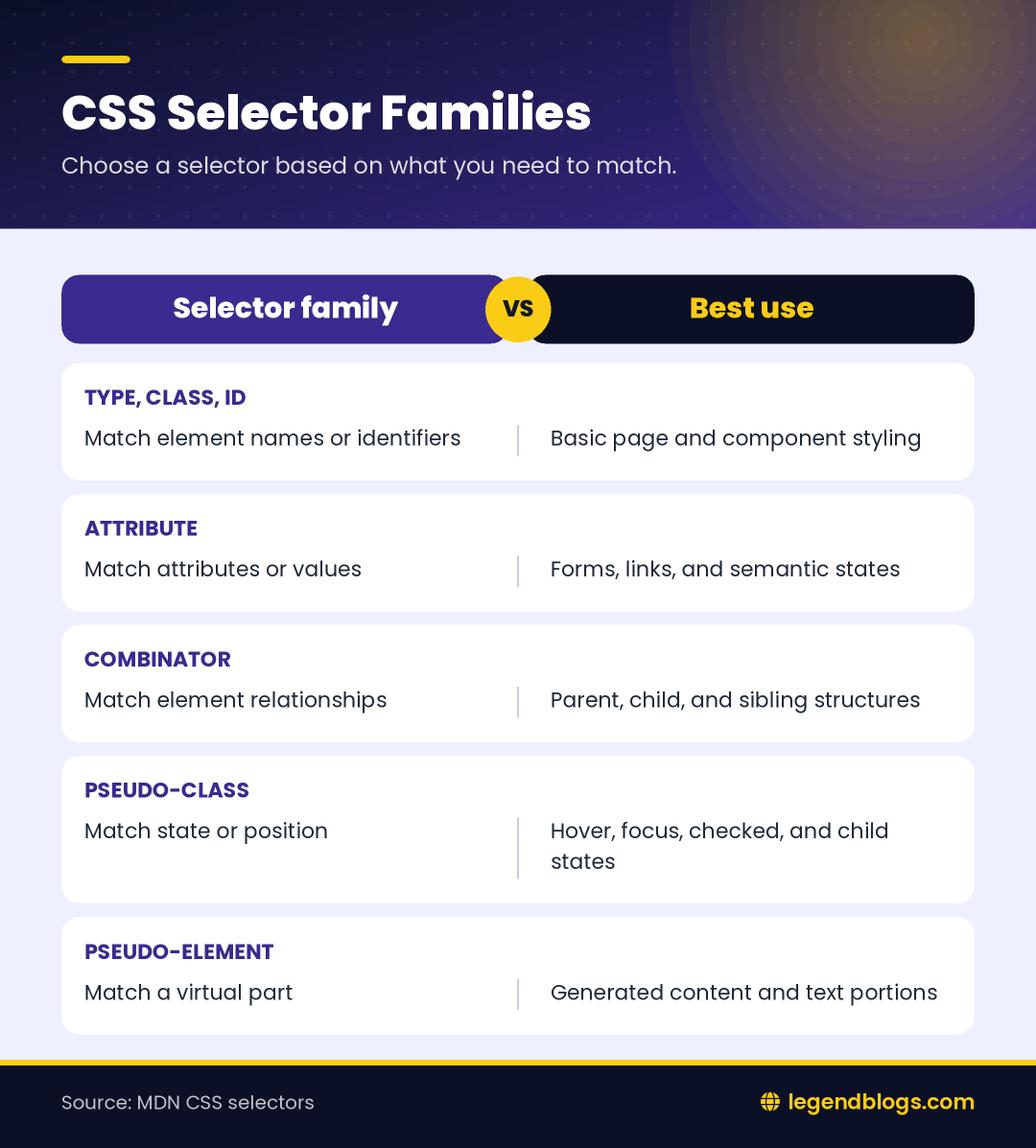
CSS selectors are patterns that match HTML elements before a declaration block applies styles. Modern CSS includes simple selectors, attribute selectors, combinators, pseudo-classes, and pseudo-elements. Choosing the narrowest selector that expresses your intent makes a stylesheet easier to maintain and reduces unexpected overrides.
How CSS Selectors Match Elements
Simple selectors and selector lists
A type selector matches an element name, a class selector matches a class value, and an ID selector matches an ID value. You can combine selectors to make a compound selector, or separate complete selectors with commas when the same declarations should apply to several targets.
h1, h2, h3 {
  font-family: system-ui, sans-serif;
}
.card.featured {
  border-color: tomato;
}
The first rule styles three heading levels. The second rule matches only an element that has both card and featured classes; it does not match an element with only one of them.
Specificity matters
When several rules match the same element, the cascade considers origin, importance, specificity, and source order. An ID selector is generally more specific than a class selector, while a class selector is more specific than a type selector. Prefer reusable classes for components instead of building a chain of IDs that becomes difficult to override.
Attribute Selectors
Match attributes and values
Attribute selectors are useful when the HTML already carries meaningful attributes. The expression input[required] matches required inputs, while a[target="_blank"] matches links whose target attribute has that exact value.
input[type="email"] {
  border-color: steelblue;
}
img[alt] {
  outline: 1px solid seagreen;
}
Match part of a value
You can match values that begin with, end with, or contain a string. For example, a[href^="https://"] targets secure links and a[href$=".pdf"] targets links ending in a PDF extension. These patterns are convenient, but class names are usually clearer when the styling represents a component state rather than an attribute value.
Descendant and Child Combinators
Descendant combinator
A space between selectors means that the second selector can appear at any depth inside the first. The rule .article p matches paragraphs inside an element with the article class, including paragraphs nested inside another element.
Child combinator
The greater-than sign requires a direct parent-child relationship. Use .menu > li when only the first level of list items should be styled. This prevents nested submenu items from receiving the same rule accidentally.
.article p {
  line-height: 1.7;
}
.menu > li {
  display: inline-block;
}
Sibling Combinators
Adjacent sibling
The plus sign selects the next matching sibling. For example, h2 + p styles the first paragraph immediately after a heading. It does not select later paragraphs.
General sibling
The tilde selects matching siblings that appear later under the same parent. The selector h2 ~ p can style every later paragraph at that level. The elements must share a parent; a paragraph nested in another container is not a match.
Pseudo-Classes
State and interaction
A pseudo-class starts with one colon and represents a condition or state that is not written as a separate class in the markup. Common examples include :hover, :focus, :active, :checked, and :disabled.
button:hover {
  background: #163d70;
}
input:focus {
  outline: 3px solid #9ac3ff;
  outline-offset: 2px;
}
Do not use hover as the only way to communicate important information. Keyboard users need visible focus styles, and touch devices may not have a hover state.
Structural pseudo-classes
Selectors such as :first-child, :last-child, and :nth-child(2n) select elements according to their position among siblings. Check the actual DOM structure before using them: a text node or a different element type can make the result different from what you expect.
Pseudo-Elements
Generated content and portions of an element
Pseudo-elements use two colons in modern CSS, such as ::before, ::after, ::first-letter, and ::selection. They represent a portion of an element or a generated box that is not a separate HTML element.
.notice::before {
  content: "Info: ";
  font-weight: 700;
}
.article p::first-letter {
  font-size: 2rem;
}
Generated content should not hold essential information that users must read or copy. Put important text in the HTML so it remains available to assistive technology, search tools, and users with styles disabled.
Debugging CSS Selector Problems
Inspect the matched element
Open the browser developer tools and inspect the element. The Styles panel shows which rules match and which declarations are crossed out. This quickly reveals spelling mistakes, a selector that is too broad, or a later rule with greater specificity.
Use a repeatable checklist
- Confirm that the class or ID is spelled exactly the same in HTML and CSS.
- Check whether the stylesheet loads and appears in the Network panel.
- Test the selector against the real nesting structure.
- Compare specificity before adding
!important. - Check media queries and state selectors such as
:hover.
Practical Selector Guidelines
Prefer readable, reusable rules
Use a class for a visual component, a type selector for broad element defaults, and an attribute selector when the attribute itself is the reason for the style. Keep selector chains short and give components a clear naming convention.
Keep accessibility in mind
Never remove focus outlines without replacing them with an equally visible alternative. Make sure selectors do not hide labels, error messages, or other content that users need. CSS controls presentation, but the HTML structure should still make sense without the styling.
FAQ
What are the main types of CSS selectors?
The main groups are universal, type, class, ID, attribute, combinator, pseudo-class, and pseudo-element selectors. They can be combined to express more precise matches.
What is the difference between a class and an ID selector?
A class is reusable across many elements, while an ID is intended to identify one element in a document. Classes are normally the better choice for reusable component styling.
When should I use an attribute selector?
Use one when an attribute or its value is the meaningful reason for styling, such as selecting required inputs or links to a particular file type.
What is the difference between a child and descendant selector?
A child selector uses > and matches only direct children. A descendant selector uses a space and can match at any nested level.
Why is my CSS selector not applying?
Check the spelling, DOM nesting, stylesheet loading, pseudo-class state, media query, specificity, and source order. Browser developer tools usually show the exact rule that wins.
Conclusion
CSS selectors let you target elements by type, class, ID, attributes, relationships, state, and position. Start with a readable selector, make it no more specific than necessary, and verify the result in developer tools.
As your stylesheet grows, reusable classes and short combinator chains are easier to maintain than deeply nested selectors. Good selector choices improve consistency, accessibility, and the amount of time you spend debugging visual changes.
1. Universal Selector
2. Element Type Selector
3. ID Selector
4. Class Selector
Let’s look at all the different kinds of selectors available, with a brief description of each Selector.
1. Universal Selector
The universal selector works like a wild card character, selecting all elements on a page. Every HTML page is built on content placed within HTML tags. Look at the following CSS example, which uses the universal selector:
* {
   color: white;
   font-size: 12px;
}
2. Element Type Selector
This selector must match at least one or more HTML elements of the same type. Thus, a selector of nav would match all HTML elements, and a selector of <ul> would match all HTML unordered lists, or <ul> elements, or <p>. Look at the following CSS example:
ul {
   list-style: none;
   border: solid 1px #CCC;
}
p {
   color: gray;
   font-size: 16px;
}
This element selector CSS uses in HTML element such as:
<ul>
  <li>one</li>
  <li>Two</li>
  <li>Three</li>
  <li>Foure</li>
</ul>
<p>Example paragraph text.</p>
3. ID Selector
This selector is declared using a hash, or pound symbol (#) preceding a string of characters. The string of characters is defined by the developer. This selector matches any HTML element that has an ID attribute with the same value as that of the selector. Look at the following CSS example, which uses the ID selector:
#main{
   width: 90%;
   margin: 0px;
   color: gray;
   font-size: 16px;
}
This ID selector CSS uses in HTML element such as:
<div id="main">Hello World!</div>4. Class Selector
The class selector is the most useful of all CSS selectors. It’s declared with a dot preceding a string of one or more characters. Just as is the case with an ID selector, this string of characters is defined by the developer. Look at the following CSS example, which uses the Class selector:
.main{
   width: 90%;
   margin: 0px;
   color: gray;
   font-size: 16px;
}
This Class selector CSS uses in HTML element such as:
<div class="main">Hello World!</div>5. Descendant Selector
The Descendant selector is also the most useful of all CSS selectors. It’s declared with a dot/pound symbol (./#) preceding a string of one or more characters. Just as is the case with an ID selector or Class selector, this string of characters is defined by the developer. Look at the following CSS example, which uses the Descendant selector:
#main .row{
   width: 90%;
   margin: 0px;
   color: gray;
   font-size: 16px;
}
This Descendant selector CSS uses in HTML element such as:
<div id="main">
<div class="row">Hello World!</div>
</div>
One more way to use this
div .row{
   width: 90%;
   margin: 0px;
   color: gray;
   font-size: 16px;
}
This Descendant selector CSS uses in HTML element such as:
<div>
<p class="row">Hello World!</p>
</div>
6. General Sibling Combinator
The selector that uses a general sibling combinator matches elements based on sibling relationships. Look at the following CSS example, which uses the general sibling selector:
h1 ~ div {
   margin-bottom: 20px;
   color: red;
   font-size: 12px;
}
This general sibling selector CSS uses in HTML element such as:
<h1>Title</h1>
<p>Paragraph One of Legend Blogs.</p>
<p>Paragraph two of Legend Blogs.</p>
<p>Paragraph three of Legend Blogs.</p>
7. Pseudo-class
The selector pseudo-class uses a colon character to identify a pseudo-state. This will work on a state of being hovered or the state of being activated. Look at the following CSS example, which uses the pseudo-class selector:
a:hover {
   color: red;
   font-size: 12px;
}
This pseudo-class selector CSS uses in HTML element such as:
<h1>Title</h1>
<a href="index.html">A pseudo-class of Legend Blogs.</p>
8. Pseudo-element
The selector uses one kind of pseudo-element, the:before pseudo-element. As the name suggests, this selector inserts an imaginary element into the page, inside the targeted element, before its contents. Look at the following CSS example, which uses the pseudo-element selector:
.a:before {
   content: "*";
   display: block;
   width: 100px;
   height: 100px;
   background-color: gray;
}
This pseudo-element selector CSS uses in HTML element such as:
<h1>Title</h1>
<a href="index.html">A pseudo-element of Legend Blogs.</p>





Write a comment