
jQuery Ajax is the powefull tool of jQuery, You can create attractive webpage with the help of JQuery ajax. jQuery's Ajax methods return a superset of the XMLHTTPResuest object.
There are two commonly used methods for a request between a client and server: GET and POST.
GET - Requests data from a specified resource, basically used for just retrieving some data from the server.
POST - Submits data to be processed to a specified resource, used for setting some data to the server and also can retrieving tha data. POST method never caches data.
Ajax request is just like a web page call. Only difference is that the user doesn’t have to reload the page and user operation will be performed. Before you call a Ajax request you need to set JQuery link in your page, You can also download it.
<head>
<script src="https://ajax.googleapis.com/ajax/libs/jquery/3.2.1/jquery.min.js"></script>
</head>
Let’s get start with a basic JQuery Ajax GET request:
$.ajax({
    type: "GET",
    url: 'server.php',
    success: function(data){
        alert(data);
    },
    error: function (Status, errorThrown) {
    }
});
Now create a Ajax page on your project where you can place your MySQL code with php script. You can set your file name like server_ajax.php
Choose a Response Format Before Writing the Endpoint
Prefer JSON for structured results
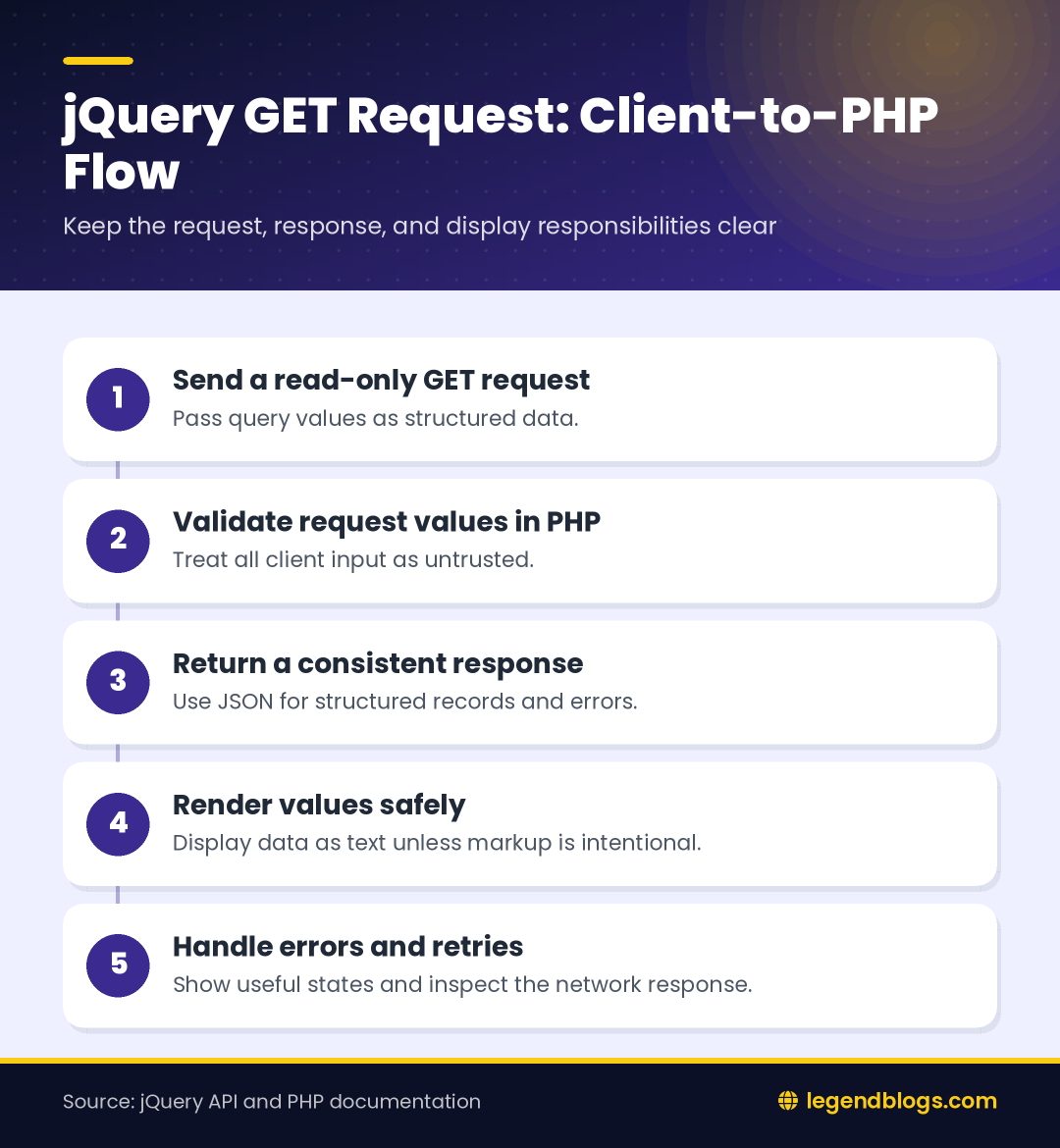
The original example prints rows as HTML fragments. That can work for a small demonstration, but it couples the PHP output to the page’s markup and makes error states harder to represent. For a reusable jQuery AJAX GET PHP endpoint, return JSON with a clear success or error shape. The browser can then decide how to render each field, while the server stays responsible for retrieving and validating data.
Set the content type consistently
When PHP returns JSON, send an application/json content type and encode a structured array with json_encode(). Keep warnings, debug text, and database diagnostics out of the response body; extra output can make an otherwise valid response impossible to parse. Log diagnostic detail on the server and send the browser a short, non-sensitive error message.
Pass and Validate GET Parameters
Send values as a data object
jQuery can serialize an object supplied as request data into query parameters for a GET request. This is preferable to concatenating values directly into a URL, because the library handles URL encoding for ordinary key-value data. Use meaningful parameter names, decide which values are optional, and avoid putting credentials or other secrets in the query string.
Validate every value on the PHP side
Browser-side checks help with usability, but they do not make a request trustworthy. In PHP, check that expected query parameters exist and have the correct shape and type before using them. Validate identifiers as the format your application expects, and use parameterized database queries when values are included in SQL. A GET endpoint should only retrieve data, not perform a destructive action.
Return a predictable empty result
If a valid query finds no rows, return a normal successful response with an empty data collection rather than printing an ambiguous message into the result stream. Reserve an error status and error structure for cases such as an invalid request or a server-side failure. The client can then distinguish “no records” from “the request failed.”
Render Results Without Trusting HTML
Insert data as text when it is not trusted markup
Database values and request parameters may contain characters that look like HTML. If a response contains ordinary text, render it as text using a safe DOM operation rather than concatenating it into an HTML string. If the server intentionally returns markup, escape dynamic values for the HTML context on the server and make the rendering choice explicit.
Build lists from response objects
For JSON records, iterate over the returned array and create the needed elements from known fields. Handle missing or null fields deliberately so one incomplete record does not break the entire page. Do not expose internal database columns simply because they were convenient to select; return only the fields the interface requires.
Handle Loading, Errors, and Repeated Requests
Show the user that work is in progress
When a request starts, display a small loading state and prevent accidental duplicate submissions if the same action is already running. Restore the interface in an always-run completion handler so both successful and failed requests remove the loading indicator. Keep the message concise and do not make the browser appear frozen while the server responds.
Handle transport and parsing failures separately
A failed request can result from a network problem, a missing endpoint, a server error, or a response that is not valid JSON. Use the failure callback or promise rejection to provide a retry option, and log useful technical details during development. If the server returns HTML warnings where JSON was expected, inspect the response body and PHP error log rather than trying to parse it as a valid data record.
Use timeouts and cancellation with care
A timeout can help the page recover from a request that takes too long, but it does not prove that the server stopped processing. For read-only GET requests, retrying is usually safer than retrying an operation that changes data. If the user starts a new search before the previous one completes, consider ignoring stale responses or aborting the earlier request so an old result does not overwrite the latest one.
Use GET and POST for Their Intended Purposes
Keep GET requests read-only
GET is suited to retrieving data that can be described by a URL and query parameters. URLs may be recorded in browser history, logs, and intermediary systems, so do not put private information in them. Repeated requests should not unexpectedly modify server data.
Use POST for changes and larger payloads
Use POST when submitting data that creates or changes server-side state, or when a request body is more appropriate than URL parameters. POST alone does not provide security; use HTTPS, validate input, enforce authorization, and apply CSRF protection where a browser session and state-changing action require it. A request method is part of the endpoint’s design, not a replacement for access control.
Debug a jQuery AJAX GET PHP Request
Inspect the browser’s network panel
Check the request URL, query string, HTTP status, response headers, and response body in the browser’s developer tools. Confirm that the page is requesting the expected PHP file from the correct path. If the request succeeds but the interface stays blank, check the selector for the result container and inspect any JavaScript errors in the console.
Check PHP output and database errors
Verify that the endpoint runs independently and returns the expected content type and response structure. Look for accidental whitespace before a PHP header, syntax errors, failed database connections, and warnings printed into the response. Keep detailed error messages in server logs rather than exposing SQL or file details to visitors.
Check cross-origin and deployment behavior
A page and its endpoint on different origins may be subject to browser cross-origin rules. Prefer a same-origin endpoint when the application architecture permits it; otherwise configure a deliberate allowlist and the appropriate response headers. Test the deployed route as well as the local version, because relative URLs and server rewrite rules can behave differently after deployment.
Keep the Example Maintainable
Use one current jQuery reference
Load one supported jQuery version rather than including multiple copies of the library on the same page. Duplicate versions can overwrite each other or produce confusing plugin behavior. Keep the AJAX code in a script file or a clearly separated block, and make the endpoint path configurable if the page can run from different base paths.
Return only what the page needs
Keep responses small and focused. If the endpoint returns many records, add appropriate server-side filtering and pagination instead of loading an entire table into the browser. Treat authorization as a server-side responsibility even if the UI hides data or a button from some users.
<?php
require_once('config.php');
if(isset($_GET['action']) && $_GET['action'] == 'get_record'])){

  $mysql_query = mysqli_query($conn, "Select * from my_ajax");
  while($mysql_rows = mysqli_fetch_array($mysql_query)){
     $firstname = $mysql_rows['firstname'];
     $lastname = $mysql_rows['lastname'];
     $email = $mysql_rows['email'];
     echo 'firstname: '.$firstname.'<br>';
     echo 'lastname : '.$lastname .'<br>';
     echo 'email : '.$email .'<br>';
  }
}
else{
  echo "Something went wrong";
}
mysqli_close($conn);
?>
Finally create your index page to call server_ajax.php:
<!DOCTYPE html>
    <html lang="en">
    <head>
    <meta charset="utf-8">
    <title>JQuery Ajax POST Example</title>
    <script src="https://code.jquery.com/jquery-1.12.4.min.js"></script>
    <script type="text/javascript">
    $(document).ready(function(){
        $.ajax({
            type: "GET",
            url: 'server_ajax.php',
            data: {action: 'get_record'},
            success: function(data){
               $("#result").append(data);
            }
        });
    });
    </script>
    </head>
    <body>
        <div id="result"></div>
    </body>
</html>






Write a comment