This is the easiest way to create dynamic bootstrap modal with jquery on your web page. The Modal plugin is a dialogue box or a popup window that is displayed on top of your current page.
On the other hand, we can say modal is a child window of the parent window. The purpose is to display data from a separate source that can have some interaction without leaving the parent page.
One more very important thing is the user can add/update/insert records in the database with the help of Modal and jquery Ajax.
Download Now Laravel Project with Admin Dashboard
Jquery ajax modal popup example
You can show Bootstrap Modal by clicking on the button or link via data attributes without writing any script, but we are going to introduce how to create Modal with dynamic value and dynamic form where you can update your record.
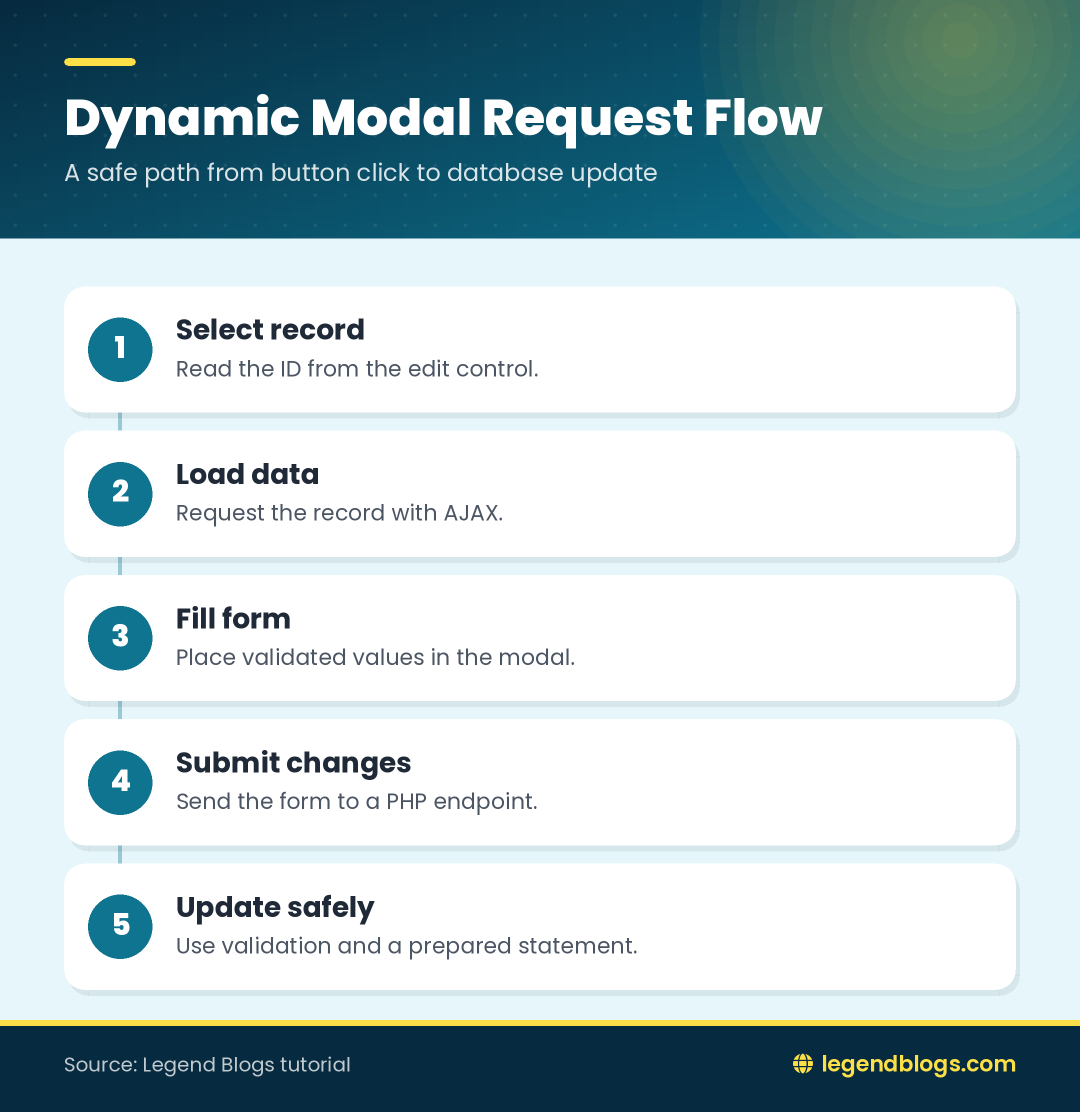
Dynamic Bootstrap modal request flow
Separate the browser and server responsibilities
A reliable dynamic Bootstrap modal has four clear stages: the visitor chooses a row, the browser requests the record, the form submits validated values, and the server returns a result. Keeping these stages separate makes errors easier to locate and prevents the modal from becoming a collection of unrelated click handlers.
Use a data attribute for the record identifier, but remember that it is only a convenience for the browser. PHP must confirm that the identifier is valid, that the record exists, and that the current user has permission to change it.
Use a predictable JSON response
Returning JSON is usually easier to maintain than returning a mixture of HTML and plain text. A response can include a success flag, a message, and the updated record. The JavaScript can then show a friendly error without exposing database details.
{"success":true,"message":"Record updated","record":{"id":12,"name":"Example"}}When the request fails, return an appropriate HTTP status and a short public message. Keep detailed database errors in private server logs rather than sending SQL statements or filesystem information to the browser.
Validate and secure the PHP endpoint
Do not build SQL with request values
The original style of concatenating an ID or name into an SQL string is unsafe. Validate the ID as an integer, trim the submitted name, apply a sensible length limit, and use a prepared statement. This protects the query even when someone sends a request outside the normal form.
$id = filter_input(INPUT_POST, 'id', FILTER_VALIDATE_INT);
$name = trim($_POST['nicename'] ?? '');
if (!$id || $name === '' || mb_strlen($name) > 100) {
    exit('Invalid input');
}
$stmt = $pdo->prepare('UPDATE country SET nicename = :name WHERE id = :id');
$stmt->execute(['name' => $name, 'id' => $id]);
Protect the action
Validation is not authorization. Check the signed-in user’s permission before allowing an update, and use a CSRF token for state-changing requests. Escape database values when placing them into table cells, attributes, or generated HTML. A prepared statement protects SQL, but it does not automatically make HTML safe.
Accessibility and troubleshooting checklist
Make the dialog usable
- Give every input a visible label.
- Use
aria-labelledbyto connect the modal to its title. - Provide a close button with an accessible name.
- Show validation errors in a clear live region.
- Disable Save while a request is in progress.
Find common failures
If the modal does not open, confirm that jQuery loads before Bootstrap and that the button target matches the modal ID. If the form submits but nothing changes, inspect the browser Network panel, response status, request fields, and PHP error log. Unexpected PHP warnings can also make a JSON response invalid.
For long lists, add server-side pagination and cap the requested limit. Avoid attaching the same Save handler every time the modal opens; bind the form submit event once and reset the form when a new record is selected.
Bootstrap Modal code is:
<!-- Modal -->
<div id="myModal" class="modal fade" role="dialog">
  <div class="modal-dialog" role="document">
    <div class="modal-content">
      <div class="modal-header">
        <h5 class="modal-title">Modal Title</h5>
        <button type="button" class="close" data-dismiss="modal" aria-label="Close">
          <span aria-hidden="true">×</span>
        </button>
      </div>
      <div class="modal-body">
         //modal body data
      </div>
      <div class="modal-footer">
        <button type="button" class="btn btn-primary">Save changes</button>
        <button type="button" class="btn btn-secondary" data-dismiss="modal">Close</button>
      </div>
    </div>
</div>
</div>
Bootstrap modal load content ajax
Now we are going to write code to generate a list of records using JQuery Ajax and bind a modal for this list.
Before moving to production, test slow responses, invalid IDs, empty fields, duplicate clicks, and permission failures. These cases reveal problems that a successful demo can hide and help keep the modal dependable for real users.
<!DOCTYPE html>
<html lang="en">
<head>
  <title>Bootstrap Modal</title>
  <meta charset="utf-8">
  <meta name="viewport" content="width=device-width, initial-scale=1">
  <link rel="stylesheet" href="https://maxcdn.bootstrapcdn.com/bootstrap/3.3.7/css/bootstrap.min.css">
  <script src="https://ajax.googleapis.com/ajax/libs/jquery/3.2.1/jquery.min.js"></script>
  <script src="https://maxcdn.bootstrapcdn.com/bootstrap/3.3.7/js/bootstrap.min.js"></script>
</head>
<body>
<div class="container">
  <h2 class="text-danger">Bootstrap Modal with update usnig Ajax</h2>
  <table id="result" class="table table-striped"></table>
  <div id="loader-icon"><i class="fa fa-refresh fa-spin" style="font-size:20px"></i></div>
</div>
<!-- Modal -->
<div id="myModal" class="modal fade" role="dialog">
  <div class="modal-dialog" role="document">
    <div class="modal-content">
      <div class="modal-header">
        <h5 class="modal-title">Edit Information</h5>
        <button type="button" class="close" data-dismiss="modal" aria-label="Close">
          <span aria-hidden="true">×</span>
        </button>
      </div>
      <div class="modal-body">
         <form class="form-horizontal modal-form" role="form"></form>
      </div>
      <div class="modal-footer">
        <button type="button" class="btn btn-primary">Save changes</button>
        <button type="button" class="btn btn-secondary" data-dismiss="modal">Close</button>
      </div>
    </div>
</div>
</div>
</body>
</html>
<script>
$('#myModal').on('shown.bs.modal', function (e) {
  var heading = [];
  var data = [];
  var id = $(e.relatedTarget).data('id');
  heading = $('.text-info').find('th').map(function(){
     return this.innerHTML;
  }).get();

  data = $('#row'+id).find('td').map(function(){
     return this.innerHTML;
  }).get();

  $('.modal-form').html(null);
  $.each( heading, function( key, value ) {
	  $('.modal-form').append('<div class="form-group"><label class="col-sm-2 control-label">'+value+'</label><div class="col-sm-10"><input type="text" class="form-control" name="'+value.toLowerCase()+'" value="'+data[key]+'" placeholder="Fill this field"/></div></div>');
  });

  $("#myModal .btn-primary" ).click(function() {
	  $.ajax({
		url: 'ajax_page.php',
		type: "POST",
		data: $(".modal-form").serialize() + "&action=save_modal_data",
		beforeSend: function(){
			$('#loader-icon').show();
		},
		complete: function(){
			$('#loader-icon').hide();
		},
		success: function(data){
			alert(data)
		},
		error: function (jqXHR, textStatus, errorThrown) {
		  if (jqXHR.status == 500) {
			  console.debug("Internal error: " + jqXHR.responseText)
		  } else {
			  console.debug("Unexpected error.")
		  }
		}
	});
  });
})
function getresult(offset,limit) {
	$.ajax({
		url: 'ajax_page.php',
		type: "POST",
		data: {action:'show_list',offset:offset,limit:limit},
		beforeSend: function(){
			$('#loader-icon').show();
		},
		complete: function(){
			$('#loader-icon').hide();
		},
		success: function(data){
			$("#result").append(data);
			window.busy = false;
		},
		error: function (jqXHR, textStatus, errorThrown) {
		  if (jqXHR.status == 500) {
			  console.debug("Internal error: " + jqXHR.responseText)
		  } else {
			  console.debug("Unexpected error.")
		  }
		}
	});
}
var busy = false;
var offset = 0;
var limit = 15;
$(window).scroll(function(){
	if($(window).scrollTop()==$(document).height()-$(window).height()){
		busy = true;
		offset = offset + limit;
		getresult(offset, limit)
	}
});
getresult(offset, limit);
</script>
Bootstrap Modal with an update using Ajax
Database connection cofig.php:
<?php
$servername = "localhost";
$username = "root";
$password = "";
$database = "mydatabase";
// Create connection
$connection = mysqli_connect($servername, $username, $password, $database);
// Check connection
if (!$connection) {
    die("Connection failed: " . $connection->connect_error);
}
function close_db(){
	mysqli_close($connection);
}
?>
Ajax page for update record onClick of the model button and fetch record from database:
<?php
require_once('../config.php');
if(isset($_POST['action'])){
	$action = $_POST['action'];

	if($action == 'show_list'){
		$offset = $_POST['offset'];
		$limit = $_POST['limit'];

		$mysql_query = mysqli_query($connection, "Select * from country Limit $offset, $limit");
		if($offset == 0){
			echo "<thead>
					<tr class='text-info'>";
				while($mysql_query_fields = mysqli_fetch_field($mysql_query)){
					$mysql_fields[] = $mysql_query_fields->name;
					echo "<th align='left'>".ucfirst($mysql_query_fields->name)."</th>";
				}
			echo "</tr>
				</thead>";
		}
		else{
			while($mysql_query_fields = mysqli_fetch_field($mysql_query)){
				$mysql_fields[] = $mysql_query_fields->name;
			}
		}
		while($mysql_rows = mysqli_fetch_array($mysql_query)){
		echo "<tr id='row".$mysql_rows['id']."'>";
			foreach($mysql_fields as $fields){
				echo "<td>".$mysql_rows[$fields]."</td>";
			}
			echo "<td><button type='button' class='btn btn-info btn-lg' data-toggle='modal' data-id='".$mysql_rows['id']."' data-target='#myModal'><span class='glyphicon glyphicon-cog'></span></button></td>";
		echo "</tr>";
		}
	}

	if($action == 'save_modal_data'){

		$sql = "UPDATE country SET nicename = '".$_POST['nicename']."' WHERE id = ".$_POST['id'];

		if(mysqli_query($connection, $sql)){
			echo "Records updated successfully.";
		} else{
			echo "ERROR: Could not able to execute. $sql" . mysqli_error($connection);
		}
	}
	else{
		 echo "Invalid Method!";
	}
}
else{
	echo "Invalid Calling Method!";
}
close_db($connection);
?> 




Write a comment