YouTube has become more competitive than ever in 2026. With over 2 billion logged-in monthly users, creators and brands must go beyond basic metrics to understand what truly drives performance. Old analytics dashboards can show views and watch time, but with AI powering deeper insights, it’s possible to predict trends, optimize content strategies, and identify exactly what your audience wants.
For practical YouTube analytics tools, start by asking which channel decision you need to make and whether Studio already provides the report you need.
Audience totals and platform-wide usage figures change over time. This guide focuses on interpreting your own channel’s reports rather than relying on a headline audience number as evidence that a specific analytics tool will grow views.
In this article, we’ll explore the best AI tools for YouTube analytics in 2026—from AI-powered dashboards that predict future performance to tools that automate sentiment analysis and competitor benchmarking. Whether you’re a beginner creator or a seasoned marketer, these platforms will help you track views, engagement, retention, and more with actionable insights.
Use caution with product lists and claims of prediction: features, availability, and pricing change, and an AI-generated recommendation is not a guaranteed forecast. Start with YouTube Studio’s own reporting, identify a question the data can answer, and only add a third-party tool when it provides a clear, verifiable benefit.
YouTube’s official help explains how Studio reports impressions, click-through rate, views, and watch time. Use those native reports as a baseline before evaluating additional analytics services.
How to judge YouTube analytics tools
Begin with a decision, not a dashboard
Pick one decision you need to make: whether to revise a thumbnail, adjust the opening, plan a follow-up topic, or understand why a video underperformed. Then identify the metric that could help. A tool that adds charts without helping you take a better action may create more complexity than value.
Compare like with like. Check the video format, traffic source, audience, publication age, and time period before comparing performance. A short, a livestream, and a long-form tutorial have different viewing patterns; totals alone may not make them comparable.
Check the product before trusting its claims
For each external platform, verify the current product name, documentation, data permissions, access requirements, pricing, and whether the feature is actually available in your region and plan. Treat predictive estimates, sentiment scores, competitor estimates, and automatically generated recommendations as hypotheses to test. Do not present them as guaranteed results or independently verified facts without evidence.
Why AI Analytics Tools Are Essential for YouTube Success in 2026
YouTube’s native analytics provide a foundation, but the platform’s sheer volume of data can overwhelm creators. AI analytics tools solve this by using machine learning to identify patterns and opportunities that humans might miss.
Important product caveat: Several tool names and feature descriptions later in this article are unverified and should not be taken as recommendations. The named services have not been confirmed as real, currently available products. Use YouTube Studio as the baseline and independently verify any third-party provider before granting channel access or relying on its claims.
The Limitations of Traditional Analytics
YouTube Analytics shows core metrics like views, watch time, and audience location—but it doesn’t always explain why those metrics changed or how to improve them.
- Lack of Predictive Insights
Traditional analytics offer historical data but no forecasts. AI tools can predict trends so creators can adjust strategies before dips occur. - Manual Pattern Recognition
It can take hours for creators to analyze retention graphs or comment sentiment. AI tools automate this, saving time and offering deeper insights. - Limited Benchmarking
Comparing performance across channels is difficult in native analytics. AI tools automate competitor benchmarking and identify industry trends.
How AI Enhances Analytics
AI tools for YouTube analytics help creators:
- Predict future performance based on historical data and trends.
- Identify topics and formats that drive the most engagement.
- Understand sentiment from comments and community interactions.
- Benchmark against competitors and industry trends.
- Automate reporting to save time and focus on content creation.
Top AI Tools for YouTube Analytics in 2026
1. TubeSenseAI – Predictive Analytics & Trend Forecasting
TubeSenseAI stands out for its predictive analytics and deep trend insights.
Product verification note: The tool names and feature descriptions in the list below have not been independently verified. Do not treat them as confirmed products or endorsements. Check a provider’s official documentation before relying on a named service; start with YouTube Studio and add another tool only after checking its capabilities, permissions, and terms.
Key Features
- Trend prediction based on historical performance and seasonal trends.
- Content idea suggestions driven by AI predictions of audience interest.
- Engagement forecasting that estimates future likes, shares, and comments.
- Customizable AI dashboards tailored for individual creators.
Why It’s Great:
TubeSenseAI helps creators not just understand what happened, but what will happen next. Its forecasting tools let you optimize your upload schedule and topics for maximum impact.
Best For
- Creators seeking growth through data-driven content planning.
- Brands needing forecast models to justify strategy decisions.
2. VidIntelli – AI Retention & Engagement Insights
VidIntelli excels in analyzing viewer engagement and retention patterns.
Key Features
- AI-powered heatmaps showing when viewers drop off.
- Engagement scoring for individual videos.
- Segmented audience behavior insights (by age, region, device).
- Natural Language Processing (NLP) to evaluate comments and sentiment.
Why It’s Great:
Understanding when viewers lose interest allows you to restructure content, refine hooks, and improve storytelling for higher watch time.
Best For
- Creators focused on optimizing existing videos.
- Channels aiming to increase watch time and retention.
3. CompetitorAI – Benchmarking & Competitive Analysis
CompetitorAI gives creators a competitive edge by offering deep competitor insights.
Key Features
- Side-by-side performance comparisons with similar channels.
- AI-suggested keyword gaps and content opportunities.
- Trend alerts when competitors launch high-performing videos.
- Market overview dashboards of industry performance.
Why It’s Great:
CompetitorAI lets you see where you stand in your niche, uncovering opportunities others may miss.
Best For
- Marketers tracking niche performance.
- Creators wanting strategic insights on competitor tactics.
4. Narrative Analytics – Sentiment & Comment Intelligence
Narrative Analytics specializes in understanding viewer sentiment and community engagement.
Key Features
- Comment sentiment scoring (positive, neutral, negative).
- Topic clustering to identify recurring themes in feedback.
- AI insights on community trends and feedback loops.
- Actionable suggestions based on comment analysis.
Why It’s Great:
Viewer feedback often holds clues about what your audience wants next. Narrative Analytics makes sense of large comment volumes so you can adapt your content strategy faster.
Best For
- Community-driven creators.
- Channels seeking better audience rapport and responsiveness.
5. AI Editor Pro – Content Optimization at Scale
AI Editor Pro blends analytics with on-video optimization suggestions.
Key Features
- Automated chapter suggestions based on viewer behavior.
- AI-driven title and thumbnail recommendations to improve CTR.
- Natural language optimization to enhance video descriptions and tags.
- Performance predictions based on optimization choices.
Why It’s Great:
This tool doesn’t just analyze your performance—it helps you improve every part of the publishing workflow.
Best For
- Creators who want actionable optimization steps.
- Channels looking to improve discovery and click-through rates.
How to Choose the Right AI Analytics Tool for Your Channel
With so many options, choosing the right AI analytics tool depends on your goals, budget, and content strategy.
Define Your Primary Analytics Goal
Before choosing a tool, ask:
- Do you want predictive insights?
- Are you more concerned with engagement and retention?
- Do you need competitive benchmarking?
- Is comment sentiment analysis a priority?
Match tools to these needs:
- Forecasting & trends: TubeSenseAI
- Retention & engagement: VidIntelli
- Competitive insights: CompetitorAI
- Comment intelligence: Narrative Analytics
- Optimization workflow: AI Editor Pro
Consider Your Team & Workflow
- Solo creators may prefer all-in-one solutions with intuitive dashboards.
- Teams and agencies might choose tools with advanced reporting and collaboration features.
- Look for API access if you plan to integrate analytics into custom dashboards.
Budget & Value
AI analytics tools range from affordable solo plans to enterprise pricing.
- Entry-level plans work for smaller channels focusing on basic insights.
- Premium plans unlock advanced forecasting, competitor benchmarking, and automation features.
Always prioritize tools that deliver actionable insights, not just data.
Key Metrics AI Tools Should Track for YouTube Growth
Understanding which metrics matter makes it easier to evaluate analytics tools.
Views & Watch Time
AI tools go beyond raw numbers to help you understand why a video performed the way it did.
Engagement (Likes, Comments, Shares)
AI can detect patterns in engagement and suggest improvements.
Retention Curves
Retention data shows where viewers drop off. AI heatmaps highlight these moments clearly.
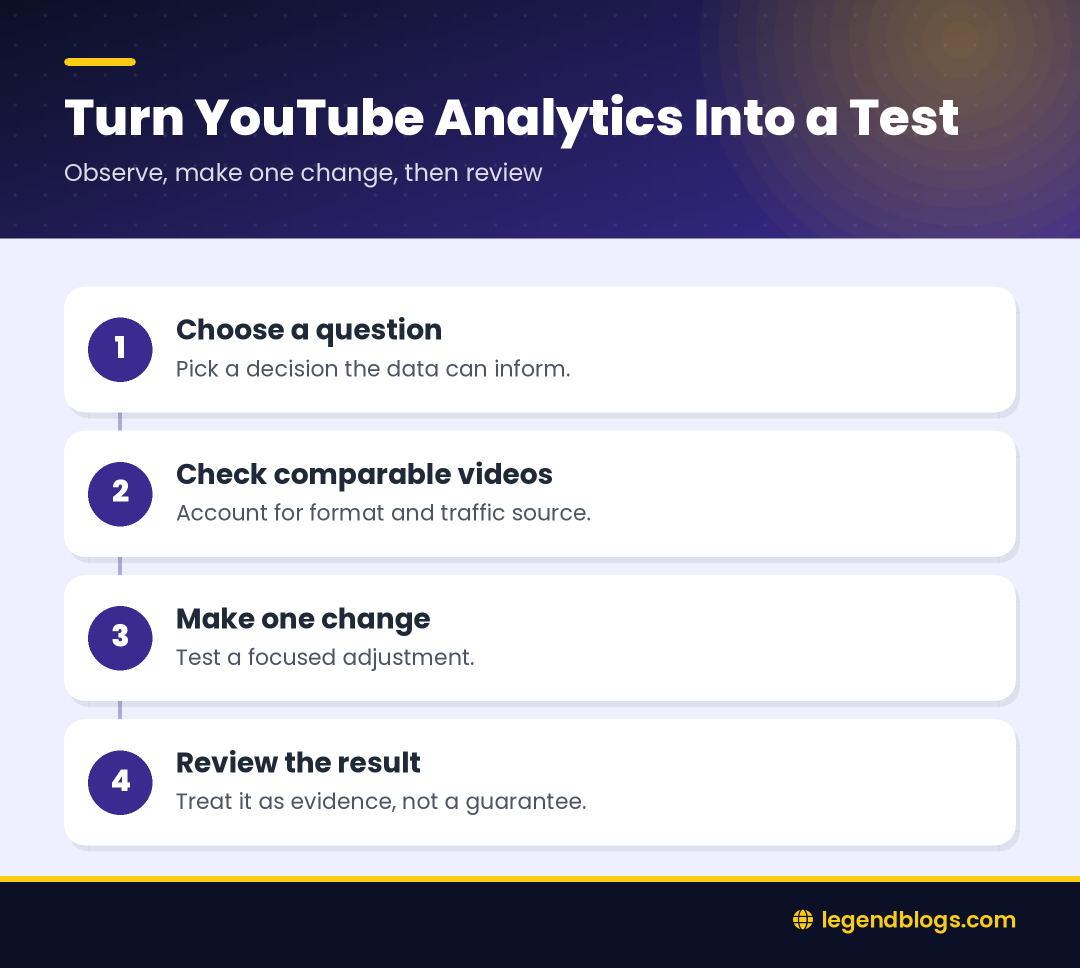
Turn an analytics observation into a test
Form a simple hypothesis
If a video loses viewers early, do not assume the opening is the only cause. Review the promise in the title and thumbnail, the first seconds of the video, audience source, and whether viewers received what they expected. Write one hypothesis, such as “the introduction delays the promised demonstration,” then make a focused change in a future video.
For planning what to publish next, pair performance review with a separate process for AI to generate trending video ideas for YouTube; treat suggestions as hypotheses to validate with your audience.
Keep a note of what changed and compare similar uploads over a reasonable period. One result is not proof of a general rule. Use a series of observations and look for consistent patterns before changing the channel’s entire approach.
Use comments as qualitative context
Comments can reveal confusion, requests, or reactions that a view count cannot explain. Automated summaries may help group recurring themes, but sarcasm, jokes, slang, and context can be misread. Read a sample of the actual comments before acting on a summary, and avoid using sentiment scores as a substitute for listening to your audience.
Protect channel access and viewer data
Review permissions and privacy
Before connecting a third-party service, review exactly what channel access it requests and whether the permission is appropriate for its stated purpose. Prefer the narrowest access that supports the workflow, understand how to revoke it, and check how the provider stores and uses analytics data. Never share account passwords to connect an analytics product.
Use team roles carefully and remove access that is no longer needed. If a tool makes claims about competitor data, verify whether the information is public estimates or authorized analytics; do not assume it has access to another creator’s private Studio data.
Keep a repeatable review rhythm
A useful routine can be weekly or tied to a publishing cycle: review a small set of metrics, record one observation, choose one experiment, and revisit the outcome. Daily monitoring may be useful around a launch, but reacting to every small fluctuation can lead to unnecessary changes. Select a cadence that gives each video enough time to collect meaningful data.
Separate the tool’s analysis from your editorial judgment. The audience, subject, and format matter. Let the numbers prompt a question, then use the video itself and viewer feedback to understand what may have happened.
Audience Demographics
Insights into location, age, and behavior help tailor content to core audiences.
Sentiment Analysis
Natural language processing scores comment tone, helping you understand audience feelings at scale.
Competitor Performance
Benchmarking against competitors reveals missed opportunities and performance gaps.
Tips for Maximizing YouTube Growth with AI Analytics
Leveraging AI insights effectively requires action. Here are practical strategies:
1. Schedule Uploads Based on AI Predictions
Use tools with trend forecasting to post when your audience is most receptive.
2. Optimize Titles and Thumbnails
AI can suggest improvements that increase click-through rates, boosting initial view velocity.
3. Use Retention Insights to Restructure Content
If AI shows consistent drop-off at a certain point, adjust your pacing or storytelling.
4. Respond to Community Trends
Sentiment analysis helps you adapt content based on what your audience truly cares about.
5. Benchmark Regularly
Check competitor performance monthly to stay ahead of industry shifts.
Common Mistakes to Avoid When Using AI Analytics
Even the best tools can be misused. Avoid these pitfalls:
Ignoring Context
AI gives insights, but human judgement is still essential. Always validate AI recommendations with your creative instincts.
Over-Optimizing for Viral Trends
Chasing every trend can dilute your brand. Use trend insights to inspire relevant content, not random uploads.
Data Overload
Too much data can be overwhelming. Focus on key metrics that align with your goals.
Waiting Too Long to Adapt
Analytics are most useful when applied quickly. Use weekly reviews to stay agile.
FAQ
What is the best AI tool for predicting future YouTube performance?
Tools like TubeSenseAI specialize in predictive analytics, helping you forecast views and engagement trends before publishing new content.
Correction: The AI product names used in this article, including TubeSenseAI, VidIntelli, CompetitorAI, Narrative Analytics, and AI Editor Pro, have not been verified as real, currently available products. Do not treat the descriptions or recommendations above as verified product information. Check official provider documentation and current terms before selecting any third-party tool.
Can AI analytics improve viewer retention?
Yes. Tools with retention heatmaps, like VidIntelli, pinpoint where viewers lose interest so you can optimize pacing and structure.
Are AI tools useful for small YouTube channels?
Absolutely. Even small channels benefit from insights that help refine content strategy and improve audience engagement.
Do AI analytics tools replace YouTube Analytics?
No. They complement native analytics by offering deeper insights, automated recommendations, and predictive models.
How often should I check AI analytics?
Weekly check-ins strike a good balance between insights and actionability, but daily monitoring helps during new video launches.
Conclusion
AI has fundamentally transformed how creators approach YouTube analytics. In 2026, the best AI analytics tools do more than report numbers—they interpret trends, predict performance, and guide growth strategies.
Whether you’re a solo creator, team manager, or brand strategist, AI analytics tools like TubeSenseAI, VidIntelli, CompetitorAI, Narrative Analytics, and AI Editor Pro provide the insights needed to grow your channel with confidence.
Start by defining your analytics goals, choose the right tools for your strategy, and use insights to fuel continuous improvement. With the right AI analytics stack, you can turn data into action—and turn viewers into loyal fans.







Write a comment