Some of the most programmers set alarm base background services are to schedule regular updates of application for offline data synchronization. In that case I think programmers should use the BroadcastReceiver for better results. There's no need to schedule an update based on an Internet resource if you aren't connected to the Internet.
Simply use ConnectivityManager:
ConnectivityManager cm =
        (ConnectivityManager)context.getSystemService(Context.CONNECTIVITY_SERVICE);
Your Need to add in your Manifest.xml for permission:
<uses-permission android:name="android.permission.INTERNET"/>
<uses-permission android:name="android.permission.ACCESS_NETWORK_STATE"/>
One more Manifest code need to add for receiving action:
<receiver android:name=".UpdateReceiver" >
    <intent-filter>
        <action android:name="android.net.conn.CONNECTIVITY_CHANGE" />
    </intent-filter>
</receiver>
And your actual code should be for getting intent on change network state:
public class BackgroundSync extends BroadcastReceiver {

    @Override
    public void onReceive(Context context, Intent intent) {
        ConnectivityManager connectivityManager = (ConnectivityManager)context.getSystemService(Context.CONNECTIVITY_SERVICE );
        NetworkInfo activeNetInfo = connectivityManager.getNetworkInfo(ConnectivityManager.TYPE_MOBILE);
        boolean isConnected = activeNetInfo != null && activeNetInfo.isConnectedOrConnecting();
        if (isConnected)
            Log.i(TAG, "Connected" + isConnected);
        else
            Log.i(TAG, "Not Connected" + isConnected);
    }
}
Finally, your code look like:
package com.legendblogs.exmpale;

import android.content.BroadcastReceiver;
import android.content.Context;
import android.content.Intent;
import android.net.ConnectivityManager;
import android.net.NetworkInfo;
import android.util.Log;

/**
 * Created by legendblogs on 12-04-2018.
 */
public class BackgroundSync extends BroadcastReceiver {

    String TAG = "BackgroundSync";

    @Override
    public void onReceive(Context context, Intent intent) {
        ConnectivityManager connectivityManager = (ConnectivityManager)context.getSystemService(Context.CONNECTIVITY_SERVICE );
        NetworkInfo activeNetInfo = connectivityManager.getNetworkInfo(ConnectivityManager.TYPE_MOBILE);
        boolean isConnected = activeNetInfo != null && activeNetInfo.isConnectedOrConnecting();
        if (isConnected)
            Log.i(TAG, "Connected" + isConnected);
        else
            Log.i(TAG, "Not Connected" + isConnected);
    }
}
What a Connectivity Check Can and Cannot Tell You
Network access is not the same as server access
A device may be attached to Wi-Fi or mobile data while a captive portal, DNS problem, firewall, or service outage prevents normal internet access. ConnectivityManager reports the network state known to Android; it does not guarantee that your own API will respond. Use the result to decide whether a request is worth starting, then handle the request timeout and error response normally.
Designing for offline use
Keep downloaded data available when the network disappears. Queue operations that can safely wait, show a retry action instead of silently dropping a request, and never run a connectivity check or network request on the main thread.
Modern Android Network Checks
Using NetworkCapabilities
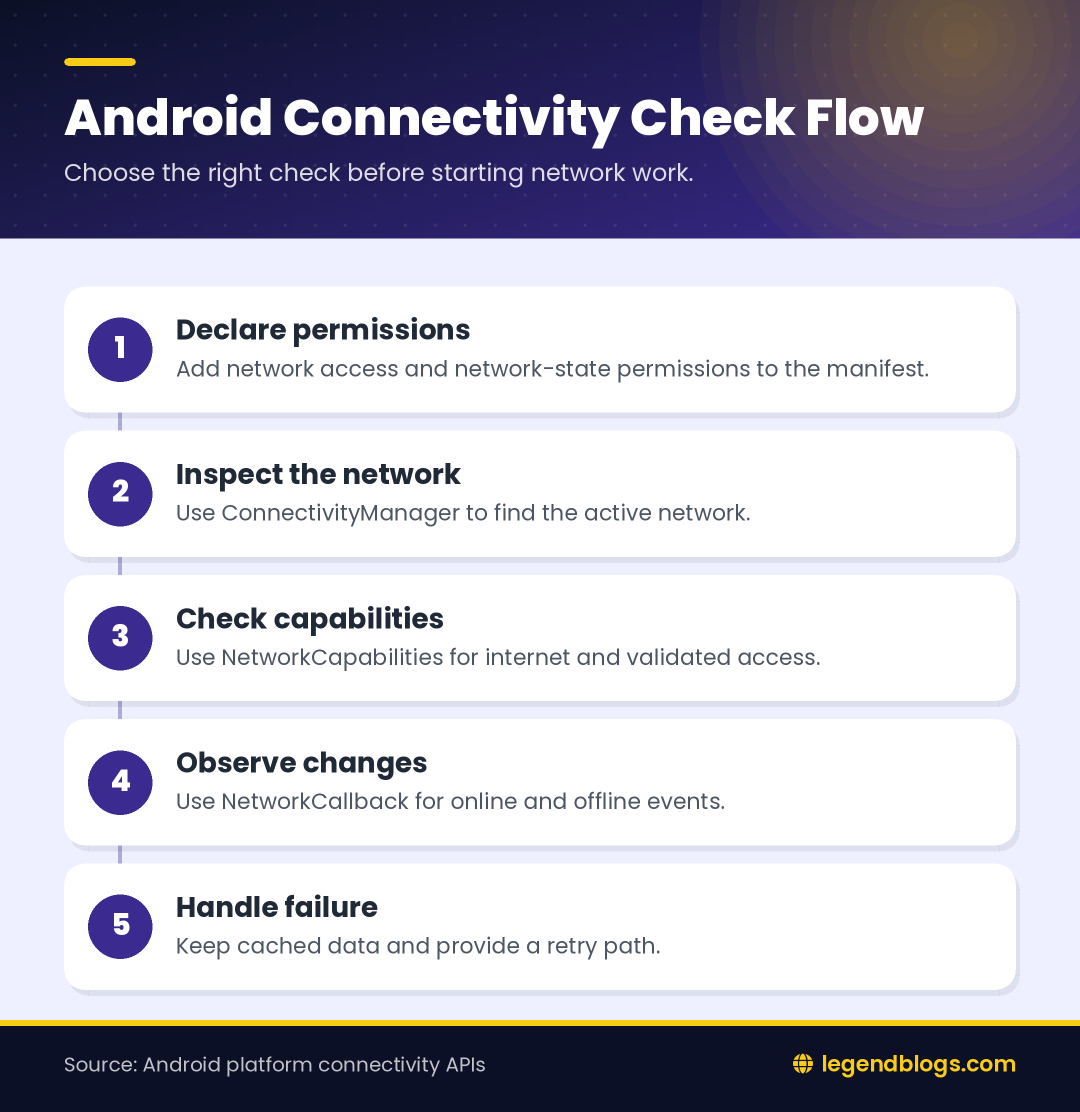
Newer Android applications can inspect the active network and its capabilities. The internet capability indicates that a network is intended to provide access, while the validated capability is a stronger signal that Android has verified access beyond the local network.
Network network = manager.getActiveNetwork();
NetworkCapabilities capabilities = manager.getNetworkCapabilities(network);
boolean available = capabilities != null
        && capabilities.hasCapability(NetworkCapabilities.NET_CAPABILITY_INTERNET)
        && capabilities.hasCapability(NetworkCapabilities.NET_CAPABILITY_VALIDATED);
Keep the older NetworkInfo implementation behind an API-level check when your minimum SDK requires it, and place both branches in one helper. That keeps activities and fragments free from repeated version checks.
Transport types
Do not assume Wi-Fi is the only useful connection. Mobile data, Ethernet, and VPN routes may all be valid for the feature. Inspect transport types only when the product has a genuine reason to restrict usage, such as a large download that should wait for an unmetered network.
Listening for Network Changes
NetworkCallback for current applications
For live updates, NetworkCallback is preferable to relying only on the old CONNECTIVITY_CHANGE broadcast. Register a NetworkRequest, update state in onAvailable and onLost, and unregister it when the observing component is destroyed.
NetworkRequest request = new NetworkRequest.Builder()
        .addCapability(NetworkCapabilities.NET_CAPABILITY_INTERNET)
        .build();
ConnectivityManager.NetworkCallback callback =
        new ConnectivityManager.NetworkCallback() {
            @Override public void onAvailable(Network network) { }
            @Override public void onLost(Network network) { }
        };
manager.registerNetworkCallback(request, callback);
// Later: manager.unregisterNetworkCallback(callback);
For background synchronization, use scheduled work with a network constraint rather than performing a long download in a receiver. Add retry backoff and make the operation safe to run again.
Lifecycle and duplicate callbacks
A screen that registers a callback every time it is recreated can receive duplicate events and leak resources. Pair every registration with an unregister operation, or move observation into a lifecycle-aware component such as a view model or repository.
Testing and Troubleshooting
Test more than Wi-Fi
Test airplane mode, transitions between Wi-Fi and mobile data, captive portals, and an unavailable backend. Also test activity recreation so callbacks are not registered repeatedly. Verify that the manifest contains ACCESS_NETWORK_STATE and INTERNET where network requests are made.
Common mistakes
- Assuming a non-null network means the internet is usable.
- Checking only Wi-Fi and rejecting mobile data or VPN routes.
- Displaying a success state before the API request completes.
- Showing a permanent error instead of allowing retry.
- Starting repeated requests while the device is offline.
Working with Failed Requests
Use timeouts and clear states
Represent loading, success, offline, server failure, and retrying as separate states. A short connection check should not replace an HTTP timeout, response validation, or authentication error handler.
Protect user data
For forms and edits, save a local draft before attempting a request. If the connection fails, keep the draft and explain whether the user can retry immediately or continue offline. This is more useful than clearing the screen after an unsuccessful submission.
FAQ
Is ACCESS_NETWORK_STATE required?
Yes, declare it when the app reads network state through ConnectivityManager. It is a normal permission and does not need a runtime prompt.
Can connectivity APIs confirm that my server works?
No. They describe the device network; the actual request to your server is the final test.
Should I use CONNECTIVITY_CHANGE?
Legacy code may use it, but current applications should consider NetworkCallback or scheduled work with network constraints.
Why can a positive check still be followed by an error?
Network conditions can change between the check and the request. DNS, server availability, authentication, and timeouts must still be handled.
Conclusion
A reliable check internet connection Android implementation combines capability inspection with defensive request handling. Use modern APIs, isolate compatibility code, and make cached data and retry actions useful when the connection changes.
Reusable Connectivity Helper
Keep version checks in one place
A helper method can return a simple Boolean to the user interface while hiding differences between old and modern Android APIs. Use the application context when storing the helper so an Activity is not accidentally retained after rotation.
public static boolean isInternetAvailable(Context context) {
    ConnectivityManager manager = (ConnectivityManager)
            context.getApplicationContext()
                    .getSystemService(Context.CONNECTIVITY_SERVICE);
    if (manager == null) return false;
    if (Build.VERSION.SDK_INT >= Build.VERSION_CODES.M) {
        Network network = manager.getActiveNetwork();
        NetworkCapabilities caps = manager.getNetworkCapabilities(network);
        return caps != null && caps.hasCapability(
                NetworkCapabilities.NET_CAPABILITY_VALIDATED);
    }
    NetworkInfo info = manager.getActiveNetworkInfo();
    return info != null && info.isConnected();
}
Use state instead of a single result
A Boolean is useful for a quick decision, but a larger application may expose states such as unavailable, connected, validated, and request failed. This lets the UI distinguish a local network problem from a server error and provide a more useful retry message.
Wi-Fi, Mobile Data, and VPN
Do not reject a valid transport
Checking only for Wi-Fi can make an app appear broken for users on mobile data, Ethernet, or a VPN. Inspect the transport only when a feature has a real policy, such as delaying a large download until the network is unmetered. For ordinary API calls, capability checks are usually more appropriate.
Recheck before important work
Network state can change between a screen opening and a synchronization job starting. Recheck close to the operation, use a timeout, and handle an exception even after the result says that the device is online.
Conclusion
A dependable check internet connection Android solution combines permission handling, a compatibility helper, modern capabilities, and graceful offline behavior. The connection check should guide the app, not replace normal request error handling.






(1) Comments
Dalton Gallegos
Hi can we work together ?
Write a comment